This time we’re going bigger than ever. Fabric, Power BI, SQL, AI and more. We're covering it all. You won't want to miss it.
Learn moreDid you hear? There's a new SQL AI Developer certification (DP-800). Start preparing now and be one of the first to get certified. Register now
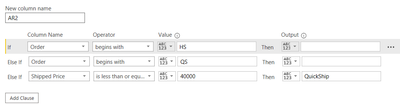
Hello Community - I would like to do this in the query editor, but have the DAX reference as well for learning.
We have Orders. These orders begin with a prefix, like HS, AR, CO, etc.
The HS and AR orders, below $40k value, are part of a particular sales channel. I would like the custom column to return the value "QuickShip" if the Order prefix begins with either HS or AR, and if the Order value is equal or less than $40k.
Solved! Go to Solution.
Hi @Anonymous
Here's a sample PBIX file with the following data and code.
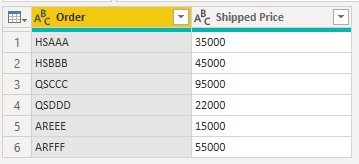
Based on this sample data
This will do the job
= if (Text.Start([Order],2) = "HS" or Text.Start([Order],2) = "AR")
and [Shipped Price] <= 40000
then "QuickShip"
else null
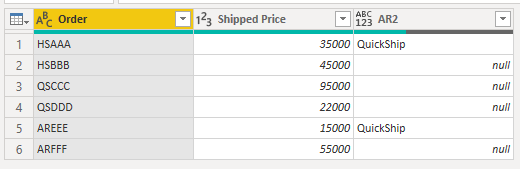
Producing this output
Regards
Phil
If I answered your question please mark my post as the solution.
If my answer helped solve your problem, give it a kudos by clicking on the Thumbs Up.
Proud to be a Super User!
Thanks Phil - This was awesome and just what I needed!
Hi @Anonymous
Here's a sample PBIX file with the following data and code.
Based on this sample data
This will do the job
= if (Text.Start([Order],2) = "HS" or Text.Start([Order],2) = "AR")
and [Shipped Price] <= 40000
then "QuickShip"
else null
Producing this output
Regards
Phil
If I answered your question please mark my post as the solution.
If my answer helped solve your problem, give it a kudos by clicking on the Thumbs Up.
Proud to be a Super User!
Check out the April 2026 Power BI update to learn about new features.
Sign up to receive a private message when registration opens and key events begin.
If you have recently started exploring Fabric, we'd love to hear how it's going. Your feedback can help with product improvements.
| User | Count |
|---|---|
| 34 | |
| 31 | |
| 30 | |
| 21 | |
| 16 |
| User | Count |
|---|---|
| 63 | |
| 53 | |
| 31 | |
| 23 | |
| 23 |