
This is best Fabric, Power BI, SQL and AI community event. How do we know? The last event sold out! Save €200 with code FABCMTY200.
Register nowA new Data Days event is coming soon! This time we’re going bigger than ever. Fabric, Power BI, SQL, AI and more. Don't miss out.
Hello,
I'm having trouble figuring out how to create a custom column to categorize Age.
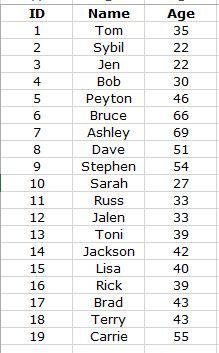
In the picture below I have employees and their age, I would like the custom column to categorize into:
<25
25 - 30
31 - 35
36 - 40
41 - 45
46 - 50
51 - 55
55 - 60
61 - 65
66+
Is this possible in Query Editor? I tried a conditional column but couldnt get it to work out so my next try would be Custom Column, but I'm not even sure if that would work. Hoping for someone to help here 😃
Thank you
Solved! Go to Solution.
Hi,
You can do it in query editor using conditinal columns.
Here's the M-code that got generated for a sample dataset.
You can change it to suit your age group requirements.
= Table.AddColumn(#"Changed Type", "Age Group", each if [Age] <= 10 then "1 - 10" else if [Age] <= 20 then "11 - 20" else if [Age] <= 30 then "21 - 30" else "Other" )
Please accept this as a solution if it satisfies the requirement. Appreciate your Kudos. 🙂
Thanks.
Hi,
You can do it in query editor using conditinal columns.
Here's the M-code that got generated for a sample dataset.
You can change it to suit your age group requirements.
= Table.AddColumn(#"Changed Type", "Age Group", each if [Age] <= 10 then "1 - 10" else if [Age] <= 20 then "11 - 20" else if [Age] <= 30 then "21 - 30" else "Other" )
Please accept this as a solution if it satisfies the requirement. Appreciate your Kudos. 🙂
Thanks.
Sign up to receive a private message when registration opens and key events begin.
If you have recently started exploring Fabric, we'd love to hear how it's going. Your feedback can help with product improvements.
| User | Count |
|---|---|
| 33 | |
| 26 | |
| 21 | |
| 20 | |
| 15 |
| User | Count |
|---|---|
| 63 | |
| 44 | |
| 28 | |
| 24 | |
| 22 |