Join us at FabCon Atlanta from March 16 - 20, 2026, for the ultimate Fabric, Power BI, AI and SQL community-led event. Save $200 with code FABCOMM.
Register now!Learn from the best! Meet the four finalists headed to the FINALS of the Power BI Dataviz World Championships! Register now
Hi,
I have a source excel file with headers in the second row. So I wish to delete the first row and promote the next row to headers. Please can you tell me how to delete the first row? (I can't just filter out blanks because I don't trust the user not to type some notes in the first row).
Many Thanks,
CM
Solved! Go to Solution.
Hi @Anonymous ,
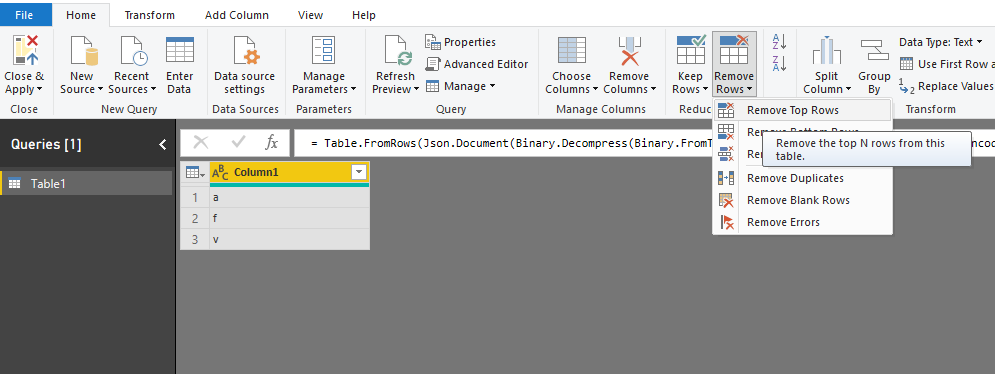
Based on my test, you could use the remove the Top N function to delete the first row in query editor:
Regards,
Daniel He
Hi @Anonymous ,
Based on my test, you could use the remove the Top N function to delete the first row in query editor:
Regards,
Daniel He
In the top left corner of the table is a context menu. Click it, and select “remove top rows, 1”
Share feedback directly with Fabric product managers, participate in targeted research studies and influence the Fabric roadmap.
Check out the February 2026 Power BI update to learn about new features.
| User | Count |
|---|---|
| 63 | |
| 55 | |
| 41 | |
| 16 | |
| 14 |
| User | Count |
|---|---|
| 97 | |
| 80 | |
| 35 | |
| 29 | |
| 25 |