cancel
Showing results for 
Search instead for 
Did you mean: 

The Power BI Data Visualization World Championships is back! Get ahead of the game and start preparing now! Learn more

Reply
Anonymous
Not applicable

Query Editor M Code to fill as duplicate rows between dates

So my data in query editor is structured as such:

2020-05-07_11-19-54.jpg


What's the best way to add rows to this table that are duplicated between each date. For example, the 1st row shown should be duplicated and have the same row for the dates 1/1/2021 through 1/31/2021. Then similar logic for the second row, it would be duplicated for the dates 2/1/2021 through 2/28/2021.

1 ACCEPTED SOLUTION

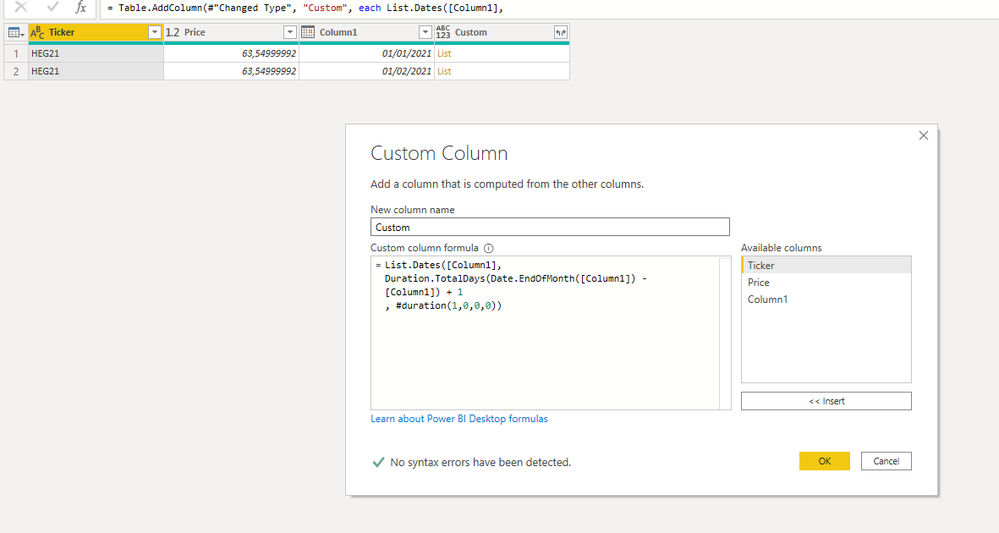
Hi  @Anonymous ,


Capture.PNG


Check this file as example: Download PBIX 


Did I answer your question? Mark my post as a solution!
Ricardo


Did I answer your question? Mark my post as a solution!

Proud to be a Super User!


View solution in original post

5 REPLIES 5
camargos88
Community Champion
Community Champion

Hi @Anonymous ,


Can you explain what are you trying to achieve ? I didn't get the logic for it.


Ricardo


Did I answer your question? Mark my post as a solution!

Proud to be a Super User!


Anonymous
Not applicable

@camargos88

The below is an example of the result for the first row.


 2020-05-07_11-36-10.jpg


This would be replicated for each row of the original table with the additional rows being the dates between.

Hi  @Anonymous ,


Capture.PNG


Check this file as example: Download PBIX 


Did I answer your question? Mark my post as a solution!
Ricardo


Did I answer your question? Mark my post as a solution!

Proud to be a Super User!


AlB
Community Champion
Community Champion

let
    Source = Table.FromRows(Json.Document(Binary.Decompress(Binary.FromText("i45WCslMzk4tMlTSUQooykxOBTEMDPWByMjAyEApVgemwgimwgiqwghdhTFMhTFUhTFURSwA", BinaryEncoding.Base64), Compression.Deflate)), let _t = ((type text) meta [Serialized.Text = true]) in type table [Ticker = _t, Price = _t, DateColumn = _t]),
    #"Changed Type" = Table.TransformColumnTypes(Source,{{"Ticker", type text}, {"Price", type text}, {"DateColumn", type date}}),
    #"Added Custom" = Table.AddColumn(#"Changed Type", "Next_date", each List.Min(List.Select(Source[DateColumn], (inner)=> Date.From(inner) >[DateColumn]) ) ),
    #"Changed Type1" = Table.TransformColumnTypes(#"Added Custom",{{"Next_date", type date}}),
    #"Added Custom1" = Table.AddColumn(#"Changed Type1", "dates_list", each if [Next_date]=null then {[DateColumn]} else List.Generate(()=>Date.AddDays(Date.From([DateColumn]),0), (inner)=> inner<Date.From([Next_date]),each Date.AddDays(_,1))),
    #"Expanded dates_list" = Table.ExpandListColumn(#"Added Custom1", "dates_list"),
    #"Removed Columns" = Table.RemoveColumns(#"Expanded dates_list",{"DateColumn", "Next_date"}),
    #"Renamed Columns" = Table.RenameColumns(#"Removed Columns",{{"dates_list", "DateColumn"}})
in
    #"Renamed Columns"

Please mark the question solved when done and consider giving kudos if posts are helpful.

 Cheers 

SU18_powerbi_badge

AlB
Community Champion
Community Champion

Hi @Anonymous 

Can you provide sample data in tex-tabular format rather than in a screen capture? So that it can be copied and used for a quick test?


Helpful resources

Announcements
Power BI DataViz World Championships

Power BI Dataviz World Championships

The Power BI Data Visualization World Championships is back! Get ahead of the game and start preparing now!

December 2025 Power BI Update Carousel

Power BI Monthly Update - December 2025

Check out the December 2025 Power BI Holiday Recap!

FabCon Atlanta 2026 carousel

FabCon Atlanta 2026

Join us at FabCon Atlanta, March 16-20, for the ultimate Fabric, Power BI, AI and SQL community-led event. Save $200 with code FABCOMM.