
cancel
Showing results for 
Search instead for 
Did you mean: 

July 7 - July 17 | Round 2 of the Power BI Dataviz World Championships. Don't miss your chance! Learn more

Reply
jmaikido
Microsoft Employee
Microsoft Employee

Query Editor - Expand rows

Hi folks,


Essentially I have a source Excel file that is a consolidated piece of work sent to me from an internal security group. It contains AD accounts. I have used the PBI AD data source connector, but for this work I use the excel source as it contains accounts from multiple ‘secure’ domains.

There are some 35 columns in total. One column contains the User account. This is of course pivotal. Another column, contains a series of AD Groups that the account is a member of. This Column is called ‘MemberOf’ (Of course it is)!

So for each row containing one User Account there are ‘x’ number of AD Groups that the account could be a member of. For example there could be 5 individual AD Groups (ie 5 rows within the one cell) for the one row containing the User Account.

For the example above I need to be able to create 5 rows. ie 5 multiples of the User Account for EACH AD Group. I require ONE row for the same user, but duplicating ALL other column values for EACH AD Group the user is a MemberOf.

I hope I this makes sense to my learned PBI colleagues.

TIA John

1 ACCEPTED SOLUTION
TomMartens
Super User
Super User

Hey,


this can be easily done, unfortunately it's not that obvious. I assume the rows are separated by a line feed.

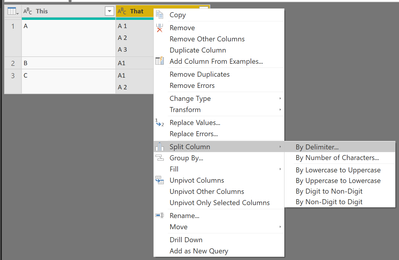
In the query editor mark the column that contains the groups and open the context menu and choose "Split Column" --> "By Delimiter"

image.png

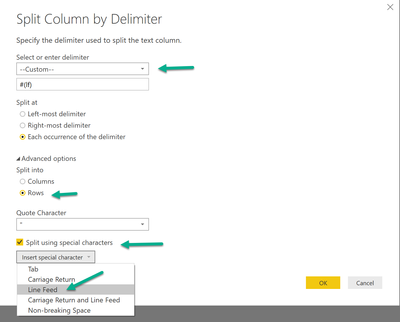
Choose the settings accordingly to the dialog below, please notice that input field will be filled automatically after you have selected the special character "Line Feed":

image.png


Before the operation the table looks like this:

image.png


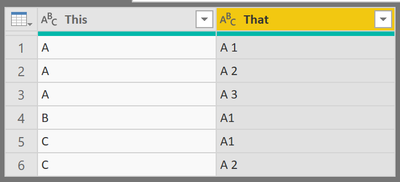
After the operation the table will look like this:

image.png


Be aware that the operation will replace the original column, if you want to keep it you have to duplicate the column.

Hopefully this is what you are looking for.


Regards,

Tom


Did I answer your question? Mark my post as a solution, this will help others!

Proud to be a Super User!
I accept Kudos 😉
Hamburg, Germany

View solution in original post

1 REPLY 1
TomMartens
Super User
Super User

Hey,


this can be easily done, unfortunately it's not that obvious. I assume the rows are separated by a line feed.

In the query editor mark the column that contains the groups and open the context menu and choose "Split Column" --> "By Delimiter"

image.png

Choose the settings accordingly to the dialog below, please notice that input field will be filled automatically after you have selected the special character "Line Feed":

image.png


Before the operation the table looks like this:

image.png


After the operation the table will look like this:

image.png


Be aware that the operation will replace the original column, if you want to keep it you have to duplicate the column.

Hopefully this is what you are looking for.


Regards,

Tom


Did I answer your question? Mark my post as a solution, this will help others!

Proud to be a Super User!
I accept Kudos 😉
Hamburg, Germany

Helpful resources

Announcements
FabCon and SQLCon Barcelona 2026

FabCon & SQLCon – Barcelona 2026

Join us in Barcelona for FabCon and SQLCon, the Fabric, Power BI, SQL, and AI community event. Save €200 with code FABCMTY200.

60 days of Data Days Carousel

Data Days 2026

Join Data Days 2026: 60 days of free live/on-demand sessions, challenges, study groups, and certification opportunities.

Power BI DataViz World Championships carousel

Power BI DataViz World Championships - June 2026

A new Power BI DataViz World Championship is coming this June! Don't miss out on submitting your entry.

Top Solution Authors