cancel
Showing results for 
Search instead for 
Did you mean: 

A new Data Days event is coming soon! This time we’re going bigger than ever. Fabric, Power BI, SQL, AI and more. Don't miss out.

Reply
AKF75
Regular Visitor

Quck Calculation MOM and YOY % not calculating correctly.

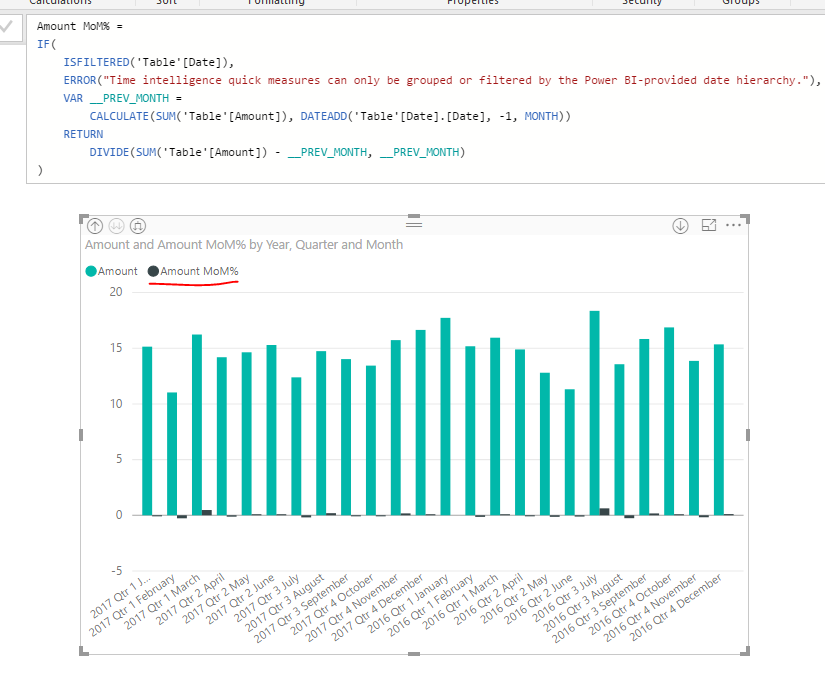
I am trying to use the quick calculation for MOM and YOY for a data set.  It is not calculating it correctly.  For example my January 2017 data is greater than January 2016, yet it is showing on the visual as a - %; clearly incorrect.  Does this have to do with how my date is set up in the data set?  In one column it has day, month and year? I was thinking maybe change it to just month and year? 

Any help would be appreciated.


1 ACCEPTED SOLUTION

I had to alter the calculation on the date portion.  It was -1, and I needed it to read -12. 

Now the calculation and visuals are accurate.


View solution in original post

2 REPLIES 2
v-sihou-msft
Microsoft Employee
Microsoft Employee

@AKF75


I haven't encountered this issue.


555.PNG


Since it uses DATEADD() function, make sure you have a full calendar dates in your table.


Can you share some sample data?


Regards,

I had to alter the calculation on the date portion.  It was -1, and I needed it to read -12. 

Now the calculation and visuals are accurate.


Helpful resources

Announcements
May Power BI Update Carousel

Power BI Monthly Update - May 2026

Check out the May 2026 Power BI update to learn about new features.

Fabric SQL PBI Data Days

Data Days 2026 coming soon!

Sign up to receive a private message when registration opens and key events begin.

New to Fabric survey Carousel

New to Fabric Survey

If you have recently started exploring Fabric, we'd love to hear how it's going. Your feedback can help with product improvements.

Power BI DataViz World Championships carousel

Power BI DataViz World Championships - June 2026

A new Power BI DataViz World Championship is coming this June! Don't miss out on submitting your entry.