Join us at FabCon Atlanta from March 16 - 20, 2026, for the ultimate Fabric, Power BI, AI and SQL community-led event. Save $200 with code FABCOMM.
Register now!Learn from the best! Meet the four finalists headed to the FINALS of the Power BI Dataviz World Championships! Register now
Dear all
Need help in calculating quarter over quarter
i used this calculation
Previous quarter= CALCULATE(SUM('Table'[value]), FILTER(ALL('calendar'),'calendar'[rank]=MAX('calendar'[rank])-1))Latest quarter = CALCULATE(SUM('Table'[value]), FILTER(ALL('calendar'),'calendar'[rank]=MAX('calendar'[rank])))
qoq%=((Latest quarter-Previous quarter)/Previous quarter)
problem arises when there is shift from 2018 to 2019
previous quarter doesnt fetch data require q42019 when i select q12019
Solved! Go to Solution.
Hi @qwaiti27231 ,
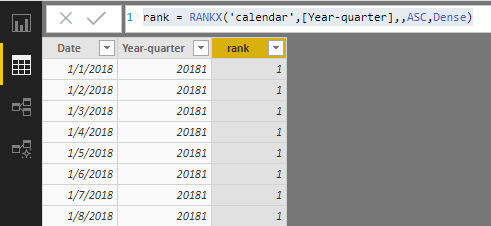
Not sure how you created [rank] in your calendar table. Please try below calculated columns. Then, still use above measures to calculate QoQ.
Year-quarter = YEAR([Date])*10+[Date].[QuarterNo]
rank = RANKX('calendar',[Year-quarter],,ASC,Dense)
Best regards,
Yuliana Gu
Hi @qwaiti27231 ,
Not sure how you created [rank] in your calendar table. Please try below calculated columns. Then, still use above measures to calculate QoQ.
Year-quarter = YEAR([Date])*10+[Date].[QuarterNo]
rank = RANKX('calendar',[Year-quarter],,ASC,Dense)
Best regards,
Yuliana Gu
*previous quarter doesnt fetch data require q42018 when i select q12019
Share feedback directly with Fabric product managers, participate in targeted research studies and influence the Fabric roadmap.
Check out the February 2026 Power BI update to learn about new features.
| User | Count |
|---|---|
| 61 | |
| 54 | |
| 41 | |
| 17 | |
| 13 |
| User | Count |
|---|---|
| 106 | |
| 99 | |
| 38 | |
| 29 | |
| 28 |