cancel
Showing results for 
Search instead for 
Did you mean: 

The Power BI Data Visualization World Championships is back! Get ahead of the game and start preparing now! Learn more

Reply
cyborgdroid
Frequent Visitor

Python - multiple tables

How do you call other tables from the python script in the query editor? How do you save the output of a python script to multiple tables?

1 ACCEPTED SOLUTION
v-yuta-msft
Community Support
Community Support

Hi cyborgdroid,


Tables in power query can be recongnized as pandas object directly, so you can simply call other tables by calling relevant pandas object. You can refer to this answer: https://stackoverflow.com/questions/51947441/power-bi-using-python-on-multiple-tables-in-the-query-e....


Regards,

Jimmy Tao

View solution in original post

5 REPLIES 5
v-yuta-msft
Community Support
Community Support

Hi cyborgdroid,


Tables in power query can be recongnized as pandas object directly, so you can simply call other tables by calling relevant pandas object. You can refer to this answer: https://stackoverflow.com/questions/51947441/power-bi-using-python-on-multiple-tables-in-the-query-e....


Regards,

Jimmy Tao

I tried this solution and it worked on my laptop, I tried it on a desktop and got the error below when I reference table 1 and 2 so it can be available in my codes:


DataSource.Error: ADO.NET: A problem occurred while processing your Python script.
Here are the technical details: [Expression.Error] The key didn't match any rows in the table.
Details:
      DataSourceKind=Python
      DataSourcePath=Python
      Message=A problem occurred while processing your Python script.
Here are the technical details: [Expression.Error] The key didn't match any rows in the table.
      ErrorCode=-2147467259
      ExceptionType=Microsoft.PowerBI.Scripting.Python.Exceptions.PythonUnexpectedException

Anonymous
Not applicable

That was a great SO-answer. Something similar should be added to the docs!

Anonymous
Not applicable

I don't know how to take input from multiple tables in a convenient way, you can however Append two queries. Lets say you have two tables that looks like this.


// table 1
animal	cost
shark	100
horse	200

// table 2
year	party
1999	yes
1998	no

// result of append
animal	cost	year	party
shark	100	null	null
horse	200	null	null
null    null    1999	yes
null    null    1998	no

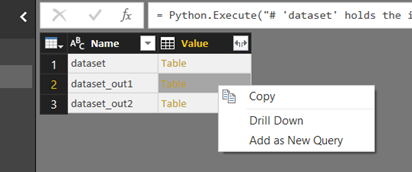
This script below shows how you drop the empty rows AND if you run it you will be able to select which of the dataset_out you are interested in. Just right click any (or both) tables and choose Add as new query. Power BI identifies all dataframes within the script and list them after you run the script.


dataset_out1 = dataset[["animal","cost"]].dropna()
dataset_out2 = dataset[["year","party"]].dropna()


image.png

Thanks karlanka! That a good way to output to multiple tables. Input from multiple tables without pre-joining them in DAX is crucial though. 

Helpful resources

Announcements
Power BI DataViz World Championships

Power BI Dataviz World Championships

The Power BI Data Visualization World Championships is back! Get ahead of the game and start preparing now!

December 2025 Power BI Update Carousel

Power BI Monthly Update - December 2025

Check out the December 2025 Power BI Holiday Recap!

FabCon Atlanta 2026 carousel

FabCon Atlanta 2026

Join us at FabCon Atlanta, March 16-20, for the ultimate Fabric, Power BI, AI and SQL community-led event. Save $200 with code FABCOMM.