Join us at FabCon Atlanta from March 16 - 20, 2026, for the ultimate Fabric, Power BI, AI and SQL community-led event. Save $200 with code FABCOMM.
Register now!The Power BI Data Visualization World Championships is back! Get ahead of the game and start preparing now! Learn more
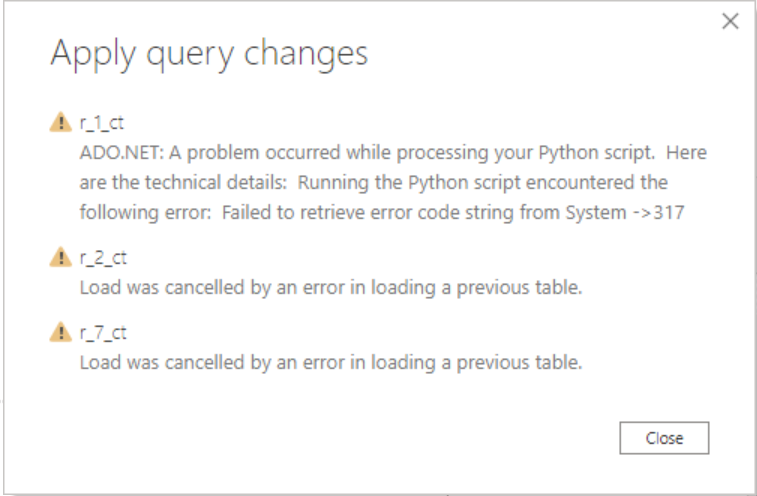
I am trying to import a dataframe into Power BI, and I am able to successfully run the code and see the correct tables once it is loaded to the Power Query Editor, but after I format the tables more and click "Close and Apply," I always get this error. I am not sure why this happens, as I have been able to load similar scripts from the Power Query Editor before. I am wondering why it can't load the data even though the tables are already in the Power Query Editor.
Hi @Anonymous ,
Are all three tables r_1_ct, r_2_ct, r_7_ct from Python scripts?
Maybe you should check if you performed the wrong operation on the r_1_ct table. As tested, I successfully "Close & Apply" the queries.
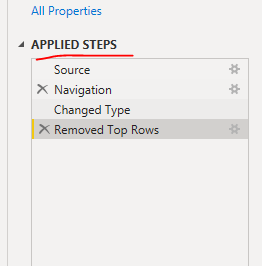
Please check the each applied steps for error.
My Power BI Desktop version: 2.79.5768.663 64-bit (March 2020)
My Python: Python3.8
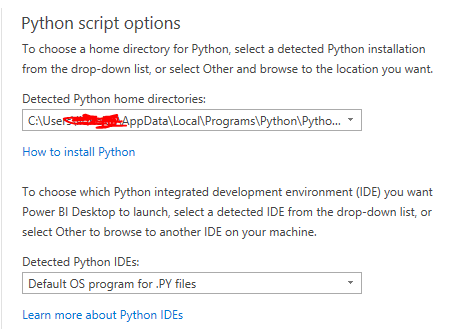
Option Setting:
Best regards,
Lionel Chen
If this post helps, then please consider Accept it as the solution to help the other members find it more quickly.
Refer, if this can help
https://community.powerbi.com/t5/Desktop/Power-BI-Python-ADO-NET-Python-Script-Error/m-p/841445
@amitchandak This is different from my problem - my code is executing as I expect it to, but it is not being loaded into Power BI properly, even though it is loaded into the Power Query Editor properly.
The Power BI Data Visualization World Championships is back! Get ahead of the game and start preparing now!
| User | Count |
|---|---|
| 40 | |
| 37 | |
| 35 | |
| 34 | |
| 27 |
| User | Count |
|---|---|
| 134 | |
| 101 | |
| 71 | |
| 67 | |
| 65 |