Share feedback directly with Fabric product managers, participate in targeted research studies and influence the Fabric roadmap.
Sign up nowGet Fabric certified for FREE! Don't miss your chance! Learn more
Apply query changes EuStockMarkets_NA ADO.NET: Python script error. File "PythonScriptWrapper.PY", line 9 completedData = dataset.fillna(method='backfill', inplace=False) ^ IndentationError: unexpected inden
Python 3.7.3 (v3.7.3:ef4ec6ed12, Mar 25 2019, 21:26:53) [MSC v.1916 32 bit (Intel)] on win32 Type "help", "copyright", "credits" or "license" for more information. >>> import sys >>> print(sys.exec_prefix) C:\Users\mudas\AppData\Local\Programs\Python\Python37-32 >>>
I was trying to complete this article on my windows 10 pro mahine and i got the above error .
https://docs.microsoft.com/en-us/power-bi/desktop-python-in-query-editor
Solved! Go to Solution.
Hi @Anonymous ,
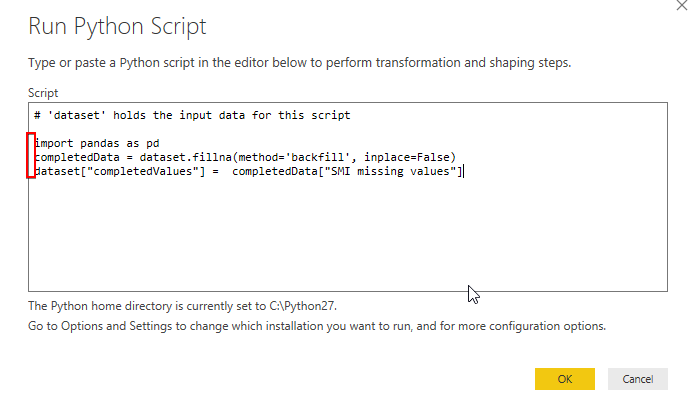
The error message "IndentationError: unexpected inden" indicates that this line of code has more spaces at the start than the one before.
This error occurs on the file PythonScriptWrapper.PY, this is a file generated by PowerBI which contains your Python code.
Please check if you have spaces before your Python code:
Best Regards,
Teige
Hi @Anonymous ,
The error message "IndentationError: unexpected inden" indicates that this line of code has more spaces at the start than the one before.
This error occurs on the file PythonScriptWrapper.PY, this is a file generated by PowerBI which contains your Python code.
Please check if you have spaces before your Python code:
Best Regards,
Teige
Share feedback directly with Fabric product managers, participate in targeted research studies and influence the Fabric roadmap.
If you love stickers, then you will definitely want to check out our Community Sticker Challenge!
Check out the January 2026 Power BI update to learn about new features.
| User | Count |
|---|---|
| 62 | |
| 62 | |
| 42 | |
| 21 | |
| 18 |