cancel
Showing results for 
Search instead for 
Did you mean: 

We've captured the moments from FabCon & SQLCon that everyone is talking about, and we are bringing them to the community, live and on-demand. Starts on April 14th. Register now

Reply
mbielby
Helper I
Helper I

Pull data from a REST API Authentication - JIRA

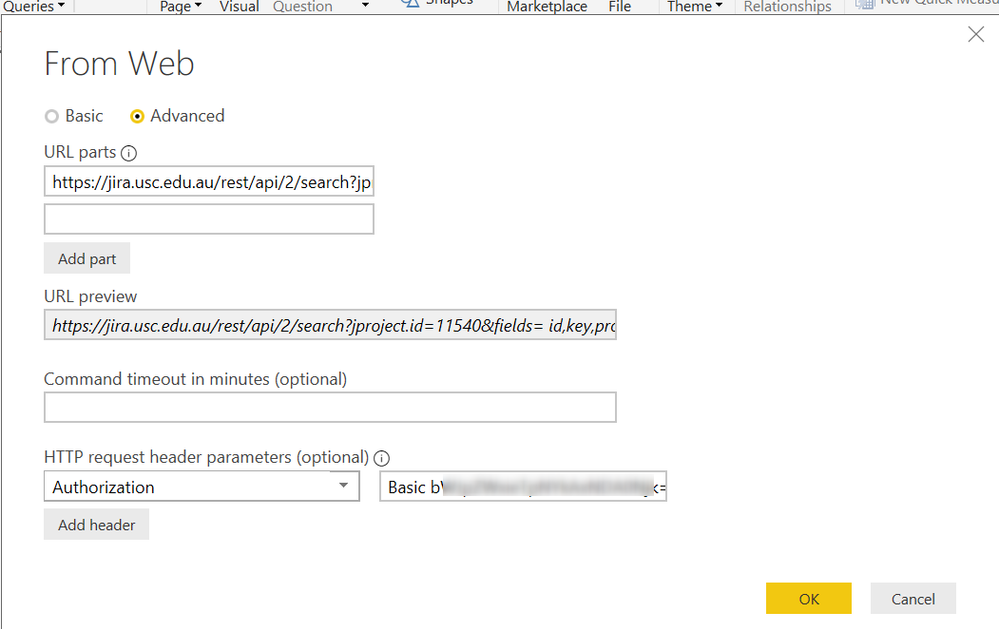
HI , I'm trying to connect PowerBI to the JIRA REST API.  I am receiving the message "Details: "The 'Authorization' header is only supported when connecting anonymously. These headers can be used with all authentication types: Accept, Accept-Charset, Accept-Encoding, Accept-Language, Cache-Control, Content-Type, If-Modified-Since, Prefer, Referer""  My connection settings look like this: 2019-04-05_16h42_13.png


The same URL is working OK with POSTMAN using Basic Authentication.  I've seen a few similar posts on the forum but nothing has works for me as yet.    Thanks

1 ACCEPTED SOLUTION
mbielby
Helper I
Helper I

Problem solved.   This was an issue with cached credentials. The fix was to apply a cache clear as recommended by 

hekaplas
hekaplas New Member
New Member
Re: Power BI Web cached credentials For OData


 Found a way to remove the cached credentials. In Power BI Desktop select File, Options and Settings and then Data Source Settings. Find the data source with the cached settings and use the "Clear Permissions" button to reset. Again, it should be obvious to the user when cached credentials are used and which cached credentials are used. Even in the Data Source Settings form we can't tell which credentials are used with each data source.

View solution in original post

2 REPLIES 2

Hi @mbielby 

I’d like to propose and alternative solution for you, you might want to try out our app - Power BI Connector for Jira: https://marketplace.atlassian.com/apps/1221150/power-bi-connector-for-jira?hosting=cloud&tab=overvie... it's available for Jira Cloud / Server / Data Center.

We have a handy User/Admin Guide https://aserve.atlassian.net/wiki/spaces/PBCFJC/overview and fast/responsive support team at support@alpha-serve.com. Please let us know if you need any assistance.

Cheers!

Anton

===
If this post helps, then please consider Accept it as the solution to help the other members find it more quickly.

mbielby
Helper I
Helper I

Problem solved.   This was an issue with cached credentials. The fix was to apply a cache clear as recommended by 

hekaplas
hekaplas New Member
New Member
Re: Power BI Web cached credentials For OData


 Found a way to remove the cached credentials. In Power BI Desktop select File, Options and Settings and then Data Source Settings. Find the data source with the cached settings and use the "Clear Permissions" button to reset. Again, it should be obvious to the user when cached credentials are used and which cached credentials are used. Even in the Data Source Settings form we can't tell which credentials are used with each data source.

Helpful resources

Announcements
New to Fabric survey Carousel

New to Fabric Survey

If you have recently started exploring Fabric, we'd love to hear how it's going. Your feedback can help with product improvements.

Power BI DataViz World Championships carousel

Power BI DataViz World Championships - June 2026

A new Power BI DataViz World Championship is coming this June! Don't miss out on submitting your entry.

Join our Fabric User Panel

Join our Fabric User Panel

Share feedback directly with Fabric product managers, participate in targeted research studies and influence the Fabric roadmap.