cancel
Showing results for 
Search instead for 
Did you mean: 

The Power BI Data Visualization World Championships is back! It's time to submit your entry. Live now!

Reply
A-WSHC
Frequent Visitor

Publishing Issue

I have been publishing worspaces with no issues. Now when I try to publish, it is saying a report with that name already exists and I have to rename it. I am trying to replace that report and associated dashboards like usual. Why is this message showing up now? I did notice I can publish on one workspace just fine, but not others. Any ideas? 

Thanks

1 ACCEPTED SOLUTION

I figured out the issue thanks! It had to do with downloading the PBIX file. I had to select "A copy of your report and data" and I accidentally selected the second option. 


AWSHC_0-1666042337506.png

Thanks!

View solution in original post

3 REPLIES 3
Anonymous
Not applicable

Hi @A-WSHC ,


Please check:

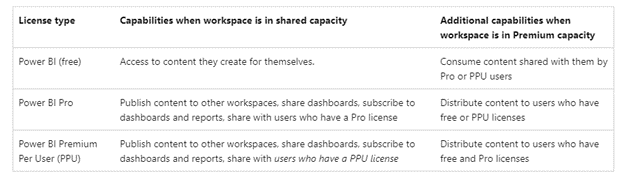
1.Your license and workspace capacity type.

Users with free licenses can use the Power BI service to connect to data and create reports and dashboards for their own use. They can't use the Power BI sharing or collaborating features with others, or publish content to other people's workspaces.

Publishing reports to the workspace enforces existing licensing rules. If you try to publish from Power BI Desktop or other client tools without a Pro or Premium Per User (PPU) license, you see the error, "Only users with Power BI Pro licenses can publish to this workspace."
Picture3.png

2.Workspace roles.If the role in the workspace is viewer, you cannot publish the report to that workspace.

3.Workspace capacity. Workspaces can contain a maximum of 1,000 datasets, or 1,000 reports per dataset.

Insufficient workspace capacity can also cause reports to fail to publish, so try to manage workspace capacity appropriately.


Refer to:

Roles in workspaces in Power BI - Power BI | Microsoft Learn

Publish from Power BI Desktop - Power BI | Microsoft Learn

Power BI service features by license type - Power BI | Microsoft Learn


Best Regards,

Neeko Tang

If this post helps, then please consider Accept it as the solution to help the other members find it more quickly. 

lbendlin
Super User
Super User

Is this on shared capacity or on Premium?   Do you have a Pro license?

I figured out the issue thanks! It had to do with downloading the PBIX file. I had to select "A copy of your report and data" and I accidentally selected the second option. 


AWSHC_0-1666042337506.png

Thanks!

Helpful resources

Announcements
Power BI DataViz World Championships

Power BI Dataviz World Championships

The Power BI Data Visualization World Championships is back! It's time to submit your entry.

January Power BI Update Carousel

Power BI Monthly Update - January 2026

Check out the January 2026 Power BI update to learn about new features.

FabCon Atlanta 2026 carousel

FabCon Atlanta 2026

Join us at FabCon Atlanta, March 16-20, for the ultimate Fabric, Power BI, AI and SQL community-led event. Save $200 with code FABCOMM.