Learn from the best! Meet the four finalists headed to the FINALS of the Power BI Dataviz World Championships! Register now
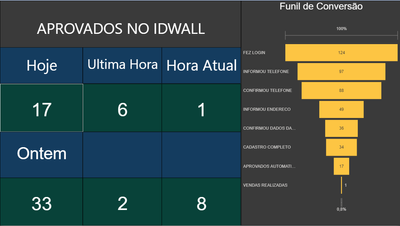
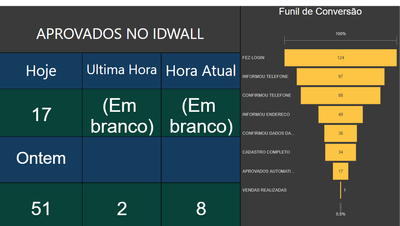
Im trying to publish my Power Bi visualization into my workspace on the website, but check out what happens with the calculated (i created a measure ) values when i publish:
Not Published
Then, we can see the published measures:
Hi @badluckmath ,
Do the suggestions from engineers make sense? If so, kindly mark the proper reply as a solution to help others having the similar issue and close the case. If not, let me know and I'll try to help you further.
Best regards
Amy
Hi @badluckmath ,
If your dataset contains on premise data source, then it needs to use the gateway, add one or more data sources of your dataset to the gateway, as described in Add a data source , and then you may use on demand refresh or configure schedule refresh to get latest data, see more :On-premises data gateway , Configure scheduled refresh .
You might also need to upgrade the Power BI Desktop to the latest version version . Download the pbix file from Power BI Service, then reopen in Power BI Desktop and republish to Power BI Service.
Best Regards,
Amy
Community Support Team _ Amy
If this post helps, then please consider Accept it as the solution to help the other members find it more quickly.
@badluckmath , Which browser and which version?
Also, Try once after clear cache. Clear Cache and Refresh.
A new Power BI DataViz World Championship is coming this June! Don't miss out on submitting your entry.
Share feedback directly with Fabric product managers, participate in targeted research studies and influence the Fabric roadmap.
| User | Count |
|---|---|
| 50 | |
| 34 | |
| 32 | |
| 18 | |
| 17 |
| User | Count |
|---|---|
| 64 | |
| 64 | |
| 41 | |
| 27 | |
| 24 |