This time we’re going bigger than ever. Fabric, Power BI, SQL, AI and more. We're covering it all. You won't want to miss it.
Learn moreDid you hear? There's a new SQL AI Developer certification (DP-800). Start preparing now and be one of the first to get certified. Register now
Hi All,
Create an embed code option not shown in my Power- BI pro license. In the admin portal only display the Capacity setting option.
Please suggest.
Solved! Go to Solution.
Hello @vijay22kar
They recently changed it so the publish to web function is off by default now.
You need someone with Power BI Admin rights to re-enable this feature for you.
Kind regards
Joren Venema
Data & Analytics Consultant
If this reply solved your question be sure to mark this post as the solution to help others find the answer more easily.
And if you are talking about "Publish to Web" so as per Microsoft Latest Update we can't use the "Publish to Web" option directly, it has added some security policy on it. you need to ask your Admin for granting such persmission.
You can refer below official blog to get better idea of it.
Don't forget to give thumbs up 👍 and accept this as a solution if it helped you.
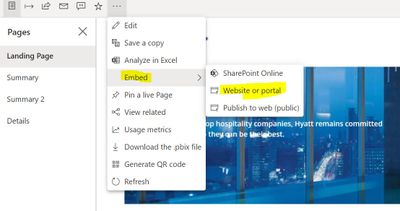
YOu can use Embed option under File menu (in old version) and Web Site or Portal under Embed option (in new version) of PBI Service.
Don't forget to give thumbs up 👍 and accept this as a solution if it helped you.
Hello @vijay22kar
They recently changed it so the publish to web function is off by default now.
You need someone with Power BI Admin rights to re-enable this feature for you.
Kind regards
Joren Venema
Data & Analytics Consultant
If this reply solved your question be sure to mark this post as the solution to help others find the answer more easily.
Check out the April 2026 Power BI update to learn about new features.
If you have recently started exploring Fabric, we'd love to hear how it's going. Your feedback can help with product improvements.
A new Power BI DataViz World Championship is coming this June! Don't miss out on submitting your entry.
| User | Count |
|---|---|
| 38 | |
| 38 | |
| 31 | |
| 22 | |
| 15 |
| User | Count |
|---|---|
| 74 | |
| 61 | |
| 31 | |
| 31 | |
| 23 |