cancel
Showing results for 
Search instead for 
Did you mean: 

July 7 - July 17 | Round 2 of the Power BI Dataviz World Championships. Don't miss your chance! Learn more

Reply
avioti
Frequent Visitor

Public Holiday - Script

Hello Guys


I have a Calendar Table and i would like to add a collumn which contains all public holidays.

Is there some script which i can use to generate it?


Thanks

1 ACCEPTED SOLUTION
Anonymous
Not applicable

Hi @avioti,


Current power bi not contains any script to auto generate the holiday calendar table.


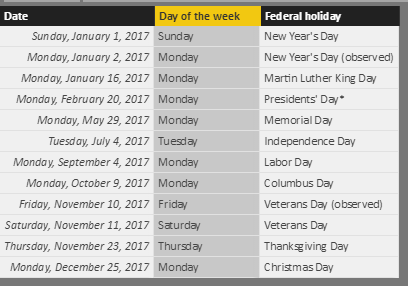
You should get a holiday list first, for example:

1. Find out a public holiday list from web, import it to power bi.

2.PNG
2. Create a calendar table and build the relationship.

DateTable = ADDCOLUMNS(CALENDAR(DATE(2015,1,1),TODAY()),"Year",FORMAT([Date],"yyyy"),"Month",FORMAT([Date],"mmmm"),"Quarter",FORMAT([Date],"q"),"Week",WEEKNUM([Date],1),"Day Of Week",FORMAT([Date],"dddd"))


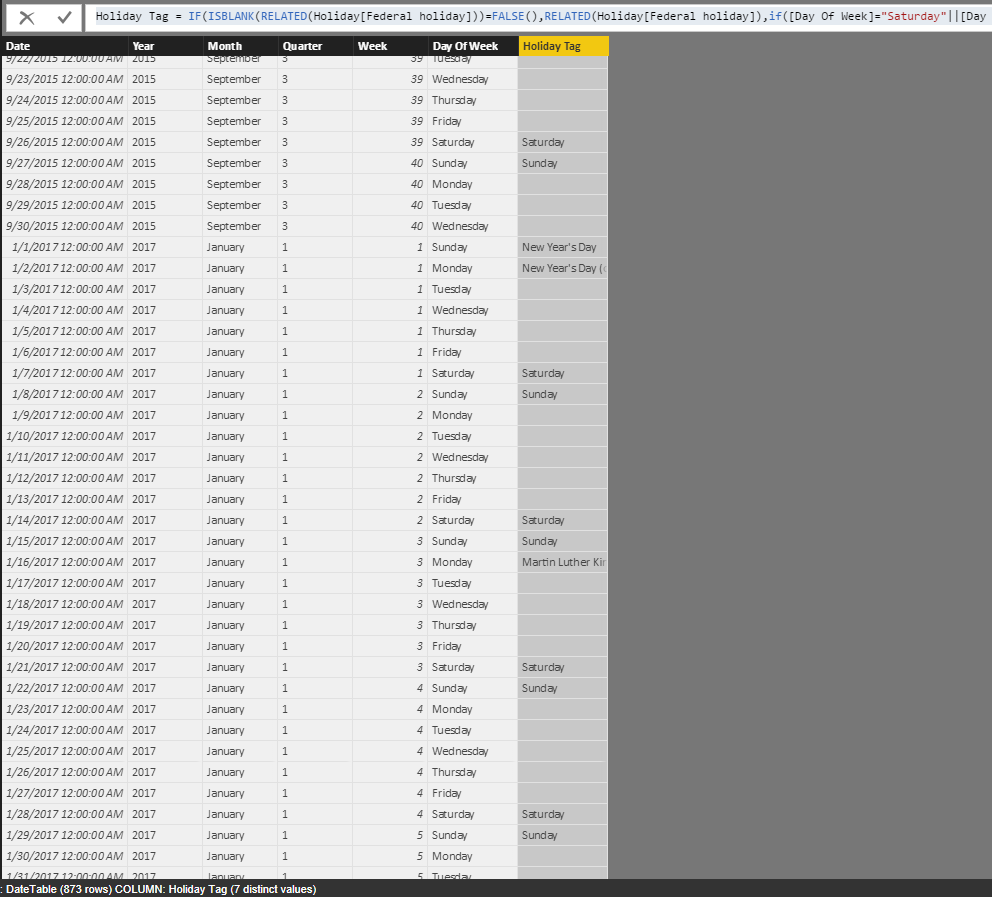
3. Add calculated column to check relationship.(holiday = normal holiday + public holiday)

Holiday Tag = IF(ISBLANK(RELATED(Holiday[Federal holiday]))=FALSE(),RELATED(Holiday[Federal holiday]),if([Day Of Week]="Saturday"||[Day Of Week]="Sunday",[Day Of Week],BLANK()))

3.PNG


BTW, you can also share your requirement to ideas.


Regards,

Xiaoxin Sheng

View solution in original post

5 REPLIES 5
Anonymous
Not applicable

You can find a list with more than 10 sources of public holidays all over the world in the post below. The list also contains some DimDate tables very detailed, especially for USA holidays.


https://www.linkedin.com/pulse/find-here-many-lists-public-holidays-wederley-m-miranda


Anonymous
Not applicable

Hi @avioti,


Current power bi not contains any script to auto generate the holiday calendar table.


You should get a holiday list first, for example:

1. Find out a public holiday list from web, import it to power bi.

2.PNG
2. Create a calendar table and build the relationship.

DateTable = ADDCOLUMNS(CALENDAR(DATE(2015,1,1),TODAY()),"Year",FORMAT([Date],"yyyy"),"Month",FORMAT([Date],"mmmm"),"Quarter",FORMAT([Date],"q"),"Week",WEEKNUM([Date],1),"Day Of Week",FORMAT([Date],"dddd"))


3. Add calculated column to check relationship.(holiday = normal holiday + public holiday)

Holiday Tag = IF(ISBLANK(RELATED(Holiday[Federal holiday]))=FALSE(),RELATED(Holiday[Federal holiday]),if([Day Of Week]="Saturday"||[Day Of Week]="Sunday",[Day Of Week],BLANK()))

3.PNG


BTW, you can also share your requirement to ideas.


Regards,

Xiaoxin Sheng

ftm
Frequent Visitor

Hi, you might take a look here if you need to do it with Power Query instead of dax. I put it here if someone has the same issue.  https://github.com/FotMac/powerquery-public-holidays-gr

Hi - I know this is not a recent post - but I found the solution whilst searching for an answer to an issue I had, and it has helped me out with what I needed to do. Thanks for the solution and for posting!

dkay84_PowerBI
Microsoft Employee
Microsoft Employee

I recommend just finding a web based source, based on your country, where you can pull in a table of dates that are holidays and then merge this with your existing date table.

Helpful resources

Announcements
FabCon and SQLCon Barcelona 2026

FabCon & SQLCon – Barcelona 2026

Join us in Barcelona for FabCon and SQLCon, the Fabric, Power BI, SQL, and AI community event. Save €200 with code FABCMTY200.

60 days of Data Days Carousel

Data Days 2026

Join Fabric Data Days 2026: 60 days of free live/on-demand sessions, challenges, study groups, and certification opportunities.

Power BI DataViz World Championships carousel

Power BI DataViz World Championships - June 2026

A new Power BI DataViz World Championship is coming this June! Don't miss out on submitting your entry.