cancel
Showing results for 
Search instead for 
Did you mean: 

Learn from the best! Meet the four finalists headed to the FINALS of the Power BI Dataviz World Championships! Register now

Reply
Anonymous
Not applicable

Prorating Subscription Value between two dates

Hi, 

Sorry if this has been answered thousands of times earlier.


From a server I have data of subscriptions extracted to power BI. I have problems dealing with values between two dates (I.e. Start, End dates)


E.g.


Start: 15.01.21

End: 14.03.21

List Rate: 10

Qty: 10

MRR: 100


For each reporting month I want to show this contract's value. Desired output result in something like this


January: MRR*(31-15)/31 = 51,612

February: = 100

March = (14/31)*100 = 45,16


Now optimally the sum of January and March value should be 100, but the duration of the contract could be a floating point number as well (Start 17.01.21 , End: 03.09.21 for example.

1 ACCEPTED SOLUTION
Jihwan_Kim
Super User
Super User

Hi, @Anonymous 

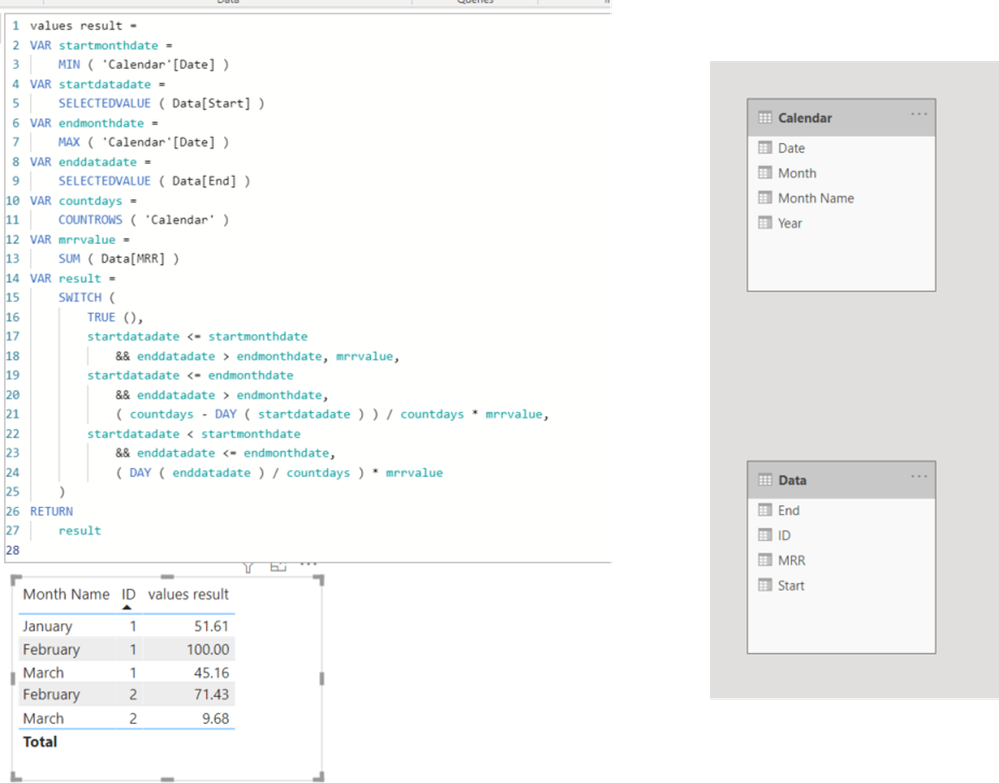
Please check the below picture and the sample pbix file's link down below.

I tried to create a sample pbix file based on your exlanation.


Picture1.png


values result =
VAR startmonthdate =
MIN ( 'Calendar'[Date] )
VAR startdatadate =
SELECTEDVALUE ( Data[Start] )
VAR endmonthdate =
MAX ( 'Calendar'[Date] )
VAR enddatadate =
SELECTEDVALUE ( Data[End] )
VAR countdays =
COUNTROWS ( 'Calendar' )
VAR mrrvalue =
SUM ( Data[MRR] )
VAR result =
SWITCH (
TRUE (),
startdatadate <= startmonthdate
&& enddatadate > endmonthdate, mrrvalue,
startdatadate <= endmonthdate
&& enddatadate > endmonthdate,
( countdays - DAY ( startdatadate ) ) / countdays * mrrvalue,
startdatadate < startmonthdate
&& enddatadate <= endmonthdate,
( DAY ( enddatadate ) / countdays ) * mrrvalue
)
RETURN
result


Hi, My name is Jihwan Kim.


If this post helps, then please consider accept it as the solution to help other members find it faster, and give a big thumbs up.


Linkedin: linkedin.com/in/jihwankim1975/

Twitter: twitter.com/Jihwan_JHKIM


If this post helps, then please consider accepting it as the solution to help other members find it faster, and give a big thumbs up.


Click here to visit my LinkedIn page

View solution in original post

2 REPLIES 2
Jihwan_Kim
Super User
Super User

Hi, @Anonymous 

Please check the below picture and the sample pbix file's link down below.

I tried to create a sample pbix file based on your exlanation.


Picture1.png


values result =
VAR startmonthdate =
MIN ( 'Calendar'[Date] )
VAR startdatadate =
SELECTEDVALUE ( Data[Start] )
VAR endmonthdate =
MAX ( 'Calendar'[Date] )
VAR enddatadate =
SELECTEDVALUE ( Data[End] )
VAR countdays =
COUNTROWS ( 'Calendar' )
VAR mrrvalue =
SUM ( Data[MRR] )
VAR result =
SWITCH (
TRUE (),
startdatadate <= startmonthdate
&& enddatadate > endmonthdate, mrrvalue,
startdatadate <= endmonthdate
&& enddatadate > endmonthdate,
( countdays - DAY ( startdatadate ) ) / countdays * mrrvalue,
startdatadate < startmonthdate
&& enddatadate <= endmonthdate,
( DAY ( enddatadate ) / countdays ) * mrrvalue
)
RETURN
result


Hi, My name is Jihwan Kim.


If this post helps, then please consider accept it as the solution to help other members find it faster, and give a big thumbs up.


Linkedin: linkedin.com/in/jihwankim1975/

Twitter: twitter.com/Jihwan_JHKIM


If this post helps, then please consider accepting it as the solution to help other members find it faster, and give a big thumbs up.


Click here to visit my LinkedIn page

amitchandak
Super User
Super User

@Anonymous , Refer to the file attached, see if that can help


or this blog

https://community.powerbi.com/t5/Community-Blog/How-to-divide-distribute-values-between-start-date-or-end-date/ba-p/1503785


Share with Power BI Enthusiasts: Full Power BI Video (20 Hours) YouTube
Microsoft Fabric Series 60+ Videos YouTube
Microsoft Fabric Hindi End to End YouTube

Helpful resources

Announcements
Join our Fabric User Panel

Join our Fabric User Panel

Share feedback directly with Fabric product managers, participate in targeted research studies and influence the Fabric roadmap.

March Power BI Update Carousel

Power BI Community Update - March 2026

Check out the March 2026 Power BI update to learn about new features.