FabCon is coming to Atlanta
Join us at FabCon Atlanta from March 16 - 20, 2026, for the ultimate Fabric, Power BI, AI and SQL community-led event. Save $200 with code FABCOMM.
Register now!- Power BI forums
- Get Help with Power BI
- Desktop
- Service
- Report Server
- Power Query
- Mobile Apps
- Developer
- DAX Commands and Tips
- Custom Visuals Development Discussion
- Health and Life Sciences
- Power BI Spanish forums
- Translated Spanish Desktop
- Training and Consulting
- Instructor Led Training
- Dashboard in a Day for Women, by Women
- Galleries
- Data Stories Gallery
- Themes Gallery
- Contests Gallery
- QuickViz Gallery
- Quick Measures Gallery
- Visual Calculations Gallery
- Notebook Gallery
- Translytical Task Flow Gallery
- TMDL Gallery
- R Script Showcase
- Webinars and Video Gallery
- Ideas
- Custom Visuals Ideas (read-only)
- Issues
- Issues
- Events
- Upcoming Events
The Power BI Data Visualization World Championships is back! Get ahead of the game and start preparing now! Learn more
- Power BI forums
- Forums
- Get Help with Power BI
- Desktop
- Re: Prorata among range of dates
- Subscribe to RSS Feed
- Mark Topic as New
- Mark Topic as Read
- Float this Topic for Current User
- Bookmark
- Subscribe
- Printer Friendly Page

- Mark as New
- Bookmark
- Subscribe
- Mute
- Subscribe to RSS Feed
- Permalink
- Report Inappropriate Content
Prorata among range of dates
Hi,
I am trying to calculate a prorata FTE Based on employee contract start/end date.
I have a table with the following data: ID , CONTRACT START DATE, CONTRACT END DATE, CONTRACTUAL FTE
So I am trying to calcute the prorata based on the Start and END dates, and between those dates it return the full FTE.
Example:
| ID | CONTRACTUAL START DATE | CONTRACTUAL END DATE | CONTRACTUAL FTE |
| AA | 15/02/2020 | 100 | |
| BB | 27/02/2020 | 14/04/2020 | 86 |
So I'd like to have as result of PRORATA FTE where i can use the total in a card visual, and have a table/matrix with ID and FTE breakdown:
ID JAN FEB MAR APR MAY
AA 0 51.72 100 100 100
BB 0 8.90 86 40.13 0
TOTAL 0 60.62 186 140.13 0
The formula that i di manually to achive this figures was:
(Contract Days * FTE) / Month Days
Contract Days: Last day of the month or Contract End date - Contract start date or Fisrt day of month (inclusive)
Month Days: Last day of the month
EMPLOYEE AA EMPLOYEE BB
FEB: (15 * 100)/29 = 51.72 FEB: (3 * 86)/29 = 8.90
MAR: (31*100)/31 = 100.00 MAR: (31*86)/31 = 86.00
APR: (30*100)/30 = 100.00 APR: (14*86)/30 = 40.13
MAY: (31*100)/31 = 100.00 MAY: (0*86)/31 = 0
Any help ?
Solved! Go to Solution.
- Mark as New
- Bookmark
- Subscribe
- Mute
- Subscribe to RSS Feed
- Permalink
- Report Inappropriate Content
HI @Anonymous,
You can refer to the following steps to achieve your requirement.
Steps:
1. Create a calendar table based on raw table date fields.
Calendar =
CALENDAR ( MIN ( Test[StartDate] ), MAX ( MAX ( Test[EndDate] ), TODAY () ) )
2. Create a matrix visual and use raw table id as row, calendar date 'year', 'month' part as the column.
3. Write measure formulas to calculate based on the current data category label.
Measure =
VAR currFTE =
    CALCULATE ( MAX ( Test[FTE] ), ALLSELECTED ( Test ), VALUES ( Test[ID] ) )
VAR range =
    CALCULATETABLE (
        CALENDAR (
            MIN ( Test[StartDate] ),
            IF ( MAX ( Test[EndDate] ) <> BLANK (), MAX ( Test[EndDate] ), TODAY () )
        ),
        ALLSELECTED ( Test ),
        VALUES ( Test[ID] )
    )
VAR _intersect =
    INTERSECT ( range, VALUES ( 'Calendar'[Date] ) )
VAR dayofMonth =
    DAY ( EOMONTH ( MAX ( 'Calendar'[Date] ), 0 ) )
RETURN
    IF (
        MAX ( 'Calendar'[Date] ) IN range
            || MIN ( 'Calendar'[Date] ) IN range,
        MIN ( COUNTROWS ( _intersect ), dayofMonth ) * currFTE / dayofMonth
    )
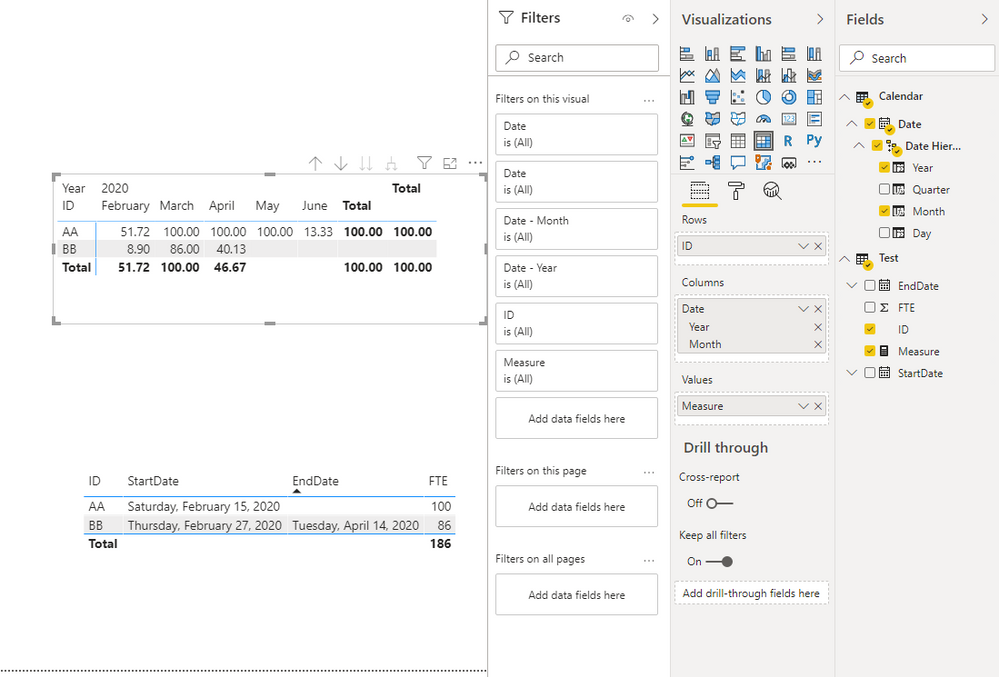
Snapshot of results:
Regards,
Xiaoxin Sheng

- Mark as New
- Bookmark
- Subscribe
- Mute
- Subscribe to RSS Feed
- Permalink
- Report Inappropriate Content
je vois que vous aviez trouver une solution sur un calcul proraté sur les dates d un slicer.Ma demande est assez similair:
Imaginer que vous enregistriez des retards de trains
et que vous ayez une date/heure de debut du retard et une date/heure de fin dans la database attache a powerBI
je veuw calculer le total des retards par mois mais en affectant que le retard proraté sur la fin du mois a 23h59 et sur le debut du mois a 0h01
donc il faut qu en fonction du slicer en place et des dates, powerbi me prorate pour les evenements a cheval avec just la partie retard jusque a la limite du mois (fin ou debut)
donc un retard de 6h enregistre entre 31/03/22 a 21h et 01/04/22 a 3hAM comptera pour 2 en mars et 3 en avril que je ferai la somme pour le mois de mars..
- Mark as New
- Bookmark
- Subscribe
- Mute
- Subscribe to RSS Feed
- Permalink
- Report Inappropriate Content
HI @Anonymous,
You can refer to the following steps to achieve your requirement.
Steps:
1. Create a calendar table based on raw table date fields.
Calendar =
CALENDAR ( MIN ( Test[StartDate] ), MAX ( MAX ( Test[EndDate] ), TODAY () ) )
2. Create a matrix visual and use raw table id as row, calendar date 'year', 'month' part as the column.
3. Write measure formulas to calculate based on the current data category label.
Measure =
VAR currFTE =
    CALCULATE ( MAX ( Test[FTE] ), ALLSELECTED ( Test ), VALUES ( Test[ID] ) )
VAR range =
    CALCULATETABLE (
        CALENDAR (
            MIN ( Test[StartDate] ),
            IF ( MAX ( Test[EndDate] ) <> BLANK (), MAX ( Test[EndDate] ), TODAY () )
        ),
        ALLSELECTED ( Test ),
        VALUES ( Test[ID] )
    )
VAR _intersect =
    INTERSECT ( range, VALUES ( 'Calendar'[Date] ) )
VAR dayofMonth =
    DAY ( EOMONTH ( MAX ( 'Calendar'[Date] ), 0 ) )
RETURN
    IF (
        MAX ( 'Calendar'[Date] ) IN range
            || MIN ( 'Calendar'[Date] ) IN range,
        MIN ( COUNTROWS ( _intersect ), dayofMonth ) * currFTE / dayofMonth
    )
Snapshot of results:
Regards,
Xiaoxin Sheng
- Mark as New
- Bookmark
- Subscribe
- Mute
- Subscribe to RSS Feed
- Permalink
- Report Inappropriate Content
thanks for that 1st help even if i will have to deep dive as not a a great DAX programmer but..the point is that you put TODAY as date for limiting the prorata.
My point was how do you use a start and end date in a slicer which is then giving the date to calculate the prorata.Can i name like Slicer start and Slicer End to cut the duration versus these 2 start or closure date for the period of the slicer
- Mark as New
- Bookmark
- Subscribe
- Mute
- Subscribe to RSS Feed
- Permalink
- Report Inappropriate Content
@Anonymous
Hi The solution woreked perfectly, except for the Total.
As you posted in the screenshot, for FEB the total is 51.72, and should be 60.62 ( the some of the 2 values 51.72 and 8.90).
Do you know how to fix it?
- Mark as New
- Bookmark
- Subscribe
- Mute
- Subscribe to RSS Feed
- Permalink
- Report Inappropriate Content
Hi @Anonymous,
You can take a look at the blow blog about measure total to use summarize function manually aggregate them to get the correct results.
Measure Totals, The Final Word
Regards,
Xiaoxin Sheng
- Mark as New
- Bookmark
- Subscribe
- Mute
- Subscribe to RSS Feed
- Permalink
- Report Inappropriate Content
Thanks a lot @Anonymous
It worked perfectly.


- Mark as New
- Bookmark
- Subscribe
- Mute
- Subscribe to RSS Feed
- Permalink
- Report Inappropriate Content
@Anonymous , refer if this file can help
Or this blog can help
Helpful resources

Power BI Dataviz World Championships
The Power BI Data Visualization World Championships is back! Get ahead of the game and start preparing now!

Power BI Monthly Update - December 2025
Check out the December 2025 Power BI Holiday Recap!

FabCon Atlanta 2026
Join us at FabCon Atlanta, March 16-20, for the ultimate Fabric, Power BI, AI and SQL community-led event. Save $200 with code FABCOMM.

| User | Count |
|---|---|
| 41 | |
| 39 | |
| 37 | |
| 29 | |
| 24 |


| User | Count |
|---|---|
| 119 | |
| 100 | |
| 72 | |
| 69 | |
| 65 |


