Get Fabric or SQL Certified for Free.
Get certified for free when you join Fabric Data Days 2026 and dive into Fabric, Power BI, SQL, AI, and other essential data skills.
Join now- Power BI forums
- Get Help with Power BI
- Desktop
- Service
- Report Server
- Power Query
- Mobile Apps
- Developer
- DAX Commands and Tips
- Custom Visuals Development Discussion
- Health and Life Sciences
- Power BI Spanish forums
- Translated Spanish Desktop
- Training and Consulting
- Instructor Led Training
- Dashboard in a Day for Women, by Women
- Galleries
- Data Stories Gallery
- Themes Gallery
- Contests Gallery
- QuickViz Gallery
- Quick Measures Gallery
- Visual Calculations Gallery
- Fabric Apps Gallery
- Notebook Gallery
- Translytical Task Flow Gallery
- TMDL Gallery
- R Script Showcase
- Webinars and Video Gallery
- Ideas
- Custom Visuals Ideas (read-only)
- Issues
- Issues
- Events
- Upcoming Events
July 7 - July 17 | Round 2 of the Power BI Dataviz World Championships. Don't miss your chance! Learn more
- Power BI forums
- Forums
- Get Help with Power BI
- Desktop
- Re: Properly load JSON file
- Subscribe to RSS Feed
- Mark Topic as New
- Mark Topic as Read
- Float this Topic for Current User
- Bookmark
- Subscribe
- Printer Friendly Page


- Mark as New
- Bookmark
- Subscribe
- Mute
- Subscribe to RSS Feed
- Permalink
- Report Inappropriate Content


- Mark as New
- Bookmark
- Subscribe
- Mute
- Subscribe to RSS Feed
- Permalink
- Report Inappropriate Content
Follow on LinkedIn
@ me in replies or I'll lose your thread!!!
Instead of a Kudo, please vote for this idea
Become an expert!: Enterprise DNA
External Tools: MSHGQM
YouTube Channel!: Microsoft Hates Greg
Latest book!: DAX For Humans
DAX is easy, CALCULATE makes DAX hard...
- Mark as New
- Bookmark
- Subscribe
- Mute
- Subscribe to RSS Feed
- Permalink
- Report Inappropriate Content
Is there any way to extract data, even if it is not in correct JSON format. I am coming up to this point:


- Mark as New
- Bookmark
- Subscribe
- Mute
- Subscribe to RSS Feed
- Permalink
- Report Inappropriate Content
Hi @Sab ,
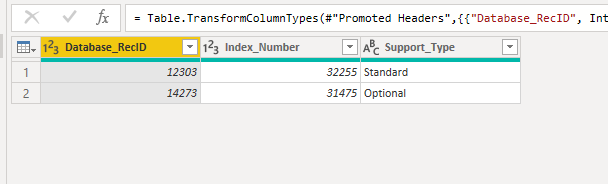
Maybe not the best code, but try it:
let
Source = Json.Document(File.Contents("D:\Downloads\example.json")),
#"Added Custom" = Json.Document(Source),
#"Converted to Table" = Record.ToTable(#"Added Custom"),
#"Pivoted Column" = Table.Pivot(#"Converted to Table", List.Distinct(#"Converted to Table"[Name]), "Name", "Value"),
Header = List.Transform(#"Pivoted Column"[column_definitions]{0}, each Record.FieldNames(_){0}),
Step1 = Table.FromList(List.Transform(#"Pivoted Column"[row_values]{0},
each
Table.Transpose(Table.FromList(_, Splitter.SplitByNothing(), null, null, ExtraValues.Error))
), Splitter.SplitByNothing(), null, null, ExtraValues.Error),
#"Expanded Column1" =
Table.Combine({
Table.Transpose(Table.FromList(Header, Splitter.SplitByNothing(), null, null, ExtraValues.Error)),
Table.ExpandTableColumn(Step1, "Column1", {"Column1", "Column2", "Column3"}, {"Column1", "Column2", "Column3"})
}),
#"Promoted Headers" = Table.PromoteHeaders(#"Expanded Column1", [PromoteAllScalars=true]),
#"Changed Type" = Table.TransformColumnTypes(#"Promoted Headers",{{"Database_RecID", Int64.Type}, {"Index_Number", Int64.Type}, {"Support_Type", type text}})
in
#"Changed Type"
Did I answer your question? Mark my post as a solution!
Proud to be a Super User!
- Mark as New
- Bookmark
- Subscribe
- Mute
- Subscribe to RSS Feed
- Permalink
- Report Inappropriate Content
Thanks a lot! I am trying to understand Header and Step1 steps, I guess there is no commands to do those steps and you have to manually write the code?!
- Mark as New
- Bookmark
- Subscribe
- Mute
- Subscribe to RSS Feed
- Permalink
- Report Inappropriate Content
@Sab ,
Yes, I thought easier to write the code, it's less steps than UI steps (I think).
I just navigated through the lists and transformed it to tables.
Did I answer your question? Mark my post as a solution!
Proud to be a Super User!
- Mark as New
- Bookmark
- Subscribe
- Mute
- Subscribe to RSS Feed
- Permalink
- Report Inappropriate Content
Can you do it with UI steps please?
Thanks!
- Mark as New
- Bookmark
- Subscribe
- Mute
- Subscribe to RSS Feed
- Permalink
- Report Inappropriate Content
@Sab ,
This one with headers.
let
Source = Json.Document(File.Contents("D:\Downloads\example.json")),
#"Added Custom" = Json.Document(Source),
#"Converted to Table" = Record.ToTable(#"Added Custom"),
#"Added Custom1" = Table.AddColumn(#"Converted to Table", "Custom", each if [Name] = "column_definitions" then
Table.Transpose(Table.FromList(List.Transform([Value], each Record.FieldNames(_){0}), Splitter.SplitByNothing(), null, null, ExtraValues.Error))
else
Table.Combine(List.Transform([Value]
, each Table.Transpose(Table.FromList(_, Splitter.SplitByNothing(), null, null, ExtraValues.Error))))),
#"Removed Other Columns" = Table.SelectColumns(#"Added Custom1",{"Custom"}),
#"Expanded Custom" = Table.ExpandTableColumn(#"Removed Other Columns", "Custom", {"Column1", "Column2", "Column3"}, {"Column1", "Column2", "Column3"}),
#"Promoted Headers" = Table.PromoteHeaders(#"Expanded Custom", [PromoteAllScalars=true]),
#"Changed Type" = Table.TransformColumnTypes(#"Promoted Headers",{{"Database_RecID", Int64.Type}, {"Index_Number", Int64.Type}, {"Support_Type", type text}})
in
#"Changed Type"
I've to input code in custom columns, I don't know how to do it without coding.
Did I answer your question? Mark my post as a solution!
Proud to be a Super User!
- Mark as New
- Bookmark
- Subscribe
- Mute
- Subscribe to RSS Feed
- Permalink
- Report Inappropriate Content
Thanks a lot again, much appreciated!
- Mark as New
- Bookmark
- Subscribe
- Mute
- Subscribe to RSS Feed
- Permalink
- Report Inappropriate Content
@Sab ,
let
Source = Json.Document(File.Contents("D:\Downloads\example.json")),
#"Added Custom" = Json.Document(Source),
row_values = #"Added Custom"[row_values],
#"Converted to Table" = Table.FromList(row_values, Splitter.SplitByNothing(), null, null, ExtraValues.Error),
#"Extracted Values" = Table.TransformColumns(#"Converted to Table", {"Column1", each Text.Combine(List.Transform(_, Text.From), ";"), type text}),
#"Split Column by Delimiter" = Table.SplitColumn(#"Extracted Values", "Column1", Splitter.SplitTextByDelimiter(";", QuoteStyle.Csv), {"Column1.1", "Column1.2", "Column1.3"}),
#"Changed Type" = Table.TransformColumnTypes(#"Split Column by Delimiter",{{"Column1.1", Int64.Type}, {"Column1.2", Int64.Type}, {"Column1.3", type text}})
in
#"Changed Type"
Without the headers.
Did I answer your question? Mark my post as a solution!
Proud to be a Super User!

Helpful resources

FabCon & SQLCon – Barcelona 2026
Join us in Barcelona for FabCon and SQLCon, the Fabric, Power BI, SQL, and AI community event. Save €200 with code FABCMTY200.

Power BI Monthly Update - July 2026
Check out the July 2026 Power BI update to learn about new features.

Data Days 2026
Join Data Days 2026: 60 days of free live/on-demand sessions, challenges, study groups, and certification opportunities.

Power BI DataViz World Championships - June 2026
A new Power BI DataViz World Championship is coming this June! Don't miss out on submitting your entry.

| User | Count |
|---|---|
| 30 | |
| 30 | |
| 25 | |
| 24 | |
| 16 |


| User | Count |
|---|---|
| 57 | |
| 36 | |
| 28 | |
| 24 | |
| 20 |


