Share feedback directly with Fabric product managers, participate in targeted research studies and influence the Fabric roadmap.
Sign up nowGet Fabric certified for FREE! Don't miss your chance! Learn more
It would be great if Power BI would properly order numbers. I'm not sure if this is an idea out there or is being worked on, but here is an example of how it should be:
1
2
3
4
5
6
7
8
9
10
11
12
13
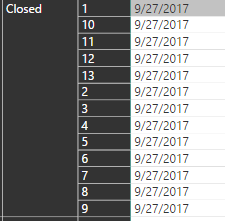
Instead, I get this:
1
10
11
12
13
2
3
4
5
6
7
8
9
That's just silly. It is happening to me in a non-stepped matrix. I've also noticed this in slicers as well and have to do some "wizadry" to make it work correctly. Why can't Power BI know that 10 is greater than 1? I understand that it must look at the first number character and THEN look at the second number character, but this seems like a poor decision.
Solved! Go to Solution.
What data type is that column? Is it actually a number, or is it text?
You've proven me to be an idiot. It works after switching it to numbers. I thought it was a number to begin with but no, it was text. Looks good now, thanks!
If you love stickers, then you will definitely want to check out our Community Sticker Challenge!
Check out the January 2026 Power BI update to learn about new features.
| User | Count |
|---|---|
| 65 | |
| 64 | |
| 49 | |
| 21 | |
| 18 |
| User | Count |
|---|---|
| 119 | |
| 117 | |
| 38 | |
| 36 | |
| 29 |