cancel
Showing results for 
Search instead for 
Did you mean: 

Vote for your favorite vizzies from the Power BI Dataviz World Championship submissions. Vote now!

Reply
Anonymous
Not applicable

Project Insight connector for Power BI

Hi


How to turn on the Project Insight connector to Power BI Desktop? It is because my Power BI desktop did not appear the Project Insight connector in get data box.


Thank You

1 ACCEPTED SOLUTION

Hi @Anonymous ,


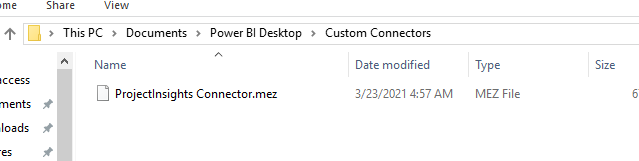
As mentioned in the vedio:https://www.scitylana.com/connectors/ , you need to create  folder under Windows Documents: Power BI Desktop\Custom Connectors then copy the mez file into it: 

Untitled picture.png


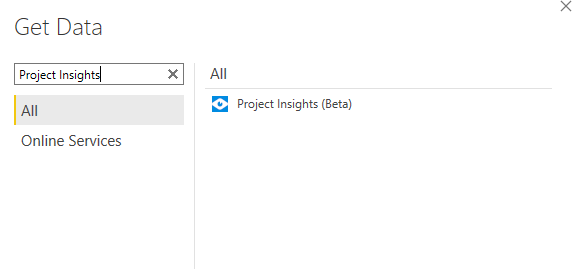
Then follow the steps in the link you provided, you can see the custom connector:


Untitled picture1.png


If this post helps, then please consider Accept it as the solution to help the other members find it more quickly.


Best Regards,

Dedmon Dai


View solution in original post

5 REPLIES 5
amitchandak
Super User
Super User

@Anonymous , I also do not see it in the list. Can share the link where you saw that


I got these two links. Which also do not show any connector

https://support.projectinsight.net/hc/en-us/community/posts/360029741292-Connect-PI-with-Power-BI

https://community.powerbi.com/t5/Developer/ProjectWise-Project-Insights-Connector/m-p/1674679/highlight/true

Share with Power BI Enthusiasts: Full Power BI Video (20 Hours) YouTube
Microsoft Fabric Series 60+ Videos YouTube
Microsoft Fabric Hindi End to End YouTube
Anonymous
Not applicable

@Anonymous , So you have already downloaded and placed the driver at the given place and closed all instances of power BI and opened power bi and checked it?

Share with Power BI Enthusiasts: Full Power BI Video (20 Hours) YouTube
Microsoft Fabric Series 60+ Videos YouTube
Microsoft Fabric Hindi End to End YouTube
Anonymous
Not applicable

Hi @amitchandak ,


Yes, already follow the step but still did not have Project Insight connector.


Thank You

Hi @Anonymous ,


As mentioned in the vedio:https://www.scitylana.com/connectors/ , you need to create  folder under Windows Documents: Power BI Desktop\Custom Connectors then copy the mez file into it: 

Untitled picture.png


Then follow the steps in the link you provided, you can see the custom connector:


Untitled picture1.png


If this post helps, then please consider Accept it as the solution to help the other members find it more quickly.


Best Regards,

Dedmon Dai


Helpful resources

Announcements
Power BI DataViz World Championships

Power BI Dataviz World Championships

Vote for your favorite vizzies from the Power BI World Championship submissions!

Sticker Challenge 2026 Carousel

Join our Community Sticker Challenge 2026

If you love stickers, then you will definitely want to check out our Community Sticker Challenge!

January Power BI Update Carousel

Power BI Monthly Update - January 2026

Check out the January 2026 Power BI update to learn about new features.

FabCon Atlanta 2026 carousel

FabCon Atlanta 2026

Join us at FabCon Atlanta, March 16-20, for the ultimate Fabric, Power BI, AI and SQL community-led event. Save $200 with code FABCOMM.