Get certified for free when you join Fabric Data Days 2026 and dive into Fabric, Power BI, SQL, AI, and other essential data skills.
Join nowData Days is here! Join us now for 60+ days of learning, challenges, and connection. Learn more
Hi All,
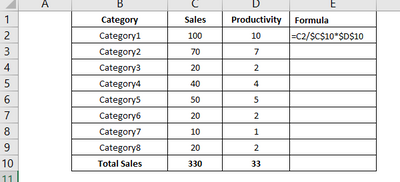
I have a category wise sum along with splitup data like below in sales, similarly the productivity data is avilable without split.
I need to calculate the value based on the total productivity value like below, i have a overall productivy value only avilable [33]. can you please give some idea how to do that.
Thanks
Raju
Solved! Go to Solution.
Hi @rajuctech ,
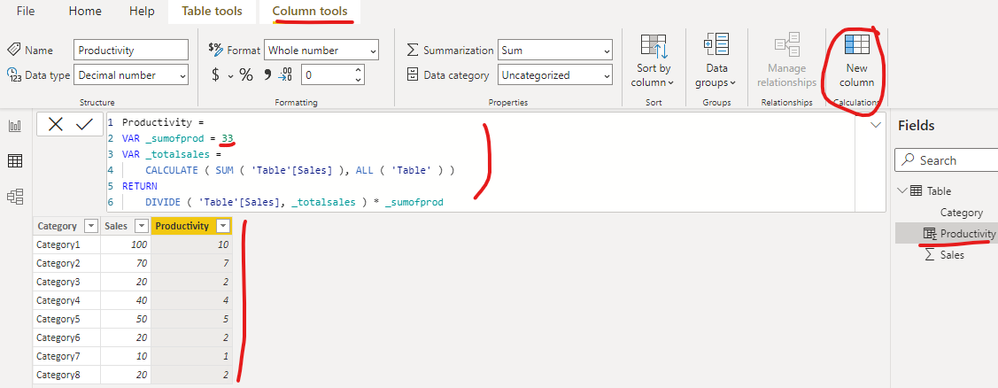
I created a sample pbix file(see attachment) for you, please check whether that is what you want. You can create a calculated column as below:
Productivity =
VAR _sumofprod = 33
VAR _totalsales =
CALCULATE ( SUM ( 'Table'[Sales] ), ALL ( 'Table' ) )
RETURN
DIVIDE ( 'Table'[Sales], _totalsales ) * _sumofprod
If the above one can't help you get the desired result, please provide some sample data in your tables (exclude sensitive data) with Text format and your expected result with backend logic and special examples. It is better if you can share a simplified pbix file. You can refer the following link to upload the file to the community. Thank you.
How to upload PBI in Community
Best Regards
Hi @rajuctech ,
I created a sample pbix file(see attachment) for you, please check whether that is what you want. You can create a calculated column as below:
Productivity =
VAR _sumofprod = 33
VAR _totalsales =
CALCULATE ( SUM ( 'Table'[Sales] ), ALL ( 'Table' ) )
RETURN
DIVIDE ( 'Table'[Sales], _totalsales ) * _sumofprod
If the above one can't help you get the desired result, please provide some sample data in your tables (exclude sensitive data) with Text format and your expected result with backend logic and special examples. It is better if you can share a simplified pbix file. You can refer the following link to upload the file to the community. Thank you.
How to upload PBI in Community
Best Regards
Any suggestion would be fine.
Don't miss out on Data Days, June 15 through August 7. Learn Fabric, Power BI, SQL, AI and more.
Check out the May 2026 Power BI update to learn about new features.
| User | Count |
|---|---|
| 23 | |
| 23 | |
| 20 | |
| 18 | |
| 14 |
| User | Count |
|---|---|
| 58 | |
| 51 | |
| 41 | |
| 30 | |
| 24 |