

cancel
Showing results for 
Search instead for 
Did you mean: 

Level up your Power BI skills this month - build one visual each week and tell better stories with data! Get started

Reply
vincentakatoh
Helper IV
Helper IV

Production Yield Calculation

Hi, 


Will like to calculate production roll yield. 


1) Below is "Roll yield" calculation using excel for each Line1-Line4

=IF(ISERROR(D3),1,D3)*IF(ISERROR(G3),1,G3)*IF(ISERROR(J3),1,J3)*IF(ISERROR(M3),1,M3)

Differentiate between zero and "#DIV/0"2017-04-24 22_55_21-PowerBI 0424 - Excel.png


2) Manage to get this far using Power BI. 

2017-04-24 22_57_47-Production Yield Calculation 0424 - Power BI Desktop.png


Que: How to calculate roll yield? Sample data in link below. 


https://1drv.ms/f/s!ArjVwEnHONXNgQ-4Kt5T8IMJwg6W

1 ACCEPTED SOLUTION

Sure thing.


Please give this a try and let me know how you get on, 🙂


https://wgtnpowerbi-my.sharepoint.com/personal/phil_wgtnpowerbi_onmicrosoft_com/_layouts/15/guestacc...


To learn more about DAX visit : aka.ms/practicalDAX

Proud to be a Datanaut!

View solution in original post

5 REPLIES 5
Phil_Seamark
Microsoft Employee
Microsoft Employee

Hi @vincentakatoh


I created the following calculated table that seems to make the calculation a little easier


Yield Roll Table = 
    SUMMARIZECOLUMNS(
        data[Area],
        data[Line],
        data[station],
        "Count of Pass",COUNTROWS(FILTer('data',[test results]="P")),
        "Count of Fail",COUNTROWS(FILTer('data',[test results]="F")),
        "Yield",DIVIDE([CountPass],[CountPass]+[CountFail],1)
        )

and then I added the following measure to the above table


Roll Yeild = PRODUCT([Yield])

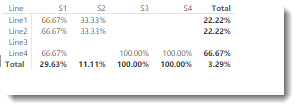
I can then use the new table to create this matix


yeld.png


To learn more about DAX visit : aka.ms/practicalDAX

Proud to be a Datanaut!

Hi Phil, 


Can you attached the sample data? Thanks, as you can tell, I'm a newbie to Power BI and dummy to DAX. Will like to explore the calculated table in Power BI. 


Thanks

Sure thing.


Please give this a try and let me know how you get on, 🙂


https://wgtnpowerbi-my.sharepoint.com/personal/phil_wgtnpowerbi_onmicrosoft_com/_layouts/15/guestacc...


To learn more about DAX visit : aka.ms/practicalDAX

Proud to be a Datanaut!

Hi Phil, 

Super. What a clean and easy solution. Love the awesome response in this forum. Power Support, Power BI!

@phil


Help! If the original data has a column "testdate", how can I add the "date" colum to the new Table "Yield Roll Table".


Tired to add "data[testdate]" in the DAX formula, but it messes up the "Yield" Calculation, giving a incorrect Yield results. 


Yield Roll Table =
SUMMARIZECOLUMNS(
data[Area],
data[Line],
data[station],
data[testdate],
"Count of Pass",COUNTROWS(FILTer('data',[test results]="P")),
"Count of Fail",COUNTROWS(FILTer('data',[test results]="F")),
"Yield",DIVIDE([CountPass],[CountPass]+[CountFail],1)
)

Helpful resources

Announcements
April Power BI Update Carousel

Power BI Monthly Update - April 2026

Check out the April 2026 Power BI update to learn about new features.

Fabric SQL PBI Data Days

Data Days 2026 coming soon!

Sign up to receive a private message when registration opens and key events begin.

New to Fabric survey Carousel

New to Fabric Survey

If you have recently started exploring Fabric, we'd love to hear how it's going. Your feedback can help with product improvements.

Power BI DataViz World Championships carousel

Power BI DataViz World Championships - June 2026

A new Power BI DataViz World Championship is coming this June! Don't miss out on submitting your entry.