
This is best Fabric, Power BI, SQL and AI community event. How do we know? The last event sold out! Save €200 with code FABCMTY200.
Register nowA new Data Days event is coming soon! This time we’re going bigger than ever. Fabric, Power BI, SQL, AI and more. Don't miss out.
I'm trying to come up with a visualization that shows production time over a 90 days period without using Start and End dates. I have the start and end dates but when using those in a visualization it just staggers the start date and end date (See pic below using the "as Timeline" visual) where what I'm intersted in is the pathway each product takes to completion while having the start and end normalized.
I played around with a stacked bar chart but the issue there is that some of the products go back to the same line over the course of the production pathway and the bar chart will just combine them.
A simplified sample table is shown below
Any help would be great!
Thanks
| Name | Production Order | Type | Start Date | End Date | Production Days |
| Product X | 1 | Line 1 | 10/1/2018 | 10/7/2018 | 6 |
| Product X | 2 | Line 4 | 10/7/2018 | 10/17/2018 | 10 |
| Product X | 3 | Line 3 | 10/17/2018 | 10/19/2018 | 2 |
| Product X | 4 | Line 1 | 10/19/2018 | 10/23/2018 | 4 |
| Product X | 5 | Line 4 | 10/23/2018 | 12/29/2018 | 67 |
| Product J | 1 | Line 2 | 10/6/2018 | 10/16/2018 | 10 |
| Product J | 2 | Line 5 | 10/16/2018 | 10/26/2018 | 10 |
| Product J | 3 | Line 4 | 10/26/2018 | 1/3/2019 | 69 |
Hi @Anonymous,
For "as Timeline" visual, Ihave no idea. However, you could try another visual.
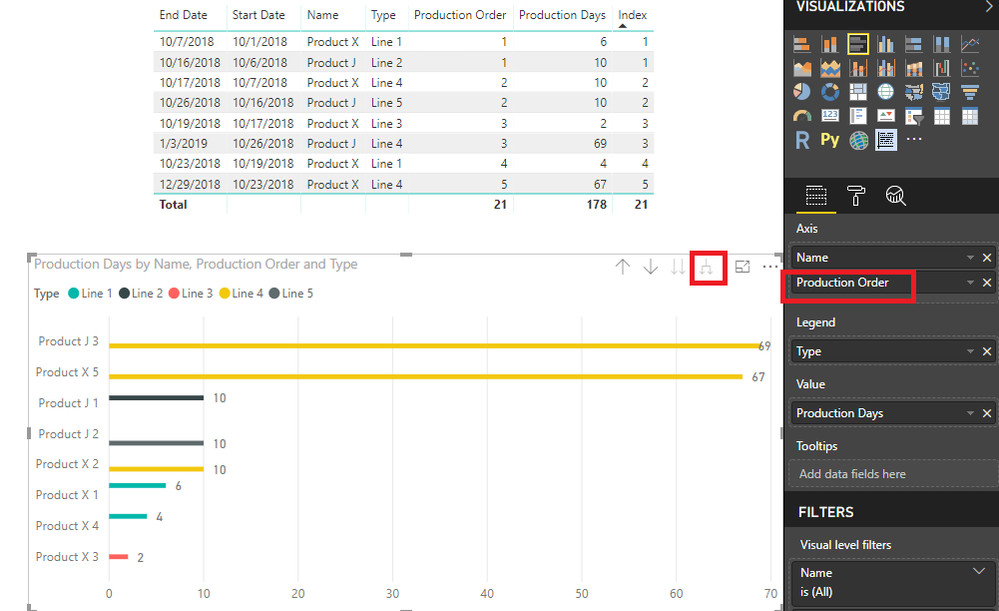
You could create a Clustered bar chart like below so that some of the products go back to the same line over the course of the production pathway and the bar chart will not combine them.
Best Regards,
Cherry
Check out the May 2026 Power BI update to learn about new features.
Sign up to receive a private message when registration opens and key events begin.
If you have recently started exploring Fabric, we'd love to hear how it's going. Your feedback can help with product improvements.
| User | Count |
|---|---|
| 31 | |
| 26 | |
| 23 | |
| 22 | |
| 15 |
| User | Count |
|---|---|
| 62 | |
| 47 | |
| 28 | |
| 24 | |
| 21 |