cancel
Showing results for 
Search instead for 
Did you mean: 

Learn from the best! Meet the four finalists headed to the FINALS of the Power BI Dataviz World Championships! Register now

Reply
Boveitj
Frequent Visitor

Production Rates by Time

Hey Guys,


I need to calculate the percentage a machine is on by day, week, month, and year and show this data graphically (line graph). The values outputted from the machine are in seconds and shown below. Is there a way I can use this data to determine the seconds on/ seconds off by day, week, month, and year to show the "Machine on Percentage" only counting days when it is in production - days it has an output of duration (in seconds) for? Meaning some days the factory is not in operation so I dont want to use that day in the calculation.


Thanks!


Data looks like this:

StartDateTime

Duration

EndDateTime

1/14/2016 8:16

202.3

1/14/2016 8:19

1/14/2016 8:19

13.2

1/14/2016 8:20

1/14/2016 8:20

323.6

1/14/2016 8:25

1/14/2016 8:25

19.4

1/14/2016 8:25

1/14/2016 8:28

204.8

1/14/2016 8:31

1/14/2016 8:31

12.9

1/14/2016 8:32

1/14/2016 8:32

357.2

1/14/2016 8:38

1/14/2016 8:38

18.9

1/14/2016 8:38

1 REPLY 1
fhill
Resident Rockstar
Resident Rockstar

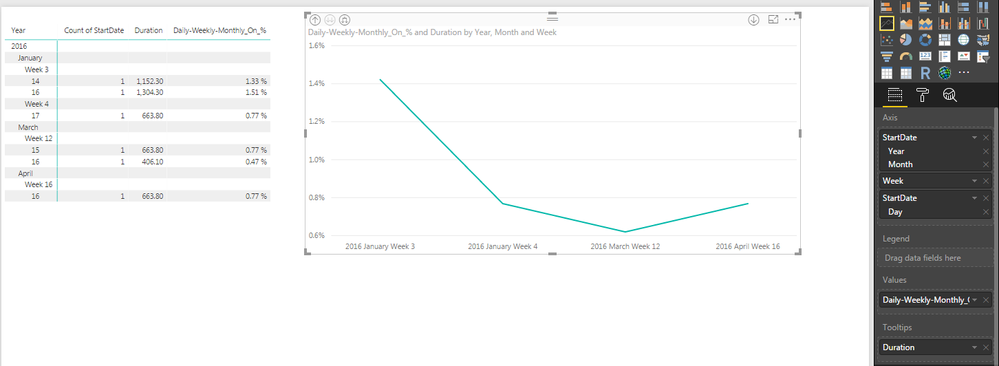
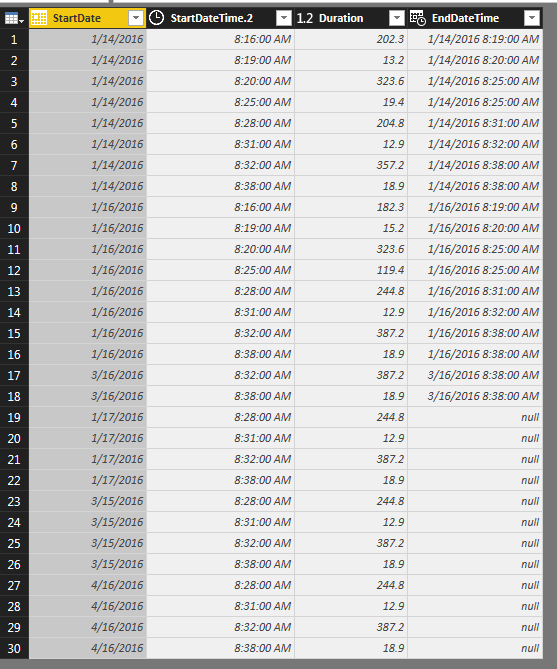
I broke up your Start Date to just the date with a SPLIT when it was in TXT format.  Now that we only have a date, PowerBI automatically converted it into Date format as shown below.  Now that we have a Date & Duration, we don't need End Time.


I'm not sure if this is what you had in mind, but trying to graph Daily / Weekly / Monthly seperatly, only works if you DON'T change the timeframe of the visual.  I was beating my head on the wall trying to figure out why Weekly  & Monthly were always the same value, when I realized when I zoomed out to a Monthly level, the calculated value changed to adjust to the zoom duration.  


As a result, I created ONE Measure that autoamatically adjusts depending on the level you look at the data.  See below where I have 'daily' level on the Matrix and 'weekly' level on the Line Chart.  If you zoom either of these In/Out the line (or value) correctly adjust to accomidate the new level automatically.  


Daily-Weekly-Monthly_On_% = SUM(Table1[Duration]) / (86400 * DISTINCTCOUNT(Table1[StartDate]) )


What you can't do, is expect a Daily 1.22% line to stay at 1.22 % when the visual is backed up to the Week level.  PowerBI by default will try to SUM the Daily figures, but that's not correct.  This is why I'm sicking with the one Measure...


** The AXIS heiarchy is important to put in this order if you want the Visaul(s) to correctly Zoom In/Out in Year / Month / Week / Daily order! **


Forrest
 

Capture.PNGCapture2.PNG


Did I answer your question, or help you along the way?
Please give Kudos or Mark as a Solution!


https://www.linkedin.com/in/forrest-hill-04480730/

Proud to give back to the community!
Thank You!


Helpful resources

Announcements
Power BI DataViz World Championships carousel

Power BI DataViz World Championships - June 2026

A new Power BI DataViz World Championship is coming this June! Don't miss out on submitting your entry.

Join our Fabric User Panel

Join our Fabric User Panel

Share feedback directly with Fabric product managers, participate in targeted research studies and influence the Fabric roadmap.

March Power BI Update Carousel

Power BI Community Update - March 2026

Check out the March 2026 Power BI update to learn about new features.