Don't miss your chance to take the Fabric Data Engineer (DP-600) exam for FREE! Find out how by attending the DP-600 session on April 23rd (pacific time), live or on-demand.
Learn moreJoin the FabCon + SQLCon recap series. Up next: Power BI, Real-Time Intelligence, IQ and AI, and Data Factory take center stage. All sessions are available on-demand after the live show. Register now
Hi all,
Can we create measure to calculate processing time per monthly based on some specific date on that transaction. Understand this is very very not clear.
For example I have this data :
| Order Id | Created date | Complete date |
| 001 | 1/10/2019 | 1/25/2019 |
| 002 | 1/11/2019 | 1/25/2019 |
| 003 | 1/12/2019 | 1/25/2019 |
| 004 | 1/13/2019 | 1/25/2019 |
| 005 | 1/13/2019 | 2/2/2019 |
| 006 | 2/1/2019 | 2/2/2019 |
| 007 | 2/2/2019 | 2/2/2019 |
| 008 | 2/3/2019 | 3/12/2019 |
| 009 | 2/4/2019 | 3/12/2019 |
| 010 | 2/5/2019 | 3/12/2019 |
| 011 | 3/1/2019 | 3/12/2019 |
| 012 | 3/2/2019 | 3/12/2019 |
| 013 | 3/3/2019 | 3/12/2019 |
| 014 | 3/4/2019 | 3/12/2019 |
| 015 | 3/5/2019 | 3/12/2019 |
| 016 | 3/6/2019 | 4/10/2019 |
| 017 | 4/1/2019 | 4/10/2019 |
| 018 | 4/2/2019 | 4/10/2019 |
| 019 | 4/3/2019 | 4/10/2019 |
| 020 | 4/4/2019 | 5/1/2019 |
Order number which I put under orange color (005, 009, 010, 016, 020) is orders that not complete on the month end.
So in my report, when Table visualization with Month displayed, this orders must be counted as WIP order, and then I need to calculate the process time of the order, End of Month date - Orders created date.
Something like this :
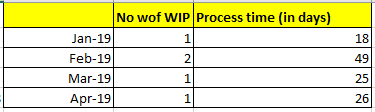
In Januari, based on my transaction tabel, Oder #005 which created date on 1/13 not yet completed at the Januari end of month, so it will put on the visualization. counted -> no of WIP = 1, then process time up to end of month is 1/31 - 1/13 = 18 days, and so on
Any advice is this achievable with Power BI ?
Thanks,
Solved! Go to Solution.
Hi @admin_xlsior ,
Does that make sense? If so, kindly mark my answer as a solution to help others having the similar issue and close the case.
Best regards
Amy Cai
Hi, thank you so much for your idea and help. it worked.
Hi @admin_xlsior ,
Does that make sense? If so, kindly mark my answer as a solution to help others having the similar issue and close the case.
Best regards
Amy Cai
Hi @admin_xlsior ,
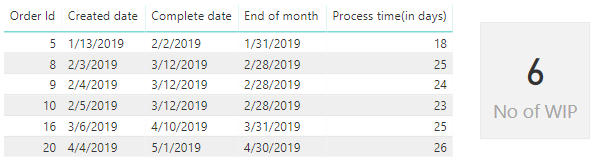
You can create calendar table DateKey ,then create measure Process time(in days) to get process time up to end of month, and create measure No of WIP to count order id which is overdue.
DateKey= CALENDARAUTO()
Process time(in days) = DATEDIFF(Table1[Created date],EOMONTH(Table1[Created date],0),DAY)
No of WIP = CALCULATE(COUNT(Table1[Order Id]),FILTER(ALLSELECTED(Table1),EOMONTH(Table1[Created date],0)<Table1[Complete date]&&(Table1[Created date]<=MAX('DateKey'[Date])&&Table1[Complete date]>=MIN('DateKey'[Date]))))
Here is my test pbix: https://qiuyunus-my.sharepoint.com/:u:/g/personal/pbipro_qiuyunus_onmicrosoft_com/ER_nvIyBY7ZPkiCCPw...
Best Regards,
Amy
If this post helps, then please consider Accept it as the solution to help the other members find it more quickly.
Check out the April 2026 Power BI update to learn about new features.
If you have recently started exploring Fabric, we'd love to hear how it's going. Your feedback can help with product improvements.
A new Power BI DataViz World Championship is coming this June! Don't miss out on submitting your entry.
| User | Count |
|---|---|
| 48 | |
| 40 | |
| 38 | |
| 20 | |
| 16 |
| User | Count |
|---|---|
| 68 | |
| 67 | |
| 30 | |
| 26 | |
| 26 |