
cancel
Showing results for 
Search instead for 
Did you mean: 

The Power BI Data Visualization World Championships is back! Get ahead of the game and start preparing now! Learn more

Reply
Anonymous
Not applicable

Problems with slicer

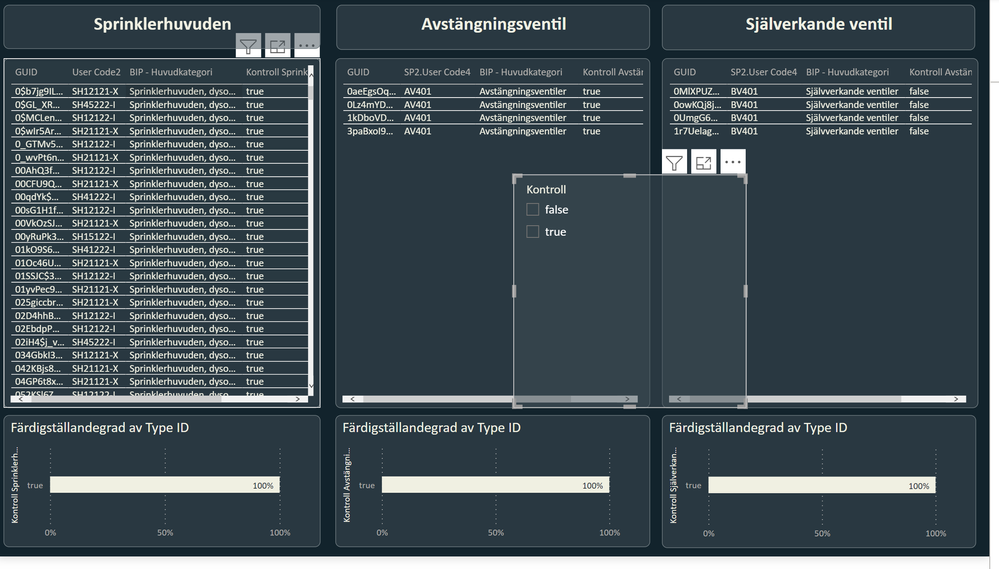
I have one table with multiple columns with false/true values. I'm trying to create a slicer that will filter all of the columns by linking a seperate table with the values true/false but having problems. 


These are my columns with the false/true values: 

1.png

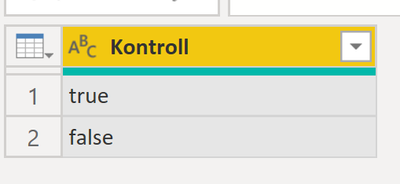
This is my table for the slicer:

hiral_0-1656702164212.png


This is how I've connected the two tables:

3.PNG


The result I'm looking for is that I want to filter all true values or all the false values for all the tables, however I can't make it work.

4.PNG

1 ACCEPTED SOLUTION
Anonymous
Not applicable

Hi @Anonymous ,


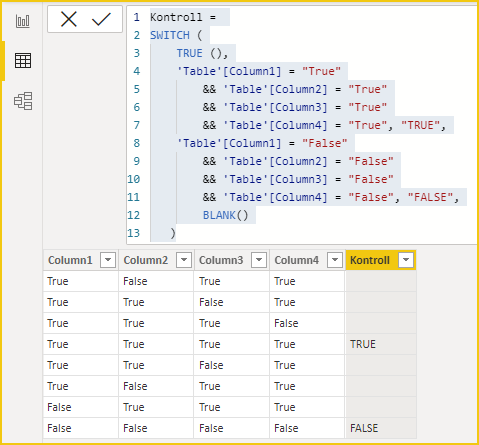
Try to create a similar calculated column and use it as a field for the slicer.

Kontroll = 
SWITCH (
    TRUE (),
    'Table'[Column1] = "True"
        && 'Table'[Column2] = "True"
        && 'Table'[Column3] = "True"
        && 'Table'[Column4] = "True", "TRUE",
    'Table'[Column1] = "False"
        && 'Table'[Column2] = "False"
        && 'Table'[Column3] = "False"
        && 'Table'[Column4] = "False", "FALSE",
        BLANK()
   )

vcgaomsft_0-1656936095969.png

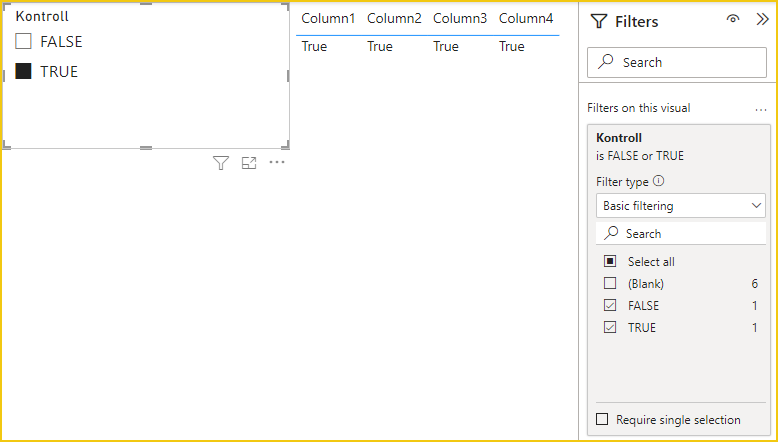
Sieve out the blanks in the slicer.

vcgaomsft_1-1656936341845.png

Best Regards,
Gao

Community Support Team


If there is any post helps, then please consider Accept it as the solution to help the other members find it more quickly. If I misunderstand your needs or you still have problems on it, please feel free to let us know. Thanks a lot!

How to get your questions answered quickly -- How to provide sample data

View solution in original post

2 REPLIES 2
dwh
Helper II
Helper II

I would do one other thing.
I would create a registry for each combination of control and data.
So column 1 = control, column2 = guid, column3 = etc.
This is for each table. By doing so you have the personal data of each one. Then I would create a Control table (true / false).
Finally, I would connect the control file with each registry table and each registry with the main table.
In all this it is enough to decide on a key or create a connection key (for example a key can be GUID + Kontrol)

I hope I was clear

dwh_0-1656937837213.png


Anonymous
Not applicable

Hi @Anonymous ,


Try to create a similar calculated column and use it as a field for the slicer.

Kontroll = 
SWITCH (
    TRUE (),
    'Table'[Column1] = "True"
        && 'Table'[Column2] = "True"
        && 'Table'[Column3] = "True"
        && 'Table'[Column4] = "True", "TRUE",
    'Table'[Column1] = "False"
        && 'Table'[Column2] = "False"
        && 'Table'[Column3] = "False"
        && 'Table'[Column4] = "False", "FALSE",
        BLANK()
   )

vcgaomsft_0-1656936095969.png

Sieve out the blanks in the slicer.

vcgaomsft_1-1656936341845.png

Best Regards,
Gao

Community Support Team


If there is any post helps, then please consider Accept it as the solution to help the other members find it more quickly. If I misunderstand your needs or you still have problems on it, please feel free to let us know. Thanks a lot!

How to get your questions answered quickly -- How to provide sample data

Helpful resources

Announcements
Power BI DataViz World Championships

Power BI Dataviz World Championships

The Power BI Data Visualization World Championships is back! Get ahead of the game and start preparing now!

December 2025 Power BI Update Carousel

Power BI Monthly Update - December 2025

Check out the December 2025 Power BI Holiday Recap!

FabCon Atlanta 2026 carousel

FabCon Atlanta 2026

Join us at FabCon Atlanta, March 16-20, for the ultimate Fabric, Power BI, AI and SQL community-led event. Save $200 with code FABCOMM.