cancel
Showing results for 
Search instead for 
Did you mean: 

July 7 - July 17 | Round 2 of the Power BI Dataviz World Championships. Don't miss your chance! Learn more

Reply
GustavoF
New Member

Problems with Edge Color Weight

Hi,


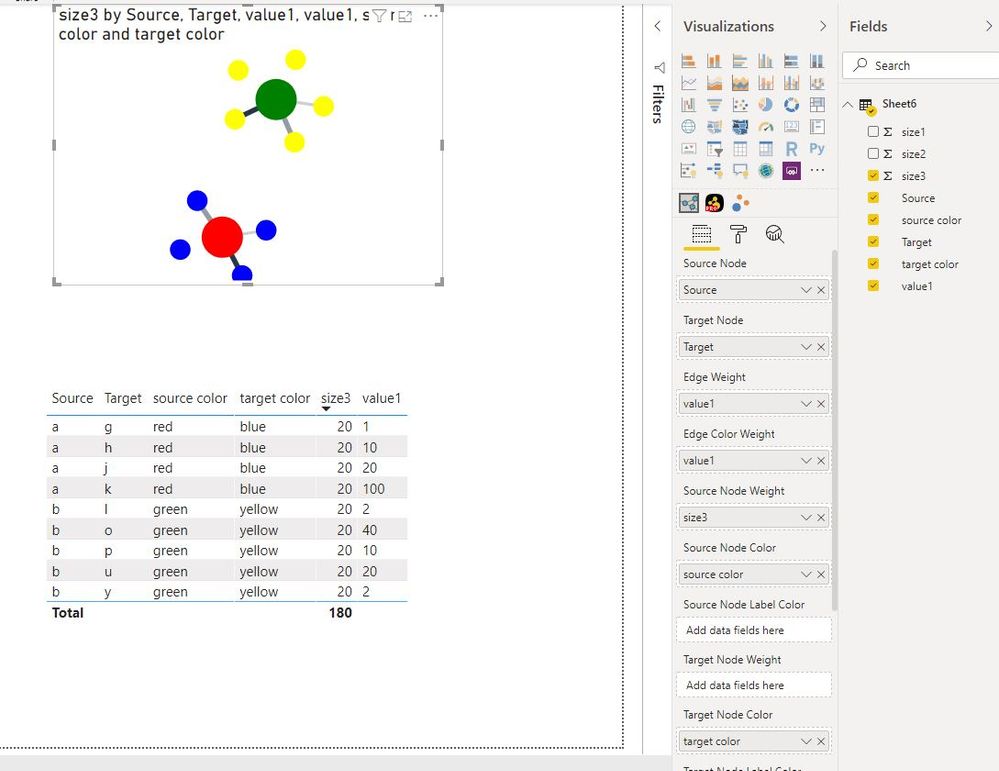
I am trying to build a very simple network graph. My spreadsheet has a column with colours in English. She does work with Source and Target Node Color but does not with Edge Color Weight. By the way, I am using Edge Weight to with an scale from 1 - 3 and I get the right result. What am I missing?


1 ACCEPTED SOLUTION
v-juanli-msft
Community Support
Community Support

Hi @GustavoF 

Basic learning video:

https://www.youtube.com/watch?v=0YHr7IreN2U


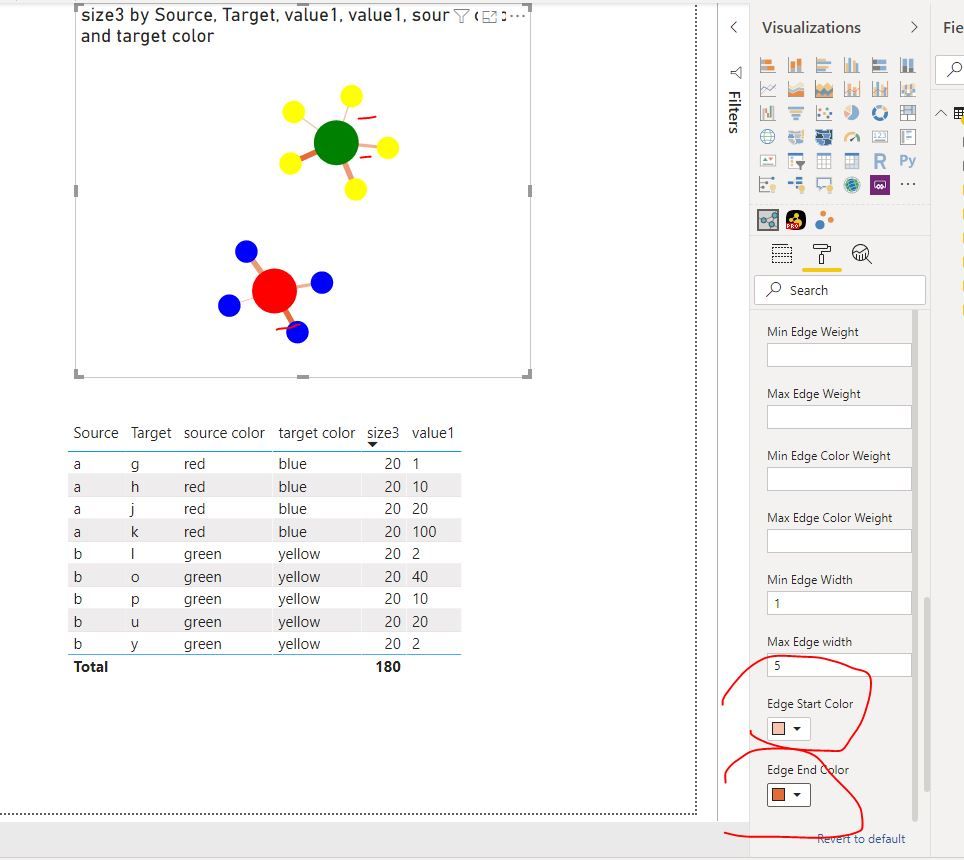
As tested, add numeric column into [Edge Color Weight] would show the gradual change color for the Edges.

Capture11.JPGCapture12.JPG


Best Regards
Maggie
Community Support Team _ Maggie Li
If this post helps, then please consider Accept it as the solution to help the other members find it more quickly.

View solution in original post

4 REPLIES 4
v-juanli-msft
Community Support
Community Support

Hi @GustavoF 

Basic learning video:

https://www.youtube.com/watch?v=0YHr7IreN2U


As tested, add numeric column into [Edge Color Weight] would show the gradual change color for the Edges.

Capture11.JPGCapture12.JPG


Best Regards
Maggie
Community Support Team _ Maggie Li
If this post helps, then please consider Accept it as the solution to help the other members find it more quickly.

Thanks very much, tried and worked. Best regards, GF:

parry2k
Super User
Super User

@GustavoF not sure what you are looking for? Is it visual? Which one? Can you provide more details? Read this post to get your answer quickly.

https://community.powerbi.com/t5/Community-Blog/How-to-Get-Your-Question-Answered-Quickly/ba-p/38490


Subscribe to the @PowerBIHowTo YT channel for an upcoming video on List and Record functions in Power Query!!

Learn Power BI and Fabric - subscribe to our YT channel - Click here: @PowerBIHowTo

If my solution proved useful, I'd be delighted to receive Kudos. When you put effort into asking a question, it's equally thoughtful to acknowledge and give Kudos to the individual who helped you solve the problem. It's a small gesture that shows appreciation and encouragement! ❤


Did I answer your question? Mark my post as a solution. Proud to be a Super User! Appreciate your Kudos 🙂
Feel free to email me with any of your BI needs.

Thanks very much, I'll follow the instructions next time, it looks like there is a later post with a solution.

Helpful resources

Announcements
FabCon and SQLCon Barcelona 2026

FabCon & SQLCon – Barcelona 2026

Join us in Barcelona for FabCon and SQLCon, the Fabric, Power BI, SQL, and AI community event. Save €200 with code FABCMTY200.

60 days of Data Days Carousel

Data Days 2026

Join Data Days 2026: 60 days of free live/on-demand sessions, challenges, study groups, and certification opportunities.

Power BI DataViz World Championships carousel

Power BI DataViz World Championships - June 2026

A new Power BI DataViz World Championship is coming this June! Don't miss out on submitting your entry.

Top Solution Authors