cancel
Showing results for 
Search instead for 
Did you mean: 

Learn from the best! Meet the four finalists headed to the FINALS of the Power BI Dataviz World Championships! Register now

Reply
soham2000
Regular Visitor

Problems replacing datasets

Hello,


We are facing issue while uploading a file (report not dashboard) in the online version of powerBI.


The whole process:


From online version we download to the local ---- make some changes in the local and add few data sources -- and finally upload it back by publishing from the local.


The filename is exactly the same in the online version of power bi, but it creates another file with the same name.


How to resolve this? Urgent.


Thanks.

2 REPLIES 2
v-huizhn-msft
Microsoft Employee
Microsoft Employee

Hi @soham2000,


Have you resolved your problem? Please mark corresponding reply as answer, which will help other people find the solution easily.


Best Regards,
Angelia

v-huizhn-msft
Microsoft Employee
Microsoft Employee

Hi @soham2000,

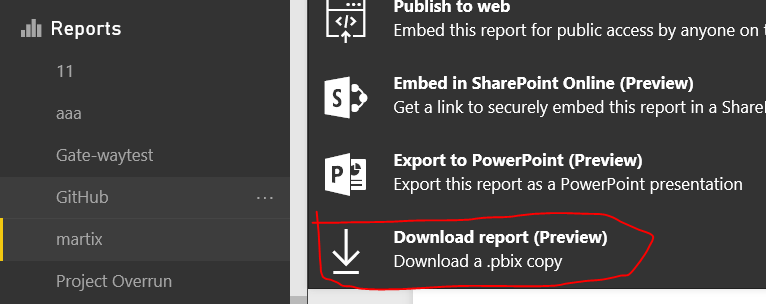
As I tested, I download a report from online Power BI by click "download report" as the highlighted in red line.

2.PNG

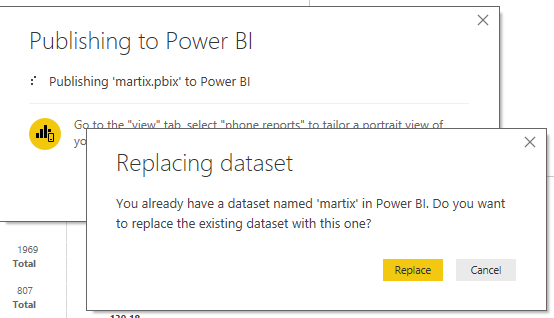
Then I open the .pbix file using Power BI desktop, add a excel resource table and create a report. Save and publish it to online, it returns the following notification, click "replace", it will replace the original report.

1.PNG

Please check your operation based on the solution above. 

Please feel free to ask if there is still some error, and share your error message for further analysis.

Best Regards,
Angelia

Helpful resources

Announcements
Power BI DataViz World Championships carousel

Power BI DataViz World Championships - June 2026

A new Power BI DataViz World Championship is coming this June! Don't miss out on submitting your entry.

Join our Fabric User Panel

Join our Fabric User Panel

Share feedback directly with Fabric product managers, participate in targeted research studies and influence the Fabric roadmap.

March Power BI Update Carousel

Power BI Community Update - March 2026

Check out the March 2026 Power BI update to learn about new features.