Join us at FabCon Atlanta from March 16 - 20, 2026, for the ultimate Fabric, Power BI, AI and SQL community-led event. Save $200 with code FABCOMM.
Register now!The Power BI Data Visualization World Championships is back! It's time to submit your entry. Live now!
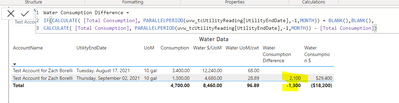
For a table I am creating, I am trying to do a month over month calculation where we displace just the difference between Month 1 and Month 2. I have the measure working correctly but the total is wrong. The measure is including the blank value that I implemented into it, as I know the measure does, but the issue is everything I have tried to not include this blank has failed. Was wondering if anyone could teach me something I clearly don't know how to accomplish here.
Initial Calculation:
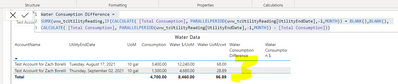
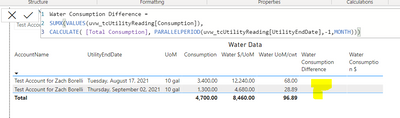
I then tried to wrap it in a SUMX and a SUMX(VALUE but if I include the whole formula I get a Blank for both regardless if I do
Wrapping in a SUMX:
Wrapping in a SUMX(Values
Solved! Go to Solution.
It's hard to see without sample data, but you could try the following:
Water Consumption Difference Totals =
SUMX (
ADDCOLUMNS (
SUMMARIZE (
uvw_tcUtilityReading,
uvw_tcUtilityReading[AccountName],
uvw_tcUtilityReading[UtilityEndDate],
uvw_tcUtilityReading[UoM]
),
"DiffTotal",
IF (
ISBLANK (
CALCULATE (
[Total Consumption],
PARALLELPERIOD ( uvw_tcUtilityReading[UtilityEndDate], -1, MONTH )
)
),
BLANK (),
CALCULATE (
[Total Consumption],
PARALLELPERIOD ( uvw_tcUtilityReading[UtilityEndDate], -1, MONTH )
) - [Total Consumption]
)
),
[DiffTotal]
)
Proud to be a Super User!
Paul on Linkedin.
It's hard to see without sample data, but you could try the following:
Water Consumption Difference Totals =
SUMX (
ADDCOLUMNS (
SUMMARIZE (
uvw_tcUtilityReading,
uvw_tcUtilityReading[AccountName],
uvw_tcUtilityReading[UtilityEndDate],
uvw_tcUtilityReading[UoM]
),
"DiffTotal",
IF (
ISBLANK (
CALCULATE (
[Total Consumption],
PARALLELPERIOD ( uvw_tcUtilityReading[UtilityEndDate], -1, MONTH )
)
),
BLANK (),
CALCULATE (
[Total Consumption],
PARALLELPERIOD ( uvw_tcUtilityReading[UtilityEndDate], -1, MONTH )
) - [Total Consumption]
)
),
[DiffTotal]
)
Proud to be a Super User!
Paul on Linkedin.
That worked to perfection! Thank you so much, this was driving me up the wall and now I can finally put it to rest!
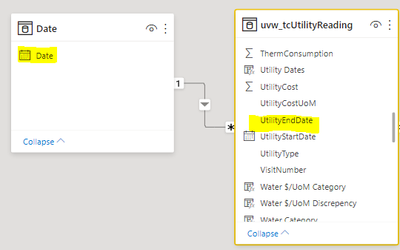
Glad it worked. Just a quick Recommendation: for Time Intelligence functions (PARALLELPERIOD etc) you should be using a Date Table as a dimension table, or you might find unexpected results.
Proud to be a Super User!
Paul on Linkedin.
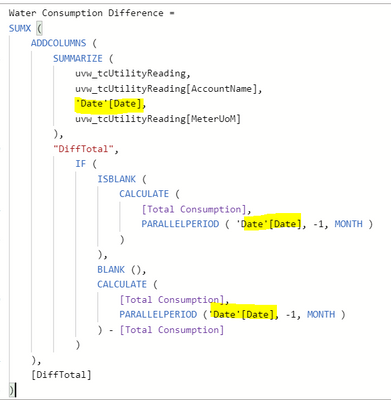
So just create a date table, connect them, and then update the formula above to be as shown below?
Exactly! Just make sure the field in the matrix is the Date [Date] field instead of the field from the main table
(The date table should contain continuous dates covering the range of dates in the model)
Edit: once you've created the date table, mark it as such using the option in the ribbon
Proud to be a Super User!
Paul on Linkedin.
The Power BI Data Visualization World Championships is back! It's time to submit your entry.
Check out the January 2026 Power BI update to learn about new features.
| User | Count |
|---|---|
| 61 | |
| 47 | |
| 39 | |
| 23 | |
| 23 |
| User | Count |
|---|---|
| 144 | |
| 106 | |
| 63 | |
| 38 | |
| 31 |