cancel
Showing results for 
Search instead for 
Did you mean: 

The Power BI Data Visualization World Championships is back! Get ahead of the game and start preparing now! Learn more

Reply
PowerBiNovice99
Regular Visitor

Problem with visual filter on multiple tables

I have a report that has three different data tables.

Within the main table there are individual transactions that all have a category A and B. Multiples transactions for each category.

I have two secondary tables that additional information on category A and B and again multiple records for each category.

I have created two additional tables that give me unique values for all the items in category A and B

Everything correctly connects up in the relationship manager.

I have cards that apply visual totals to the transactions from the main table when the user selects either something from category A or B in other visuals. These are all based off the main table.

I have tried to add cards that give a single number based on data in other tables. However this card only shows the total rather than filtering based on the selection of category A or B.

I would like this to change based on what the user has selected in other visuals
6 REPLIES 6
Anonymous
Not applicable

@PowerBiNovice99,

Please check the following steps to troubleshoot this issue.

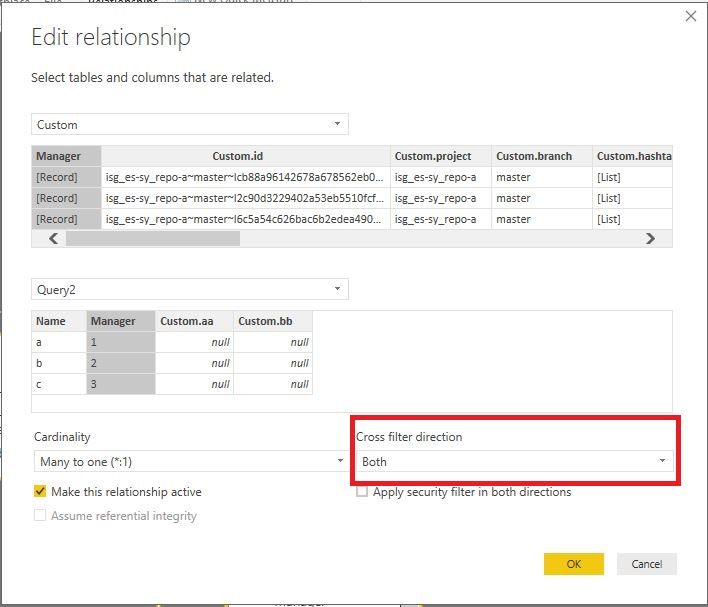
1. Change the Cross filter direction ftom Single to Both between TARGETS table and Brokers table.
1.JPG

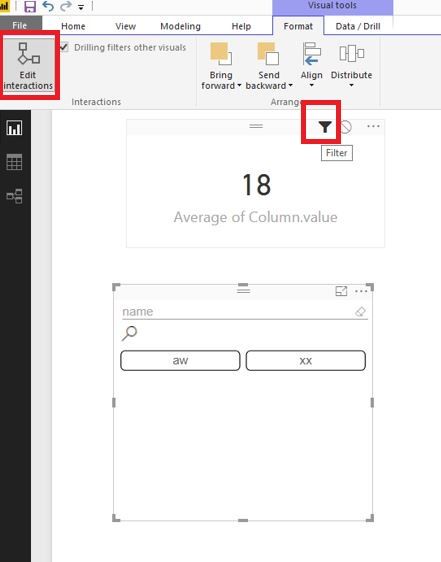
2. Click other visual, enable "Edit interactions" , then make sure that you choose Filter for the Card visual.

2.JPG

If the above steps don't help, please share dummy data of your table and post expected result.

Regards,
Lydia

PowerBiNovice99
Regular Visitor

Sorry should have said that most of my visuals are based on the table cc_data and trying to get a card that sums the relevant categories from the table target based on what has been selected in the other visuals
BalaVenuGopal
Resolver I
Resolver I

Hi @PowerBiNovice99 ,


Could you pleae provide data diagram with example what you need

PowerBiNovice99
Regular Visitor

I have a report that has three different data tables.

Within the main table there are individual transactions that all have a category A and B. Multiples transactions for each category.

I have two secondary tables that additional information on category A and B and again multiple records for each category.

I have created two additional tables that give me unique values for all the items in category A and B

Everything correctly connects up in the relationship manager.

I have cards that apply visual totals to the transactions from the main table when the user selects either something from category A or B in other visuals. These are all based off the main table.

I have tried to add cards that give a single number based on data in other tables. However this card only shows the total rather than filtering based on the selection of category A or B.

I would like this to change based on what the user has selected in other visuals

I have a report that has three different data tables.

Within the main table there are individual transactions that all have a category A and B. Multiples transactions for each category.

I have two secondary tables that additional information on category A and B and again multiple records for each category.

I have created two additional tables that give me unique values for all the items in category A and B

Everything correctly connects up in the relationship manager.

I have cards that apply visual totals to the transactions from the main table when the user selects either something from category A or B in other visuals. These are all based off the main table.

I have tried to add cards that give a single number based on data in other tables. However this card only shows the total rather than filtering based on the selection of category A or B.

I would like this to change based on what the user has selected in other visuals

Helpful resources

Announcements
November Power BI Update Carousel

Power BI Monthly Update - November 2025

Check out the November 2025 Power BI update to learn about new features.

Fabric Data Days Carousel

Fabric Data Days

Advance your Data & AI career with 50 days of live learning, contests, hands-on challenges, study groups & certifications and more!

FabCon Atlanta 2026 carousel

FabCon Atlanta 2026

Join us at FabCon Atlanta, March 16-20, for the ultimate Fabric, Power BI, AI and SQL community-led event. Save $200 with code FABCOMM.

Top Kudoed Authors