This time we’re going bigger than ever. Fabric, Power BI, SQL, AI and more. We're covering it all. You won't want to miss it.
Learn moreDid you hear? There's a new SQL AI Developer certification (DP-800). Start preparing now and be one of the first to get certified. Register now
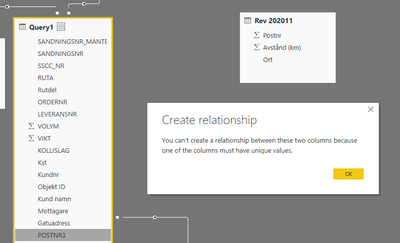
I have a table of shipments statistics 'Query 1', and a table with distances from our warehouse based on postnumbers 'Rev 202011'.
I'm trying to create a relationship between the postnumbers ('query1[POSTNR3]) and ('Rev 202011'[Postnr]) to see the distance for each shipment.
That will of course not work beacuse the distance column ('Rev 202011'[Avstånd (km)]) don't have unique values, simply because several posnumbers can have the same distance from our warehose.
Is there a way to work around this?
Solved! Go to Solution.
Hi @Dhjlm ,
In addition to what @Greg_Deckler mentioned in his response, do check if there are NULL values in the columns that you are trying to create relationship on. ('query1[POSTNR3] and 'Rev 202011'[Postnr] in your case)
I have experienced similar error in the past due to the NULL values in the key columns that are used for creating the relationships between two tables.
Thanks,
Pragati
Hi @Dhjlm ,
In addition to what @Greg_Deckler mentioned in his response, do check if there are NULL values in the columns that you are trying to create relationship on. ('query1[POSTNR3] and 'Rev 202011'[Postnr] in your case)
I have experienced similar error in the past due to the NULL values in the key columns that are used for creating the relationships between two tables.
Thanks,
Pragati
@Dhjlm You should be able to create a many-to-many relationship although that is generally not ideal. You can use DISTINCT to get a table of unique values that you could use as a bridge table. But, sample data and such would be very helpful to try to see what you are trying to accomplish.
Please see this post regarding How to Get Your Question Answered Quickly: https://community.powerbi.com/t5/Community-Blog/How-to-Get-Your-Question-Answered-Quickly/ba-p/38490
The most important parts are:
1. Sample data as text, use the table tool in the editing bar
2. Expected output from sample data
3. Explanation in words of how to get from 1. to 2.
Check out the April 2026 Power BI update to learn about new features.
Sign up to receive a private message when registration opens and key events begin.
If you have recently started exploring Fabric, we'd love to hear how it's going. Your feedback can help with product improvements.
| User | Count |
|---|---|
| 36 | |
| 33 | |
| 31 | |
| 21 | |
| 16 |
| User | Count |
|---|---|
| 66 | |
| 55 | |
| 31 | |
| 24 | |
| 23 |