cancel
Showing results for 
Search instead for 
Did you mean: 

Level up your Power BI skills this month - build one visual each week and tell better stories with data! Get started

Reply
JorgeAbiad
Helper III
Helper III

Problem with slicers

Hello PBI Experts,


I will have 2 questions to ask.

1. First, I have 3 slicers in the report which are all set to dropdown. I have also have 1 button used to clear the filters applied using slicers. However, after clicking the button, the selctions on the slicers are cleared but the slicers are now set to list. I have another form with the same set up and I have no issue after clicking the button. What could be causing this?


2. Second, I have two tables, resolver_group and competence center with many to one relationship. How do I get the values for a particular column named resolver group based on the selected value in the competence center. Competence center colimn is displayed in a slicer. The column values will be used as axis in the bar chart.


Thanks

JorgeAbiad

1 ACCEPTED SOLUTION

Hi @JorgeAbiad 


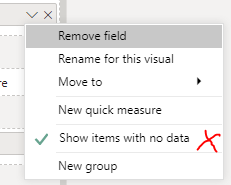
Have you try turn off the show items with no data.

vchenwuzmsft_0-1634526734889.png


If the value from resolver group is 0 instead of blank, this will no work.

Tyr to put the group from one table into the slicer and the group from many table into the bar chart

Or you can ues a measure to show the blank where the calculation result is zero.


Best Regards

Community Support Team _ chenwu zhu


If this post helps, then please consider Accept it as the solution to help the other members find it more quickly.

View solution in original post

3 REPLIES 3
Pragati11
Super User
Super User

Hi @JorgeAbiad ,


Answers are below:

1. You button is resetting your slicers to list because you may have added those slicers after the button/bookmark was created on the report page. Simple way to fix this will be to make all your slicers as dropdown type and then update your bookmark. This will resolve this issue.

2. If you have a realtionship between the tables then it should work. But I am not clear on the filter direction on your relationship. Can you share a screenshot on the relationship you have?


Thanks,

Pragati

Best Regards,

Pragati Jain


MVP logo


LinkedIn | Twitter | Blog YouTube 

Did I answer your question? Mark my post as a solution! This will help others on the forum!

Appreciate your Kudos!!

Proud to be a Super User!!

Hello Pragati,

Thanks for prompt reply.

I think my first issue is resolved.

For the second, below is the relationship  (m->1), and the cross filter direction is Single

JorgeAbiad_0-1634131887391.png

When I select a value from Competence Center slicer, correct values are displayed in the resolver group slicer. But when when the same resolver group is used in stacked bar chart, all resolver group values are displayed. I am expecting to have the same values displayed in the resolver group s;icer.

Below is my bar chart. It should only contain 3 values, but it is displaying all the values from the resolver group. The values that are to be excluded are highlighted in yellow.
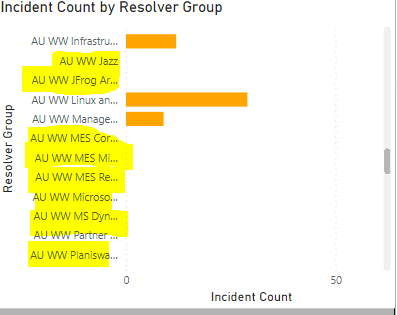
 

JorgeAbiad_2-1634132613412.png


Hi @JorgeAbiad 


Have you try turn off the show items with no data.

vchenwuzmsft_0-1634526734889.png


If the value from resolver group is 0 instead of blank, this will no work.

Tyr to put the group from one table into the slicer and the group from many table into the bar chart

Or you can ues a measure to show the blank where the calculation result is zero.


Best Regards

Community Support Team _ chenwu zhu


If this post helps, then please consider Accept it as the solution to help the other members find it more quickly.

Helpful resources

Announcements
April Power BI Update Carousel

Power BI Monthly Update - April 2026

Check out the April 2026 Power BI update to learn about new features.

Fabric SQL PBI Data Days

Data Days 2026 coming soon!

Sign up to receive a private message when registration opens and key events begin.

New to Fabric survey Carousel

New to Fabric Survey

If you have recently started exploring Fabric, we'd love to hear how it's going. Your feedback can help with product improvements.

Power BI DataViz World Championships carousel

Power BI DataViz World Championships - June 2026

A new Power BI DataViz World Championship is coming this June! Don't miss out on submitting your entry.