Join us at FabCon Atlanta from March 16 - 20, 2026, for the ultimate Fabric, Power BI, AI and SQL community-led event. Save $200 with code FABCOMM.
Register now!Get Fabric Certified for FREE during Fabric Data Days. Don't miss your chance! Request now
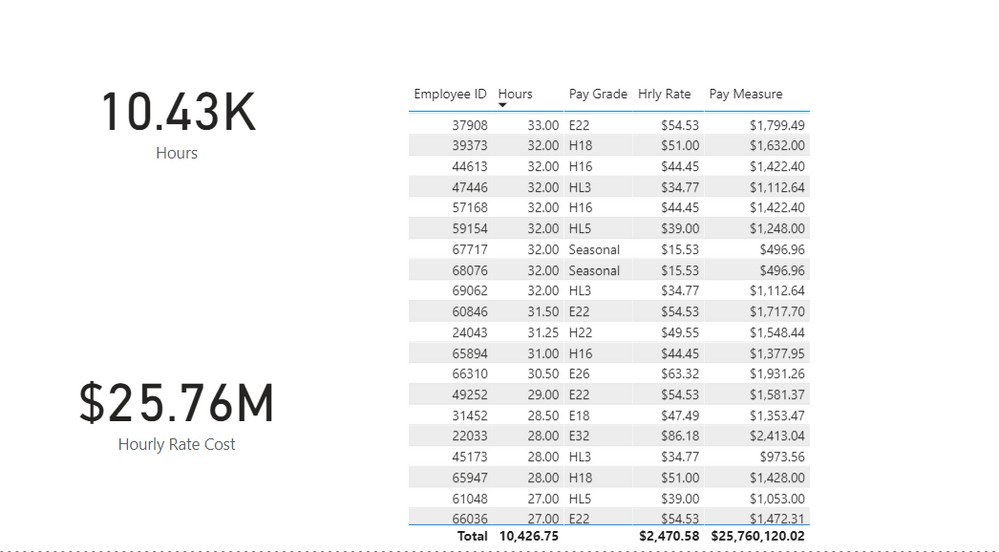
Hello! So I am working on a project and trying to mutliply employee hours by their pay rate based on pay grade but I seem to be having an issue. I've tried using SUMX * SUM but its giving me widly massive numbers like 25M and my total should be around 565K. I have two tables with MANY*MANY relationship using PAY GRADE. I think I am using the wrong formula specifically SUM Hrly rate, any help would be very appreciated!
Pay Measure = SUMX('Hours','Hours'[Hours]) * SUM('PAY RATES'[Hrly Rate])
Solved! Go to Solution.
Hi @Anonymous ,
Sorry, it was complicated by me. Just try this:
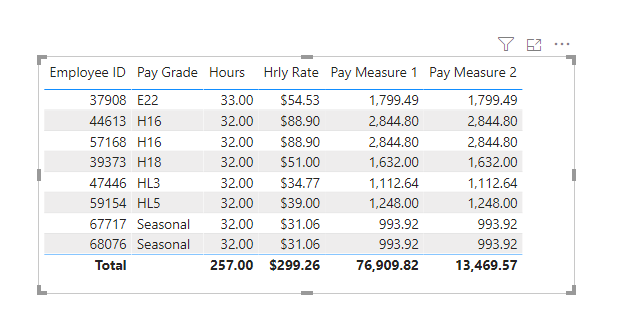
1. Create [Pay Measure 1].
Pay Measure 1 = SUM( 'Hours'[Hours] ) * SUM ( 'PAY RATES'[Hrly Rate] )
2. Create [Pay Measure 2].
Pay Measure 2 =
IF (
HASONEVALUE ( Hours[Employee ID] ),
[Pay Measure 1],
SUMX ( Hours, [Pay Measure 1] )
)
Best Regards,
Icey
If this post helps, then please consider Accept it as the solution to help the other members find it more quickly.
Hi @Anonymous ,
Create the measure like so:
Pay Measure 2 =
VAR table_ =
SUMMARIZE (
Hours,
Hours[Employee ID],
Hours[Pay Grade],
Hours[Hours],
'PAY RATES'[Hrly Rate],
"Sum_", [Hours] * [Hrly Rate]
)
RETURN
IF (
HASONEVALUE ( Hours[Employee ID] ),
SUMX ( 'Hours', 'Hours'[Hours] ) * SUM ( 'PAY RATES'[Hrly Rate] ),
SUMX ( table_, [Sum_] )
)
Best Regards,
Icey
If this post helps, then please consider Accept it as the solution to help the other members find it more quickly.
Hello,
Thanks for the reponse and help! I tried using the measure you provided but I am unable to select 'PAY RATES' table it is not listed when I try to add the last line in SUMMARIZE. I noticed your pbix has a 1*1 relationship but mine is MANY*MANY is that why? Also worth noting that on my HOURS table each employee has multiple rows of hours
PAY RATES'[Hrly Rate],
Hi @Anonymous ,
Sorry, it was complicated by me. Just try this:
1. Create [Pay Measure 1].
Pay Measure 1 = SUM( 'Hours'[Hours] ) * SUM ( 'PAY RATES'[Hrly Rate] )
2. Create [Pay Measure 2].
Pay Measure 2 =
IF (
HASONEVALUE ( Hours[Employee ID] ),
[Pay Measure 1],
SUMX ( Hours, [Pay Measure 1] )
)
Best Regards,
Icey
If this post helps, then please consider Accept it as the solution to help the other members find it more quickly.
Thank you so much this is exactly what I needed!
This looks like a measure totals problem. Very common. See my post about it here: https://community.powerbi.com/t5/DAX-Commands-and-Tips/Dealing-with-Measure-Totals/td-p/63376
Also, this Quick Measure, Measure Totals, The Final Word should get you what you need:
https://community.powerbi.com/t5/Quick-Measures-Gallery/Measure-Totals-The-Final-Word/m-p/547907
Check out the November 2025 Power BI update to learn about new features.
Advance your Data & AI career with 50 days of live learning, contests, hands-on challenges, study groups & certifications and more!