FabCon is coming to Atlanta
Join us at FabCon Atlanta from March 16 - 20, 2026, for the ultimate Fabric, Power BI, AI and SQL community-led event. Save $200 with code FABCOMM.
Register now!- Power BI forums
- Get Help with Power BI
- Desktop
- Service
- Report Server
- Power Query
- Mobile Apps
- Developer
- DAX Commands and Tips
- Custom Visuals Development Discussion
- Health and Life Sciences
- Power BI Spanish forums
- Translated Spanish Desktop
- Training and Consulting
- Instructor Led Training
- Dashboard in a Day for Women, by Women
- Galleries
- Data Stories Gallery
- Themes Gallery
- Contests Gallery
- QuickViz Gallery
- Quick Measures Gallery
- Visual Calculations Gallery
- Notebook Gallery
- Translytical Task Flow Gallery
- TMDL Gallery
- R Script Showcase
- Webinars and Video Gallery
- Ideas
- Custom Visuals Ideas (read-only)
- Issues
- Issues
- Events
- Upcoming Events
The Power BI Data Visualization World Championships is back! Get ahead of the game and start preparing now! Learn more
- Power BI forums
- Forums
- Get Help with Power BI
- Desktop
- Re: Problem with monthly average measure
- Subscribe to RSS Feed
- Mark Topic as New
- Mark Topic as Read
- Float this Topic for Current User
- Bookmark
- Subscribe
- Printer Friendly Page


- Mark as New
- Bookmark
- Subscribe
- Mute
- Subscribe to RSS Feed
- Permalink
- Report Inappropriate Content
Problem with monthly average measure
Hi there,
Sorry for asking for a trivial issue. I have been stuck on the calculation for hours. I have got five years of monthly data. I want to calculate the cumulative sum of the average monthly data. For this purpose, I first calculate the measure that calculates the sum of the value for on the monthly basis:
sum_measure = sum(table[value])
As I have five years of data which means that each month has 5 values. So the next step is to calculate the Monthly average of the entire data set. So I created the monthly average measure using the following measure:
Monthly_average_measure = Averagex(values(Date['Month']),[sum_measure])
When I displayed the value and both measures in the table then it shows the following output:
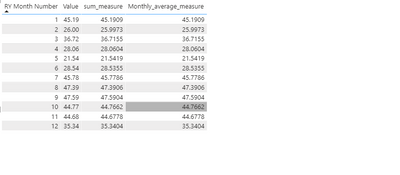
As you can see that all three column produces the same value.
and If I include the year column in the table, it shows following output:
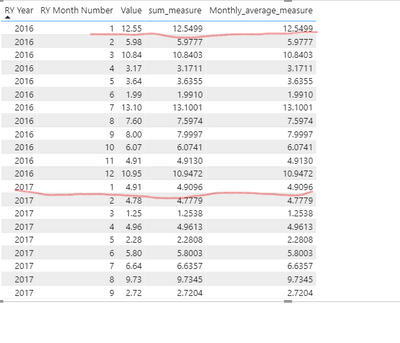
I was expecting that same RY Month Number column should have the same Monthly average_measure value but that is not the case.
I am not sure where I made the mistake. Any help would be really appreciated.
Solved! Go to Solution.


- Mark as New
- Bookmark
- Subscribe
- Mute
- Subscribe to RSS Feed
- Permalink
- Report Inappropriate Content
@Dunner2020 , then you need to RY Month NO
Monthly_average_measure = calculate(Averagex(values(Date['Month']),[sum_measure]), allexcept(Date,Date[RY Month NO]))
better would be
Monthly_average_measure = calculate(Averagex(values(Date['Month']),[sum_measure]), filter(allselected(Date),Date[RY Month NO])=max(Date[RY Month NO]))
- Mark as New
- Bookmark
- Subscribe
- Mute
- Subscribe to RSS Feed
- Permalink
- Report Inappropriate Content
@Dunner2020 , fi you take only yeat then if will give Monthly Average. Else use allexpect for year and try
Monthly_average_measure = calculate(Averagex(values(Date['Month']),[sum_measure]), allexcept(Date,Date[Year]))
- Mark as New
- Bookmark
- Subscribe
- Mute
- Subscribe to RSS Feed
- Permalink
- Report Inappropriate Content
@amitchandak , When I used your formula, it produces same monthly average as shown below:
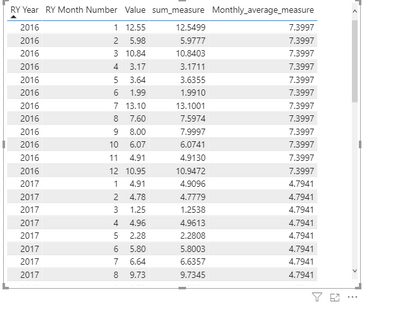
I am expecting that same month should have same value. For example, the monthly average of April in 2016 should be the same as in April 2017 because its monthly average of 5 years.

- Mark as New
- Bookmark
- Subscribe
- Mute
- Subscribe to RSS Feed
- Permalink
- Report Inappropriate Content
Hi,
You may download my PBI file from here.
Hope this helps.
Regards,
Ashish Mathur
http://www.ashishmathur.com
https://www.linkedin.com/in/excelenthusiasts/
- Mark as New
- Bookmark
- Subscribe
- Mute
- Subscribe to RSS Feed
- Permalink
- Report Inappropriate Content
@Dunner2020 , then you need to RY Month NO
Monthly_average_measure = calculate(Averagex(values(Date['Month']),[sum_measure]), allexcept(Date,Date[RY Month NO]))
better would be
Monthly_average_measure = calculate(Averagex(values(Date['Month']),[sum_measure]), filter(allselected(Date),Date[RY Month NO])=max(Date[RY Month NO]))

- Mark as New
- Bookmark
- Subscribe
- Mute
- Subscribe to RSS Feed
- Permalink
- Report Inappropriate Content
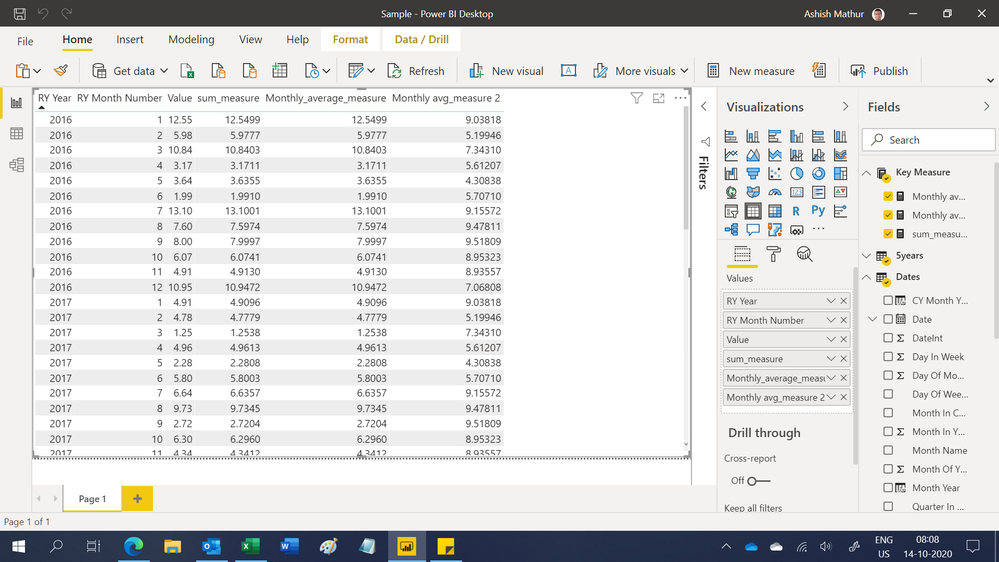
will this work?
Monthly avg_measure 2 = IF(  SUM('5years'[Value]) ,
 CALCULATE(   AVERAGEX( VALUES(Dates[RY Month Number]),  SUM('5years'[Value]) ), ALLEXCEPT(Dates, Dates[RY Month Number])), blank())

- Mark as New
- Bookmark
- Subscribe
- Mute
- Subscribe to RSS Feed
- Permalink
- Report Inappropriate Content
Can you share the excel spreadsheet with Data OR the list of coluns in base Table. I can write the measure on that Data.
- Mark as New
- Bookmark
- Subscribe
- Mute
- Subscribe to RSS Feed
- Permalink
- Report Inappropriate Content
Hi @Megha166 ,
Here is the link of pibx file https://1drv.ms/u/s!AucycxZHFe9TjS6G96JVtgslQLBX?e=1Njrdx

Helpful resources

Power BI Monthly Update - November 2025
Check out the November 2025 Power BI update to learn about new features.

Fabric Data Days
Advance your Data & AI career with 50 days of live learning, contests, hands-on challenges, study groups & certifications and more!

FabCon Atlanta 2026
Join us at FabCon Atlanta, March 16-20, for the ultimate Fabric, Power BI, AI and SQL community-led event. Save $200 with code FABCOMM.


