Get certified for free when you join Fabric Data Days 2026 and dive into Fabric, Power BI, SQL, AI, and other essential data skills.
Join nowData Days is here! Join us now for 60+ days of learning, challenges, and connection. Learn more
Hello,
I have a problem with my formula and i don't understand why it's not possible to do this.
DIFF = CALCULATE(SUM(Commandes[LCCNVALCDE]);TEST[References.ValeursUtilise])-CALCULATE(SUM(Commandes[LCCNVALCDE]);IF(TEST[References.ValeursUtilise]<>"H-OF";TEST[References.ValeursUtilise]+1;""))
Commandes[LCCNVALCDE] -> type int
TEST[Refrences.ValeursUtilise] -> type string
H-OF is last value in my table so i want block this formula when TEST[Refrences.ValeursUtilise] =H-OF
Make this as a calculated column first:
Some column = IF(TEST[References.ValeursUtilise]<>"H-OF";TEST[References.ValeursUtilise]+1;BLANK())
Then create your measures after and adjust them to your newly calculated column.
Let me know how it goes.
Best,
Martin
Hi ValubiMartin,
I can't do this column i have an error message with value before H-OF.
The message speak about impossible to convert my value type of string in int.
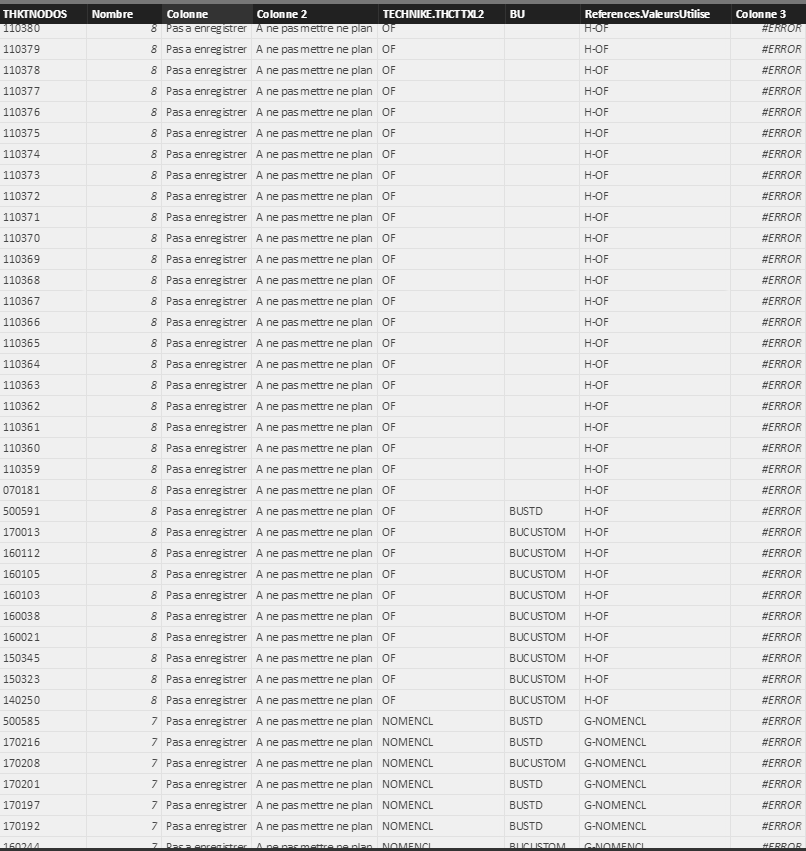
Can you send me a picture of how your data is stored?
Hi @AlexGallet01,
You can try to use below calculate column formula if it suitbale for your requirement:
DIFF= IF(TEST[References.ValeursUtilise]<>"H-OF",CALCULATE(SUM(Commandes[LCCNVALCDE]),TEST[THKTNODOS])-CALCULATE(SUM(Commandes[LCCNVALCDE]),TEST[THKTNODOS]+1),blank())
BTW, I think you should use the index column to calculate the diff. Actually, you are try to calculate between number and text. ![]()
Regards,
Xiaoxin Sheng
No mi calcul it's between the sum of price command where my thknodos have the first value and th sum of price command where the value of thknodos have the second value. And next i want to do this between all thknodos.
Hi @AlexGallet01,
>>No mi calcul it's between the sum of price command where my thknodos have the first value and th sum of price command where the value of thknodos have the second value.
For this requirement, you should create a measure to compare between current and previous. If this is a case, you need to find out a index column to help calculate through all your records.
Regards,
Xiaoxin Sheng
Don't miss out on Data Days, June 15 through August 7. Learn Fabric, Power BI, SQL, AI and more.
Check out the May 2026 Power BI update to learn about new features.
| User | Count |
|---|---|
| 23 | |
| 23 | |
| 20 | |
| 18 | |
| 14 |
| User | Count |
|---|---|
| 58 | |
| 51 | |
| 40 | |
| 30 | |
| 24 |