cancel
Showing results for 
Search instead for 
Did you mean: 

July 7 - July 17 | Round 2 of the Power BI Dataviz World Championships. Don't miss your chance! Learn more

Reply
ilana105
Helper I
Helper I

Problem with date filter when sum

Hello community,


I have a problem of data filtering when I want to calculate a sum. The problem is the following:


I want to calculate the sum of OCP based on the arrival date, departure date and insert date. If, for example, I am looking in september, october and november I want to see the reservations inserted in all 3 months that have arrival date after september and departure date before november. The formula I use is the following:


Pick up = CALCULATE(SUM('VW_Z_TEST_OCUPACION'[OCP]);FILTER(VW_TEST_RESERVAS_CANAL;
VW_TEST_RESERVAS_CANAL[ID_FCH_INS_DF] >= MIN(LINK_DF_1[ID_FCH_DF]) &&
VW_TEST_RESERVAS_CANAL[ID_FCH_INS_DF] <= MAX(LINK_DF_1[ID_FCH_DF]) &&
VW_TEST_RESERVAS_CANAL[ID_FCH_LLG_DF] >= MIN(LINK_DF_1[ID_FCH_DF]) &&
VW_TEST_RESERVAS_CANAL[ID_FCH_SLD_DF] <= MAX(LINK_DF_1[ID_FCH_DF]))

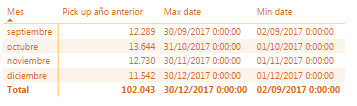
The problem occurs when I visualize the data in a table. When I want to see the reservations per month, automatically PowerBI use the max(date) and min(date) as the first and last day of the month. Consequently, I only see the values inserted in that month, instead of the reservations inserted in months before:
Pickup.PNG


In that pick the first column is the total of OCP for each month. For november shows 12.730, but it should be around 27.000. Also you can see that the total of the column doesn´t correspond with the sum of all the rows.


I think the solution could be to set the max and min value for the insert date, but I don't know how to make it, could you please help me?


Thank you very much


1 ACCEPTED SOLUTION
v-qiuyu-msft
Community Support
Community Support

Hi @ilana105,


In your scenario, you can create a calendar table which contains continues date and corresponding month name. Create a measure compares calendar date with arrival date, departure date and insert date. Please drag the month column from calendar table to the table visual. 


If you are not able to work it by yourself, please share some sample data and show us the corresponding desired results for our analysis. 


Best Regards,
Qiuyun Yu 

Community Support Team _ Qiuyun Yu
If this post helps, then please consider Accept it as the solution to help the other members find it more quickly.

View solution in original post

1 REPLY 1
v-qiuyu-msft
Community Support
Community Support

Hi @ilana105,


In your scenario, you can create a calendar table which contains continues date and corresponding month name. Create a measure compares calendar date with arrival date, departure date and insert date. Please drag the month column from calendar table to the table visual. 


If you are not able to work it by yourself, please share some sample data and show us the corresponding desired results for our analysis. 


Best Regards,
Qiuyun Yu 

Community Support Team _ Qiuyun Yu
If this post helps, then please consider Accept it as the solution to help the other members find it more quickly.

Helpful resources

Announcements
FabCon and SQLCon Barcelona 2026

FabCon & SQLCon – Barcelona 2026

Join us in Barcelona for FabCon and SQLCon, the Fabric, Power BI, SQL, and AI community event. Save €200 with code FABCMTY200.

60 days of Data Days Carousel

Data Days 2026

Join Data Days 2026: 60 days of free live/on-demand sessions, challenges, study groups, and certification opportunities.

Power BI DataViz World Championships carousel

Power BI DataViz World Championships - June 2026

A new Power BI DataViz World Championship is coming this June! Don't miss out on submitting your entry.

Top Solution Authors