
Get certified for free when you join Fabric Data Days 2026 and dive into Fabric, Power BI, SQL, AI, and other essential data skills.
Join nowJuly 7 - July 17 | Round 2 of the Power BI Dataviz World Championships. Don't miss your chance! Learn more
I am new to Power BI and now stuck in writing a measure to do conditional formatting.
I want to show if the number of complaints in different business units increase from last month to current month.
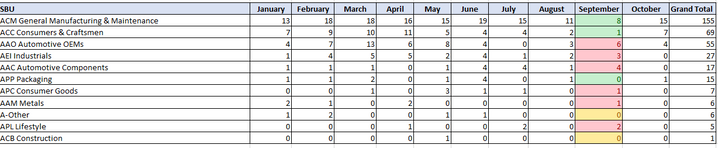
As it's still October now, conditional formatting should show the difference between August and September. Red refers to number increase, Green decrease, and yello when number is unchanged. This is how it should look like (I did it in Excel):
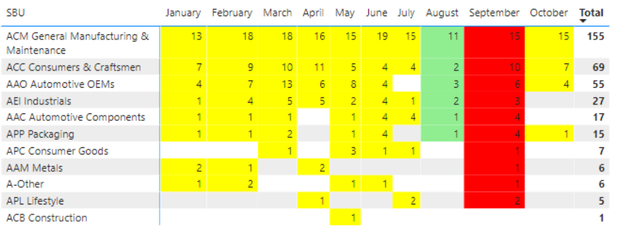
I tried to write a measure as below but it ends up applying to the entire visual and those that are empty are not calculated.
I have two questions here:
1. Can I only apply conditional formatting (background color) to October?
2. For those that are blank, how can I make it become 0 so that the measure can work for the conditional formatting?
Thanks for helping!
@Anonymous , Add +0 to the measure so that will show 0 in place of blank
+0 can force left join, so I usuallt prefer.
0 between range
Measure = var _1= SUM(Opportunity[Opportunity count]) +0
var _min = minx(ALLSELECTED('Calendar'), 'Calendar'[Date])
var _max = maxx(ALLSELECTED('Calendar'), 'Calendar'[Date])
return
CALCULATE(if(max('Calendar'[Date]) <_min || max('Calendar'[Date]) >_max , BLANK(), _1))
If you need color on for oct.
the return blank() or white color in else
example
Colour =
SWITCH(TRUE(),
max('Table'[Month]) = "OCT", "red", //loop if or switch if needed
"White")
Hi,
+0 works for me now, Thank you!
However, I sitll can't put color only on September (sorry not October), because when I applied the color measure to conditioning formatting, it applies to the entire matrix.
Join us in Barcelona for FabCon and SQLCon, the Fabric, Power BI, SQL, and AI community event. Save €200 with code FABCMTY200.
Join Fabric Data Days 2026: 60 days of free live/on-demand sessions, challenges, study groups, and certification opportunities.
| User | Count |
|---|---|
| 22 | |
| 22 | |
| 18 | |
| 17 | |
| 13 |
| User | Count |
|---|---|
| 63 | |
| 50 | |
| 46 | |
| 41 | |
| 39 |