Join us at FabCon Atlanta from March 16 - 20, 2026, for the ultimate Fabric, Power BI, AI and SQL community-led event. Save $200 with code FABCOMM.
Register now!The Power BI Data Visualization World Championships is back! Get ahead of the game and start preparing now! Learn more
I have this matrix view.
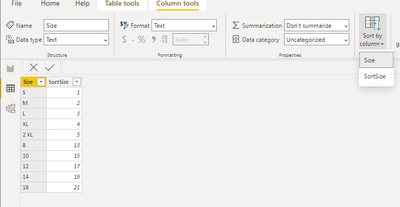
For sizes for clothing going across, how can I sort the sizes like S, M ,L....till 5 XL...then...8,10,12,14 etc
Solved! Go to Solution.
Hi @learner03
You can add a calculated column in your table :
SortOrder = IF(Table[Size]="S",1, IF(Table[Size]="M",2,.............................IF(Table[Size]="5 XL",10,Table[Size]+10))))))
And then you sort you column size by this new column
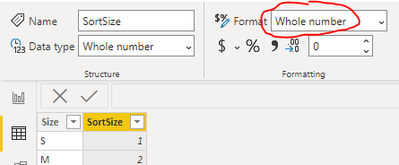
Check that your SortOrder column has for type "Whole number" :
Please accept it as a solution if it solved your issue
Hi @learner03
You can add a calculated column in your table :
SortOrder = IF(Table[Size]="S",1, IF(Table[Size]="M",2,.............................IF(Table[Size]="5 XL",10,Table[Size]+10))))))
And then you sort you column size by this new column
Check that your SortOrder column has for type "Whole number" :
Please accept it as a solution if it solved your issue
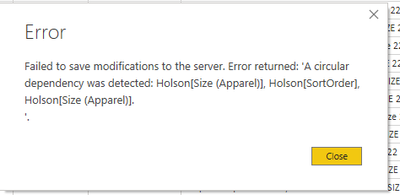
@AntoineTRICHET @Fowmy I did the above but when I click on sort by sortorder it gies me below error-
The Power BI Data Visualization World Championships is back! Get ahead of the game and start preparing now!
| User | Count |
|---|---|
| 39 | |
| 37 | |
| 33 | |
| 32 | |
| 29 |
| User | Count |
|---|---|
| 133 | |
| 88 | |
| 85 | |
| 68 | |
| 64 |