Join us at FabCon Atlanta from March 16 - 20, 2026, for the ultimate Fabric, Power BI, AI and SQL community-led event. Save $200 with code FABCOMM.
Register now!The Power BI Data Visualization World Championships is back! Get ahead of the game and start preparing now! Learn more
Hi!
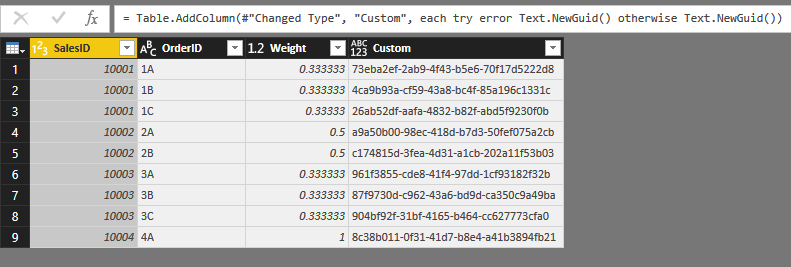
we would like to assign a different GUID for each Row in a Query.
I've tried the function Text.NewGUID() but there are some strange behaviours.
I noticed that:
- in Query Editor it's mandatory to put the column with the GUID as last after an index;
- if I merge or append the query with the ID with another one the system set the same GUID for every row;
- when the query it's applied the system set the same GUID for every row as in Report as in Data View.
Have someone experienced the same issue?
thanks,
have a nice day
Samuele
Solved! Go to Solution.
I don't fully understand your issues, but I recognize the duplicate GUIDs.
It must have something to do with lazy evaluation (Power Query code is evaluated only if absolutely required; in this case it looks like one time evaluation of Text.NewGuid is regarded sufficient to generate GUID's for multiple rows, which is - of course - wrong).
Maybe somebody will come up with a better solution, but a working workaround is to create the new Guid as a nested table and take the value of Column1, row 0:
let
Source = #table(type table[ID = Int64.Type],List.Zip({{1..10}})),
#"Added Custom" = Table.AddColumn(Source, "GUID", each #table(1,{{Text.NewGuid()}})[Column1]{0}, type text)
in
#"Added Custom"
Edit: beware that new GUID's will be created with every refresh of the query.
Hi @Sam88,
It is an known issue which consulted form product team, you can refer to below link to know more about this:
Problem with Text.NewGUID() M Language
BTW, if you only input Text.NewGUID() to custom column formula, it seem return the static value, but if you add some calculation to this query, it will return the dynamic value.
Regards,
Xiaoxin Sheng
Hi, Copilot wasn't aware of the problem and your solution yet, but luckily traditional search engine brought me here... I was able to fix my problem with your solution! THX!!!
I don't fully understand your issues, but I recognize the duplicate GUIDs.
It must have something to do with lazy evaluation (Power Query code is evaluated only if absolutely required; in this case it looks like one time evaluation of Text.NewGuid is regarded sufficient to generate GUID's for multiple rows, which is - of course - wrong).
Maybe somebody will come up with a better solution, but a working workaround is to create the new Guid as a nested table and take the value of Column1, row 0:
let
Source = #table(type table[ID = Int64.Type],List.Zip({{1..10}})),
#"Added Custom" = Table.AddColumn(Source, "GUID", each #table(1,{{Text.NewGuid()}})[Column1]{0}, type text)
in
#"Added Custom"
Edit: beware that new GUID's will be created with every refresh of the query.
The Power BI Data Visualization World Championships is back! Get ahead of the game and start preparing now!
| User | Count |
|---|---|
| 68 | |
| 45 | |
| 43 | |
| 36 | |
| 23 |
| User | Count |
|---|---|
| 196 | |
| 126 | |
| 106 | |
| 78 | |
| 55 |