cancel
Showing results for 
Search instead for 
Did you mean: 

Learn from the best! Meet the four finalists headed to the FINALS of the Power BI Dataviz World Championships! Register now

Reply
LucasTroncoso
Regular Visitor

Problem with Filled Map

Hi there. I have trouble locating an Argentine province on a choropleth map. 

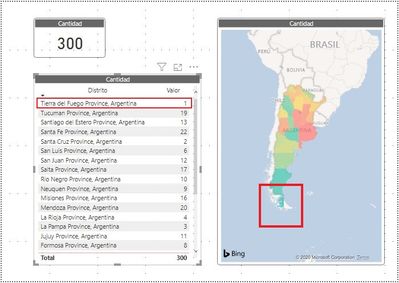
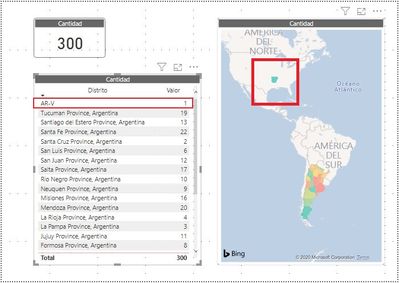
When I want to locate Tierra del Fuego, Argentina on the map, a part of southern Chile or the state of Arkansas, US is filled.

When I write the name of the province in English or Spanish, the south of Chile is filled (I tried with 'Tierra del Fuego, Argentina', 'Provincia de Tierra del Fuego, Argentina', 'Tierra del Fuego Province, Argentina', 'Tierra del Fuego, Antartida e Islas del Atlantico Sur, Argentina', 'Tierra del Fuego, Antarctica and South Atlantic Islands, Argentina', and so on...):
tierra-del-fuego-01.jpg

When I use the ISO 3166-2, IATA code or any other codification system, Arkansas US is filled up. ('AR-V', 'TF, AR', ...):
tierra-del-fuego-02.jpg

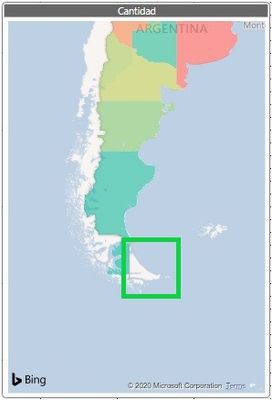
Tierra del Fuego, Argentina is supposed to be located over here:
tierra-del-fuego-03.jpg

In case anyone wonders, I specified the data category as Region / Sate.

If someone can help me, I would appreciate it.

Thank you very much to all.


1 ACCEPTED SOLUTION
AllisonKennedy
Community Champion
Community Champion

I believe Tierra del Fuego, Argentina is a long standing issue with Bing maps (which is what the visual you're using uses for Geocoding location). If I type that location into Bing Maps directly, it still takes me to Chile.


If you want a robust filled map, I'd recommend looking at other visual options. The Synoptic Panel by OKViz is a pretty good one that lets you use your own images and fill them based on Power BI data: 

You can download the visual from the marketplace, and then if you don't have an SVG file for Argentinian regions you can create it using their designer here: 

https://synoptic.design/


Or you can try to find an SVG file that will work for your needs, like this one (don't worry, the Synoptic Panel can change the colors): 

https://en.m.wikipedia.org/wiki/File:Lockdown_on_Argentina_provinces_due_to_COVID-19.svg


Please @mention me in your reply if you want a response.

Copying DAX from this post? Click here for a hack to quickly replace it with your own table names

Has this post solved your problem? Please Accept as Solution so that others can find it quickly and to let the community know your problem has been solved.
If you found this post helpful, please give Kudos C

I work as a Microsoft trainer and consultant, specialising in Power BI and Power Query.
www.excelwithallison.com

View solution in original post

2 REPLIES 2
Syndicate_Admin
Administrator
Administrator

Hello, the same thing happened to me as to you.

Create a separate column as a filter to mark the provinces of Argentina on the map. And for the specific case of Tierra del Fuego, writing: "Isla Grande de Tierra del Fuego" works (perooooo... he marks it by taking a little part of Chile).

For other provinces it is solved by putting "Province", example Salta Province / Formosa Province

Best regards

AllisonKennedy
Community Champion
Community Champion

I believe Tierra del Fuego, Argentina is a long standing issue with Bing maps (which is what the visual you're using uses for Geocoding location). If I type that location into Bing Maps directly, it still takes me to Chile.


If you want a robust filled map, I'd recommend looking at other visual options. The Synoptic Panel by OKViz is a pretty good one that lets you use your own images and fill them based on Power BI data: 

You can download the visual from the marketplace, and then if you don't have an SVG file for Argentinian regions you can create it using their designer here: 

https://synoptic.design/


Or you can try to find an SVG file that will work for your needs, like this one (don't worry, the Synoptic Panel can change the colors): 

https://en.m.wikipedia.org/wiki/File:Lockdown_on_Argentina_provinces_due_to_COVID-19.svg


Please @mention me in your reply if you want a response.

Copying DAX from this post? Click here for a hack to quickly replace it with your own table names

Has this post solved your problem? Please Accept as Solution so that others can find it quickly and to let the community know your problem has been solved.
If you found this post helpful, please give Kudos C

I work as a Microsoft trainer and consultant, specialising in Power BI and Power Query.
www.excelwithallison.com

Helpful resources

Announcements
Power BI DataViz World Championships carousel

Power BI DataViz World Championships - June 2026

A new Power BI DataViz World Championship is coming this June! Don't miss out on submitting your entry.

Join our Fabric User Panel

Join our Fabric User Panel

Share feedback directly with Fabric product managers, participate in targeted research studies and influence the Fabric roadmap.

March Power BI Update Carousel

Power BI Community Update - March 2026

Check out the March 2026 Power BI update to learn about new features.