Join us at FabCon Atlanta from March 16 - 20, 2026, for the ultimate Fabric, Power BI, AI and SQL community-led event. Save $200 with code FABCOMM.
Register now!Vote for your favorite vizzies from the Power BI Dataviz World Championship submissions. Vote now!
After @jdbuchanan71 helped me with this one (https://community.powerbi.com/t5/Desktop/Evolution-Cumulative-Sum/m-p/757213#M364895 ), a new problem has come up:
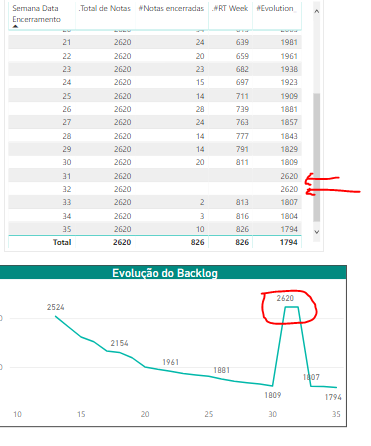
I have a running total calculation in order to show me the Evolution of notes that have been closed in a certain period of time. Whenever there aren't notes closed in a certain week my Evolution calculation is wrong.
I have tried performing something like:
#Evolution = var CurrentWeek = MAX(tab_Notas[Semana Data Encerramento]) var LastWeek = CurrentWeek - 1 return IF([#Notas encerradas] > 0; CALCULATE( //TRUE [#Notas encerradas]; ALL(tab_Notas[Semana Data Encerramento]); tab_Notas[Semana Data Encerramento] <= CurrentWeek ); CALCULATE( //FALSE [#Notas encerradas]; ALL(tab_Notas[Semana Data Encerramento]); tab_Notas[Semana Data Encerramento] <= LastWeek ) )
but can't seem to get it working properly.
The measures goes as follows:
[.Total de Notas] is a COUNTROWS of the table;
[#Notas encerradas] shows me the amount of notes that have been closed and is a CALCULATE including the filters I need;
[#RT Week] is a CALCULATE as answered by @jdbuchanan71 in my other question
[#Evolution] is simply ===> [.Total de Notas] - [#RT Week]
Any suggestions?
Regards,
Thiago Izidoro.
Solved! Go to Solution.
Got it a few days ago:
Created two measures:
First one:
#Notes closed in the past week =
var currentweek = MAX(tab_Notas[Closing Week])
var lastweek = currentweek - 1
return
CALCULATE(
[#Notas encerradas];
tab_Notas[Closing Week] <= lastweek
)And the second one is what I was looking for:
#Evolution =
var currentweek = MAX(tab_Notas[Closing Week])
var lastweek = lastweek - 1
return
IF([#Notas encerradas] > 0;
[.Total de Notas] - [.#RT Week]; //TRUE
CALCULATE( //FALSE
[.Total de Notas] - [#Notes closed in the past week];
ALL(tab_Notas[Closing Week]);
tab_Notas[Closing Week] <= lastweek
)
)
Regards,
Thiago Izidoro.
@Anonymous
It seems that you may use the code below.
RETURN
[.Total de Notas]
- CALCULATE (
[#Notas encerradas],
tab_Notas[Semana Data Encerramento] <= CurrentWeek
)
Got it a few days ago:
Created two measures:
First one:
#Notes closed in the past week =
var currentweek = MAX(tab_Notas[Closing Week])
var lastweek = currentweek - 1
return
CALCULATE(
[#Notas encerradas];
tab_Notas[Closing Week] <= lastweek
)And the second one is what I was looking for:
#Evolution =
var currentweek = MAX(tab_Notas[Closing Week])
var lastweek = lastweek - 1
return
IF([#Notas encerradas] > 0;
[.Total de Notas] - [.#RT Week]; //TRUE
CALCULATE( //FALSE
[.Total de Notas] - [#Notes closed in the past week];
ALL(tab_Notas[Closing Week]);
tab_Notas[Closing Week] <= lastweek
)
)
Regards,
Thiago Izidoro.
Thanks @v-chuncz-msft , but it still doesn't work. It returns the same as posted above.
Vote for your favorite vizzies from the Power BI World Championship submissions!
If you love stickers, then you will definitely want to check out our Community Sticker Challenge!
Check out the January 2026 Power BI update to learn about new features.
| User | Count |
|---|---|
| 58 | |
| 53 | |
| 43 | |
| 17 | |
| 16 |
| User | Count |
|---|---|
| 123 | |
| 108 | |
| 44 | |
| 32 | |
| 24 |