Get certified for free when you join Fabric Data Days 2026 and dive into Fabric, Power BI, SQL, AI, and other essential data skills.
Join nowJuly 7 - July 17 | Round 2 of the Power BI Dataviz World Championships. Don't miss your chance! Learn more
I have loaded two excel (fact) tables into Power BI. Both have the same date formatting. However, when I create relationships between these two tables and my date (dimension table), Power BI imposes a bidirectional relationship on one of the tables, and a single, one-to-many on the other. I want both relationhips to be one-to-many. When I try to edit the bidirectional relationship, power BI says it is a many-to-many relationship. I have reviewed both excel tables and the date fields are formated exactly the same way, with no errors. What am I doing wrong??
Solved! Go to Solution.
Hi @Anonymous
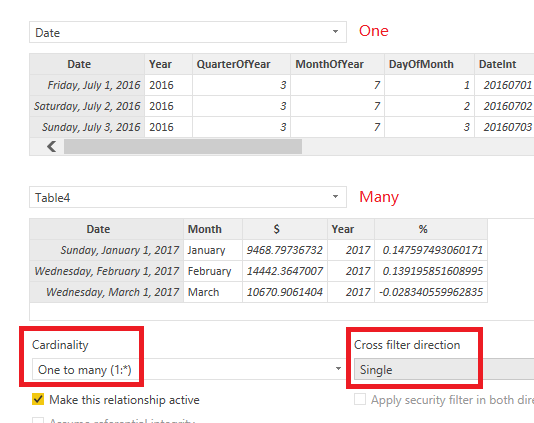
You may change the Cardinality to 'One to many' first. Then change the cross filter direction to single. Here are some articles for your reference.
Create and manage relationships in Power BI Desktop
What is the Direction of Relationship in Power BI?
Regards,
Cherie
Hi,
Share the link from where i can download your PBI file.
Hello Cherie,
Yes, the file is fixed. However, can you please tell me what was wrong, and how you remedied it?
Thanks.
Hi @Anonymous
You may change the Cardinality to 'One to many' first. Then change the cross filter direction to single. Here are some articles for your reference.
Create and manage relationships in Power BI Desktop
What is the Direction of Relationship in Power BI?
Regards,
Cherie
| User | Count |
|---|---|
| 22 | |
| 18 | |
| 17 | |
| 17 | |
| 13 |
| User | Count |
|---|---|
| 60 | |
| 54 | |
| 47 | |
| 42 | |
| 37 |