cancel
Showing results for 
Search instead for 
Did you mean: 

A new Data Days event is coming soon! This time we’re going bigger than ever. Fabric, Power BI, SQL, AI and more. Don't miss out.

Reply
ZowieS
Regular Visitor

Problem with Between Slicer - Date

Hi,


My Goal:

I'm trying to get my between slicer with dates working but I'm unseccefull.

I would like to slice my visuals based on date. Both Create and Closed date. Something like this:
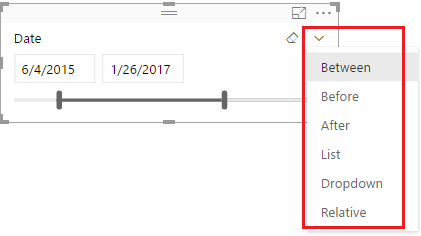
217dba7a-5b71-4755-962a-10a4d8204fd8


My Data

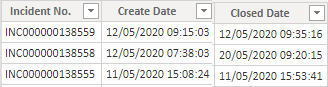
My Table is like this:

2020_06_04_11_36_53_Window.png

Name - Format

Incident No. - Text

Created Date - Text

Closed Date - Text

and the time is in 24h format and the date is dd/MM/yyyy

It comes from XLSX file on a Sharepoint Online Folder location.

The problem?

When I try change the format from Text to Date/Time or just Date it switches places on Day and Month get formated as MM/dd/yyyy.

Exampel: 12th of May 2020 is changed to 5th of December 2020

And it dosn't mather if I Duplicate the columm and then change it or

Create a new columm based on one of the dates colums and then change it (ex: " New column = Format([Created Date], "dd/MM/yyyy") ".


I also created a Calendar Table but I'm unseccefull there too 😐

This is the relationship between the to Tables
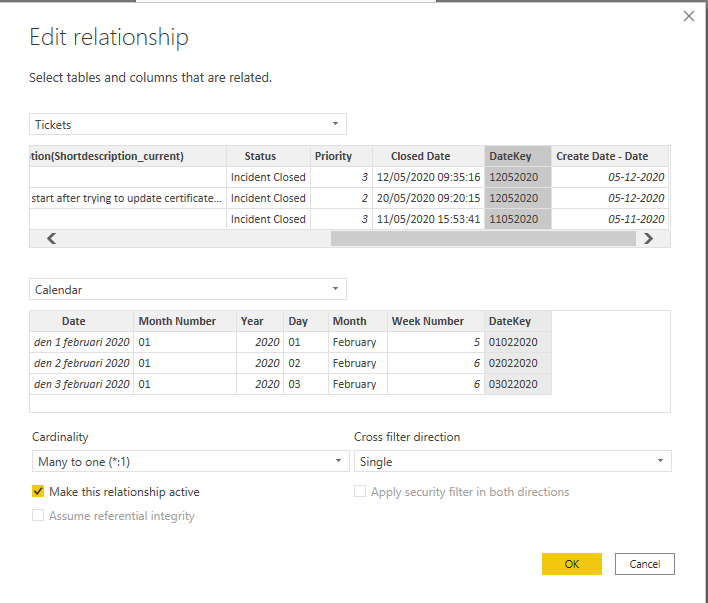
2020-06-04 12_42_03-Window.png

My table Calendar code:


Calendar = 
VAR BaseCalendar  = CALENDAR ( DATE ( 2020, 1, 1 ), DATE ( 2025, 12, 31 ) )
RETURN
    GENERATE (
        BaseCalendar,
        VAR BaseDate = [Date]
        VAR YearDate = YEAR ( BaseDate )
        VAR MonthNumber = MONTH ( BaseDate )
        VAR YearMonthNumber = YearDate * 12 + MonthNumber - 1
        RETURN ROW (
            "Day", FORMAT (BaseDate, "dd"),
            "Month Name", FORMAT ( BaseDate, "mmmm" ),
            "Month Short name", FORMAT ( BaseDate, "mmm" ),
            "Year", YearDate,
            "Month Number", FORMAT(MonthNumber, "MM"),            
            "Week Number", WEEKNUM([Date]),
            "DateKey", FORMAT(BaseDate,"ddmmyyyy")
        )
    )


Thank you


1 ACCEPTED SOLUTION

One other thing to try.  Make sure your first Changed Type step for that column sets it to text type, use Column From Examples to get the format you want based on that column selection, and then change to Date.


If this works for you, please mark it as the solution.  Kudos are appreciated too.  Please let me know if not.

Regards,

Pat


Did I answer your question? Mark my post as a solution! Kudos are also appreciated!

To learn more about Power BI, follow me on Twitter or subscribe on YouTube.


@mahoneypa HoosierBI on YouTube


View solution in original post

4 REPLIES 4
Anonymous
Not applicable

Hi @ZowieS ,


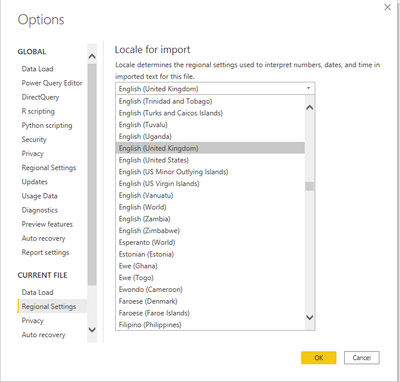
Change Locale for import under Options to English (United Kingdom).

4.PNG

Then change the Date type under Column tools to Date/time.

5.PNG


Best Regards,

Jay


Community Support Team _ Jay Wang

If this post helps, then please consider Accept it as the solution to help the other members find it more quickly.

Hi @Anonymous,


Thanks for your reply!

I've tested that with both Swedish (Sweden), English (Sweden) and Enligsh (United Kingdom) but it still switch places on the Day and Month 😑


One other thing to try.  Make sure your first Changed Type step for that column sets it to text type, use Column From Examples to get the format you want based on that column selection, and then change to Date.


If this works for you, please mark it as the solution.  Kudos are appreciated too.  Please let me know if not.

Regards,

Pat


Did I answer your question? Mark my post as a solution! Kudos are also appreciated!

To learn more about Power BI, follow me on Twitter or subscribe on YouTube.


@mahoneypa HoosierBI on YouTube


Hi @mahoneypat,


Thank you!

That worked with "Column From Examples" for some reson 🤔

Helpful resources

Announcements
May Power BI Update Carousel

Power BI Monthly Update - May 2026

Check out the May 2026 Power BI update to learn about new features.

Fabric SQL PBI Data Days

Data Days 2026 coming soon!

Sign up to receive a private message when registration opens and key events begin.

New to Fabric survey Carousel

New to Fabric Survey

If you have recently started exploring Fabric, we'd love to hear how it's going. Your feedback can help with product improvements.

Power BI DataViz World Championships carousel

Power BI DataViz World Championships - June 2026

A new Power BI DataViz World Championship is coming this June! Don't miss out on submitting your entry.