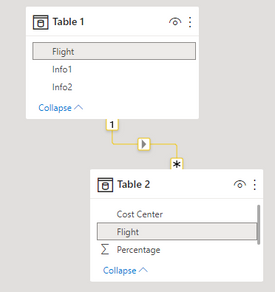
I have two tables that are related by the Flight column. I want to add three new columns to Table 1 with the sum of the percentages each Cost Center has on that specific flight (information that is on Table 2).
Table 1
| Flight | Info1 | Info2 |
| Flight1 | ... | ... |
| Flight2 | ... | ... |
| Flight3 | ... | ... |
| ... | ... | ... |
Table 2
| Flight | Cost Center | Percentage |
| Flight1 | CC1 | 50% |
| Flight1 | CC2 | 50% |
| Flight2 | CC1 | 25% |
| Flight2 | CC2 | 35% |
| Flight2 | CC3 | 40% |
| Flight3 | CC1 | 20% |
| Flight3 | CC2 | 20% |
| Flight3 | CC2 | 60% |
| ... | ... | ... |
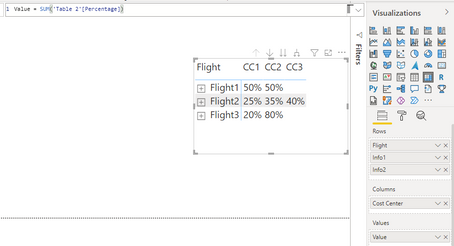
The desired result would be somethink like this below. Please note that sometimes I can have repeated rows of the same Cost Center for a same flight on Table 2 (like on flight 3 where I have CC2 20% + CC2 60% separately).
| Flight | Info1 | Info2 | CC1 | CC2 | CC3 |
| Flight1 | ... | ... | 50% | 50% | 0% |
| Flight2 | ... | ... | 25% | 35% | 40% |
| Flight3 | ... | ... | 20% | 80% | 0% |
| ... | ... | ... | ... | ... | ... |
I tried using something like this below, but it returns the total for that specific cost center of all flights together, instead of separetely for each flight with its respective value. I need the sum because sometimes the cost center will repeat for the same flight in Table 2, but not summing everything together..
CC1 = CALCULATE(SUMX('Table 2','Table 2'[Percentage]),FILTER('Table 2','Table 2'[Cost Center]="CC1"))
CC2 = CALCULATE(SUMX('Table 2','Table 2'[Percentage]),FILTER('Table 2','Table 2'[Cost Center]="CC2"))
CC3 = CALCULATE(SUMX('Table 2','Table 2'[Percentage]),FILTER('Table 2','Table 2'[Cost Center]="CC3"))
I thought of using LOOKUPVALUE, but I would need to filter Table 2 and I'm not sure how to use a "Virtual Table" inside LOOKUPVALUE function. At the same time, it would be a problem for when I have repeated cost centers for the same flight on Table 2 as mentioned before, because it would not sum.. it would take the first value it finds. Also tought of using RELATED DAX but I don't think it will work.. I have some ideas, but not sure how to figure it out.