
cancel
Showing results for 
Search instead for 
Did you mean: 

Data Days is here! Join us now for 60+ days of learning, challenges, and connection. Learn more

Reply
ShrimpSurf
Helper II
Helper II

Flipping Rows and Columns in a Matrix Visualization

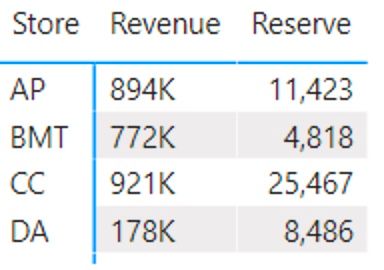
Is there a way to flip rows and columns, such in the below example, where revenue and reserve total would be in rows and the stores would be in the columns?


Screen Shot 2022-01-07 at 11.55.06 AM.jpg


1 ACCEPTED SOLUTION
Pragati11
Super User
Super User

Hi @ShrimpSurf ,


Consider the following scenario at my end similar to your's. I have the following information in the matrix visual:

Pragati11_1-1641578613059.png

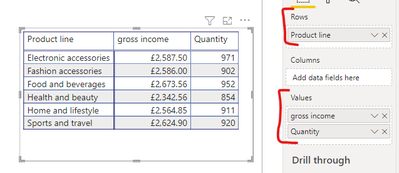
When you say have your Store as a Column - in my case Product Line, do you mean something as below:

Pragati11_2-1641578750159.png

Basically for every Product Line in this case, I end up with Gross Income and Quantity.

Let me know if this is what you need or something else.


Thanks,

Pragati


Best Regards,

Pragati Jain


MVP logo


LinkedIn | Twitter | Blog YouTube 

Did I answer your question? Mark my post as a solution! This will help others on the forum!

Appreciate your Kudos!!

Proud to be a Super User!!

View solution in original post

2 REPLIES 2
ShrimpSurf
Helper II
Helper II

Didn't think of that.   Thank you!   Have a great weekend.

Pragati11
Super User
Super User

Hi @ShrimpSurf ,


Consider the following scenario at my end similar to your's. I have the following information in the matrix visual:

Pragati11_1-1641578613059.png

When you say have your Store as a Column - in my case Product Line, do you mean something as below:

Pragati11_2-1641578750159.png

Basically for every Product Line in this case, I end up with Gross Income and Quantity.

Let me know if this is what you need or something else.


Thanks,

Pragati


Best Regards,

Pragati Jain


MVP logo


LinkedIn | Twitter | Blog YouTube 

Did I answer your question? Mark my post as a solution! This will help others on the forum!

Appreciate your Kudos!!

Proud to be a Super User!!

Helpful resources

Announcements
Fabric Data Days is here Carousel

Fabric Data Days 2026

Don't miss out on Data Days, June 15 through August 7. Learn Fabric, Power BI, SQL, AI and more.

May Power BI Update Carousel

Power BI Monthly Update - May 2026

Check out the May 2026 Power BI update to learn about new features.

Power BI DataViz World Championships carousel

Power BI DataViz World Championships - June 2026

A new Power BI DataViz World Championship is coming this June! Don't miss out on submitting your entry.