FabCon is coming to Atlanta
Join us at FabCon Atlanta from March 16 - 20, 2026, for the ultimate Fabric, Power BI, AI and SQL community-led event. Save $200 with code FABCOMM.
Register now!- Power BI forums
- Get Help with Power BI
- Desktop
- Service
- Report Server
- Power Query
- Mobile Apps
- Developer
- DAX Commands and Tips
- Custom Visuals Development Discussion
- Health and Life Sciences
- Power BI Spanish forums
- Translated Spanish Desktop
- Training and Consulting
- Instructor Led Training
- Dashboard in a Day for Women, by Women
- Galleries
- Data Stories Gallery
- Themes Gallery
- Contests Gallery
- QuickViz Gallery
- Quick Measures Gallery
- Visual Calculations Gallery
- Notebook Gallery
- Translytical Task Flow Gallery
- TMDL Gallery
- R Script Showcase
- Webinars and Video Gallery
- Ideas
- Custom Visuals Ideas (read-only)
- Issues
- Issues
- Events
- Upcoming Events
The Power BI Data Visualization World Championships is back! Get ahead of the game and start preparing now! Learn more
- Power BI forums
- Forums
- Get Help with Power BI
- Desktop
- Re: Problem when publish panel with filter visual
- Subscribe to RSS Feed
- Mark Topic as New
- Mark Topic as Read
- Float this Topic for Current User
- Bookmark
- Subscribe
- Printer Friendly Page

- Mark as New
- Bookmark
- Subscribe
- Mute
- Subscribe to RSS Feed
- Permalink
- Report Inappropriate Content
Problem when publish panel with filter visual
Hello, I have figure out the following problem.
I have created a panel with a filter visual, and configured it to be single select (it appear with radio buttons).

When I publish the panel to online workspace, the panel appears online with the following configuration:

Even if I try to reedit in online workspace, when I save, the visual does not update. I think it is a bug on power bi.
- Mark as New
- Bookmark
- Subscribe
- Mute
- Subscribe to RSS Feed
- Permalink
- Report Inappropriate Content
Hi @Anonymous
Has your problem been solved ? If it has been solved, then please consider Accept it as the solution to help the other members find it more quickly.
Best Regards
Community Support Team _ Ailsa Tao
- Mark as New
- Bookmark
- Subscribe
- Mute
- Subscribe to RSS Feed
- Permalink
- Report Inappropriate Content
Hello @Anonymous , I tried in other computer, and the problem remains.
😞
- Mark as New
- Bookmark
- Subscribe
- Mute
- Subscribe to RSS Feed
- Permalink
- Report Inappropriate Content
Hi @Anonymous
Have you tried it on other computers ? See if there will be the same problem. Because there is no problem in my test, it is not easy to judge the cause of the problem. Maybe you can try another computer.
Best Regards
Community Support Team _ Ailsa Tao
If this post helps, then please consider Accept it as the solution to help the other members find it more quickly.
- Mark as New
- Bookmark
- Subscribe
- Mute
- Subscribe to RSS Feed
- Permalink
- Report Inappropriate Content
Hi @Anonymous
Could you clear your browser cache ? It may be caused by browser cache .Please sign out your account and clear cache and try again .
Best Regards
Community Support Team _ Ailsa Tao
If this post helps, then please consider Accept it as the solution to help the other members find it more quickly.
- Mark as New
- Bookmark
- Subscribe
- Mute
- Subscribe to RSS Feed
- Permalink
- Report Inappropriate Content
Hi @Anonymous
As you suggested, a tried to clear my browser cache, but the problem is still ocurring.
😞
- Mark as New
- Bookmark
- Subscribe
- Mute
- Subscribe to RSS Feed
- Permalink
- Report Inappropriate Content
Hello!
Firstly, I would like to thanks the answer on my post.
Unfortunattely, my desktop version is the same as you listed I my problem is still occurring.
Even if I try to edit the panel directly from web app interface and save, after save the change on the component (making it to be single select) does not have effect.
It is possible to have a particular support for my case?
- Mark as New
- Bookmark
- Subscribe
- Mute
- Subscribe to RSS Feed
- Permalink
- Report Inappropriate Content
Hi @Anonymous
I restored your scenes , the following two are the renderings in Desktop and Service respectively . Everything is displayed normally, and there is no such thing as what you said.
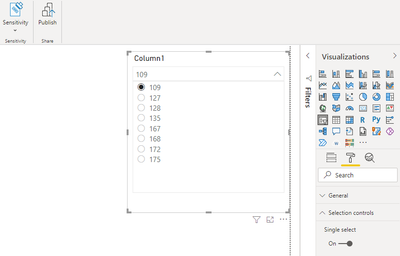
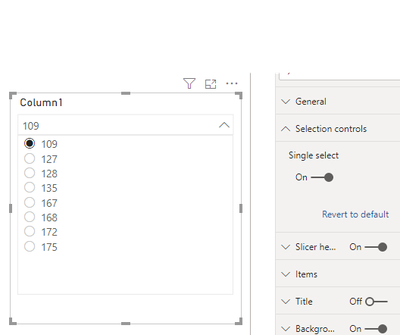
The following are my steps.
(1)Add a slicer and select the type :Dropdown ,and then turn on Single select in Visual Format settings .

(2)Publish the report to Service .
I tested the scenes with version August 2021 , maybe you can update your Desktop version to version August 2021 and then publish the report to Service again .

Best Regards
Community Support Team _ Ailsa Tao
If this post helps, then please consider Accept it as the solution to help the other members find it more quickly.
Helpful resources

Power BI Dataviz World Championships
The Power BI Data Visualization World Championships is back! Get ahead of the game and start preparing now!

Power BI Monthly Update - December 2025
Check out the December 2025 Power BI Holiday Recap!

FabCon Atlanta 2026
Join us at FabCon Atlanta, March 16-20, for the ultimate Fabric, Power BI, AI and SQL community-led event. Save $200 with code FABCOMM.

| User | Count |
|---|---|
| 63 | |
| 55 | |
| 42 | |
| 41 | |
| 23 |


| User | Count |
|---|---|
| 167 | |
| 136 | |
| 120 | |
| 79 | |
| 54 |


