Join us at FabCon Atlanta from March 16 - 20, 2026, for the ultimate Fabric, Power BI, AI and SQL community-led event. Save $200 with code FABCOMM.
Register now!Vote for your favorite vizzies from the Power BI Dataviz World Championship submissions. Vote now!
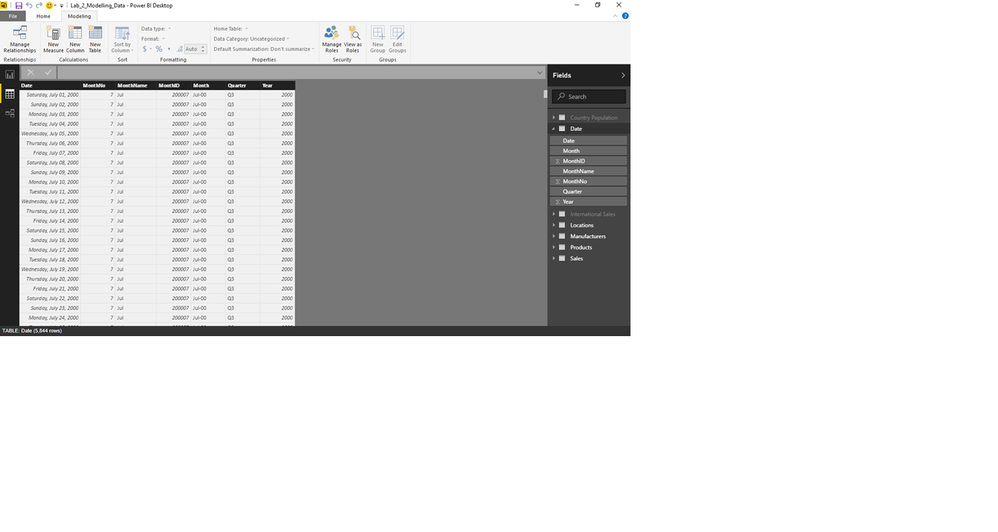
While going through "Getting Started", I ran into a problem with the Date table. When viewing the Date table, the MonthID and MonthNo appear as expected. For July, 2000, MonthNo=7, MonthID=200007.
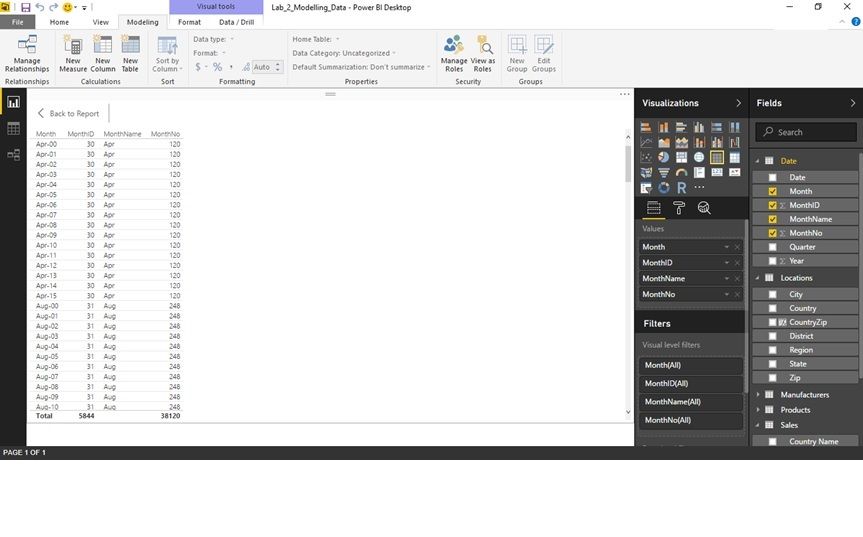
When I setup a simple sample report, MonthID and MonthNo do not appear as expected. For July 2000, MonthID=217 MonthNo = 31
Any ideas? I'm guessing it is probably something simple.
Solved! Go to Solution.
hi, check if both columns are Summarizing in the Table.
Thanks for the quick reply! That was the problem.
Vote for your favorite vizzies from the Power BI World Championship submissions!
If you love stickers, then you will definitely want to check out our Community Sticker Challenge!
Check out the January 2026 Power BI update to learn about new features.
| User | Count |
|---|---|
| 58 | |
| 55 | |
| 42 | |
| 16 | |
| 16 |
| User | Count |
|---|---|
| 113 | |
| 108 | |
| 38 | |
| 35 | |
| 26 |