Join us at FabCon Atlanta from March 16 - 20, 2026, for the ultimate Fabric, Power BI, AI and SQL community-led event. Save $200 with code FABCOMM.
Register now!View all the Fabric Data Days sessions on demand. View schedule
Hello Everyone,
I hope you all are doing great.
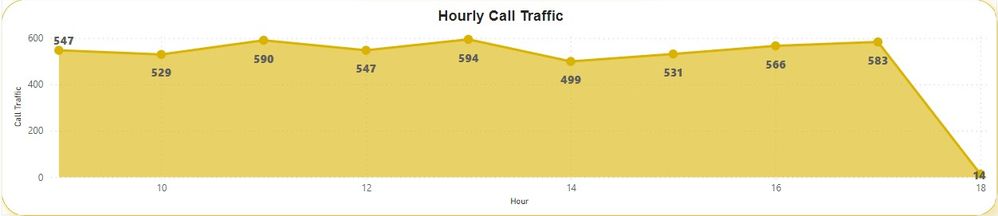
I am having a problem using an area graph to show hourly call traffic on the Y-axis and time on the X-axis. The X-axis is showing the 24-hour time format, but the client wants to see a 12-hour time format on the X-axis. I am sharing all the screenshots of the same to help you understand the problem well.
I am able to plot the area chart as follows:
But I want to show the area chart as follows:
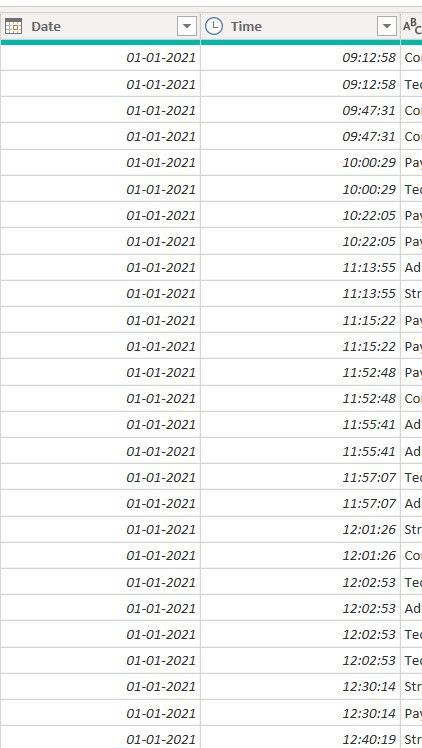
I have the data as follows:
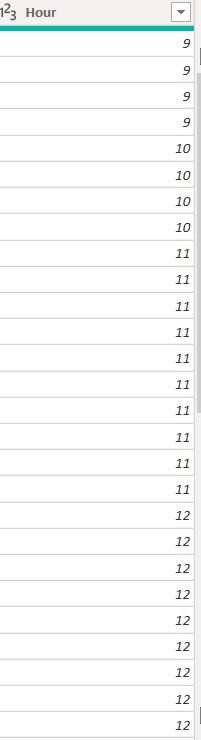
From the above time column, I have extracted the hour to use the same in the area chart.
Could you please help me out with this?
Thank you in anticipation.
Solved! Go to Solution.
| Thanks to the great efforts by MS engineers to simplify syntax of DAX! Most beginners are SUCCESSFULLY MISLED to think that they could easily master DAX; but it turns out that the intricacy of the most frequently used RANKX() is still way beyond their comprehension! |
DAX is simple, but NOT EASY! |
| Thanks to the great efforts by MS engineers to simplify syntax of DAX! Most beginners are SUCCESSFULLY MISLED to think that they could easily master DAX; but it turns out that the intricacy of the most frequently used RANKX() is still way beyond their comprehension! |
DAX is simple, but NOT EASY! |
Thank you so much, sir/ma'am, it's working like a charm. I really appreciate your help.
Check out the November 2025 Power BI update to learn about new features.
Advance your Data & AI career with 50 days of live learning, contests, hands-on challenges, study groups & certifications and more!