Share feedback directly with Fabric product managers, participate in targeted research studies and influence the Fabric roadmap.
Sign up nowGet Fabric certified for FREE! Don't miss your chance! Learn more
Hi all,
I am a very new user of Power BI.
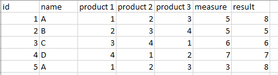
This is my table
I need to do a sum by product. I have tried several ways but any of them works:
I've tried with summarize function as follows but it gives an error:
result = SUMMARIZE(Sheet1;Sheet1[name];"result";Sum(Sheet1[measure]))
Also I've tried with calculate function but it doesn't work.
How can I summarize by name?
Hi,
You should unpivot your data to create only 4 columns - id, Name, Product and Values. The drag name to your visual and just write a sum function to add the numbers in the values column.
If you love stickers, then you will definitely want to check out our Community Sticker Challenge!
Check out the January 2026 Power BI update to learn about new features.
| User | Count |
|---|---|
| 65 | |
| 65 | |
| 45 | |
| 21 | |
| 18 |
| User | Count |
|---|---|
| 115 | |
| 114 | |
| 38 | |
| 36 | |
| 26 |