Don't miss your chance to take the Fabric Data Engineer (DP-700) exam on us!
Learn moreWe've captured the moments from FabCon & SQLCon that everyone is talking about, and we are bringing them to the community, live and on-demand. Starts on April 14th. Register now
Hi
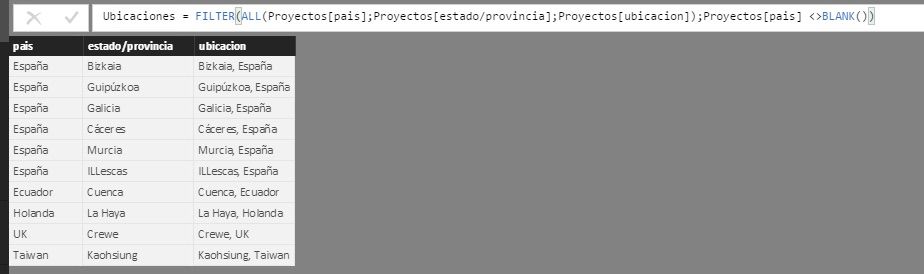
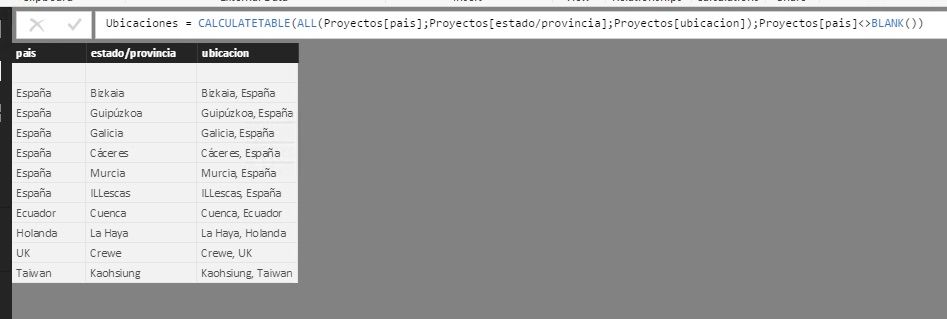
I have this Calculated Table
Where te column "ubicacion" has unique values but when I try to create a relationship between Ubicaciones.ubicacion and Proyectos.ubicacion says this
Any idea Please???
regards
Solved! Go to Solution.
You can make a table with unique values of "ubicacion" with that method:
1. See which table contains all values for "ubicacion"
2. Duplicate that table
3. Delete all columns except "ubicacion"
4. Remove duplicates
5. Make your relationships
Hi @kintela,
In order to create a relationship in between these two columns in Power BI, at least one side of the relationship must be tied to a column that is unique in the table. Please verify a column in one side is unique. From your screenshot, there are blank values in table, if you have mutiple blank rows, there are unable to create relationship.
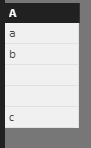
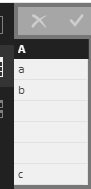
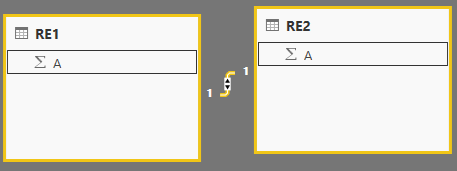
For instance, the following table RE1 and RE2, there are mutiple blank values, so we get error when create relationship. Please the the screenshot.
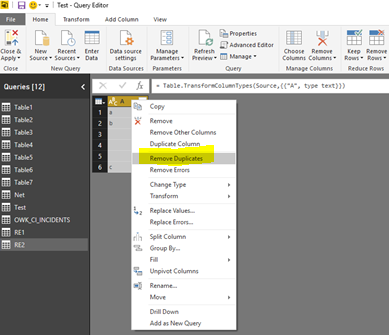
Click resource table->Edit Query, select the column->right click->remove duplicates, you will get unique values in table.
So please check and remove duplicates in your resource table using Edit Query, and try to create relationship to verify if the error still exists.
Best Regards,
Angelia
Hi
The problem is that ALL Function always add a blank record. In my table Ubicaciones the column Ubicacion have unique values but All function add one record in the new created table with NULLS.
Thanks
Hi @kintela,
Please try the following formula and check if it works fine.
Ubicacions= CALCULATETABLE(ALL(Proyectos[pais],Proyectos[estado/provincia],Proyectos[ubicacion]),Proyectos[pais]<>BLANK())
If you have any other problem, please feel free to ask.
Best Regards,
Angelia
If you have recently started exploring Fabric, we'd love to hear how it's going. Your feedback can help with product improvements.
A new Power BI DataViz World Championship is coming this June! Don't miss out on submitting your entry.
Share feedback directly with Fabric product managers, participate in targeted research studies and influence the Fabric roadmap.
| User | Count |
|---|---|
| 55 | |
| 40 | |
| 35 | |
| 19 | |
| 18 |
| User | Count |
|---|---|
| 71 | |
| 70 | |
| 38 | |
| 35 | |
| 23 |